This document is the property of Ingenico Inc. Rev20180802
Its content cannot be reproduced or divulged without the company’s written approval.
11 / 26
4 Installation
4.1 Checking Environment for Installation
Place the terminal onto a desk or table big and stable enough to support the weight of
the system and peripherals to prevent it from dropping. The terminal should be in the
environment far away from heat source, and free from moisture, electromagnetic and
electrical devices (e.g. PC screen and electric motor, etc.).
Notice: Do not arrange power cables along the pedestrian walkway or across
the channel on the floor for the sake of safety.
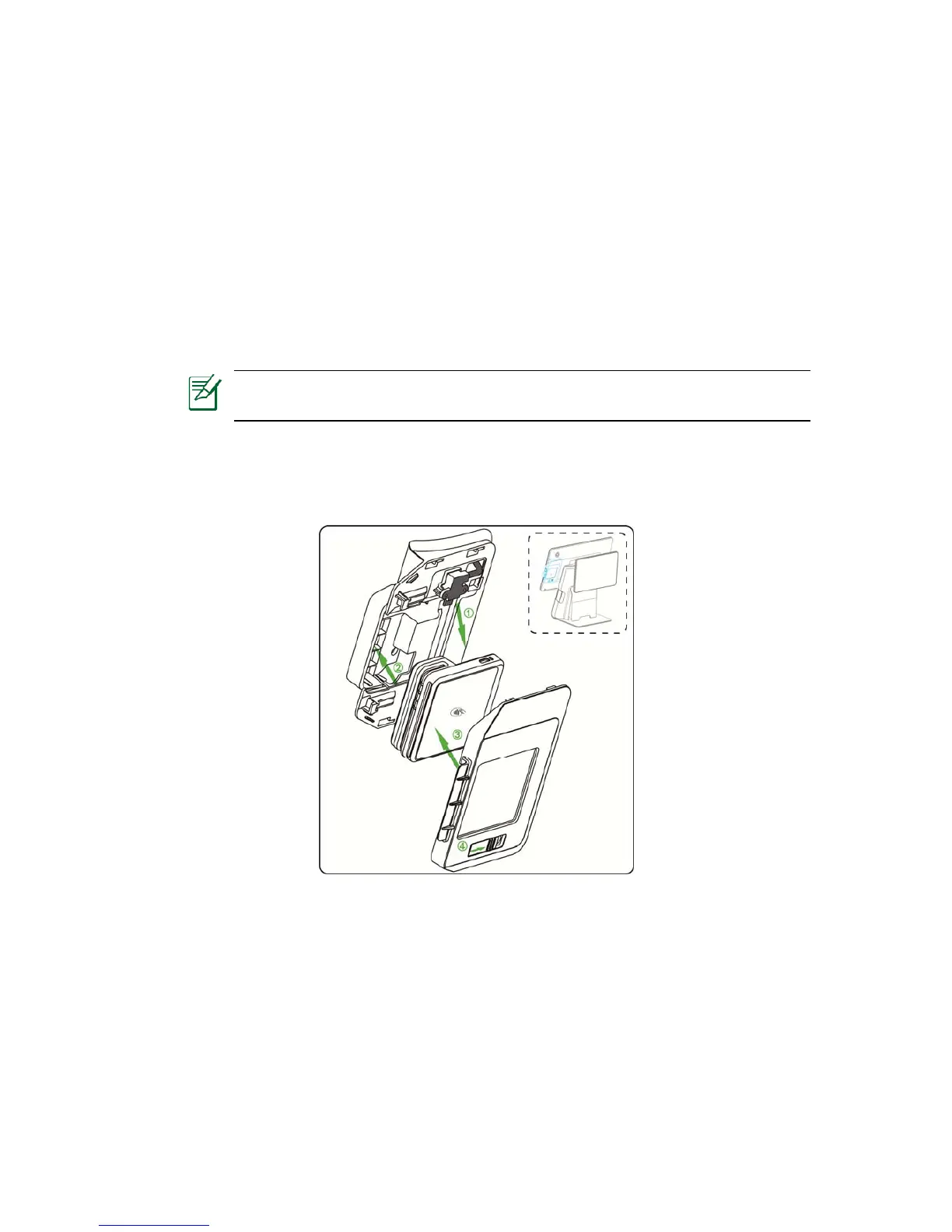
4.2 Install RP45x module
Figure 4-1
After the RP45x cover plate is lifted,
(1) Insert the RP45x reader card module into the Micro USB cable head
(2) Put the RP45x vertically into the structural groove
(3) Cover the RP45x cover plate
(4) Screw the cover plate screw and set the screw cover plate screw to the right.



 To Next Page