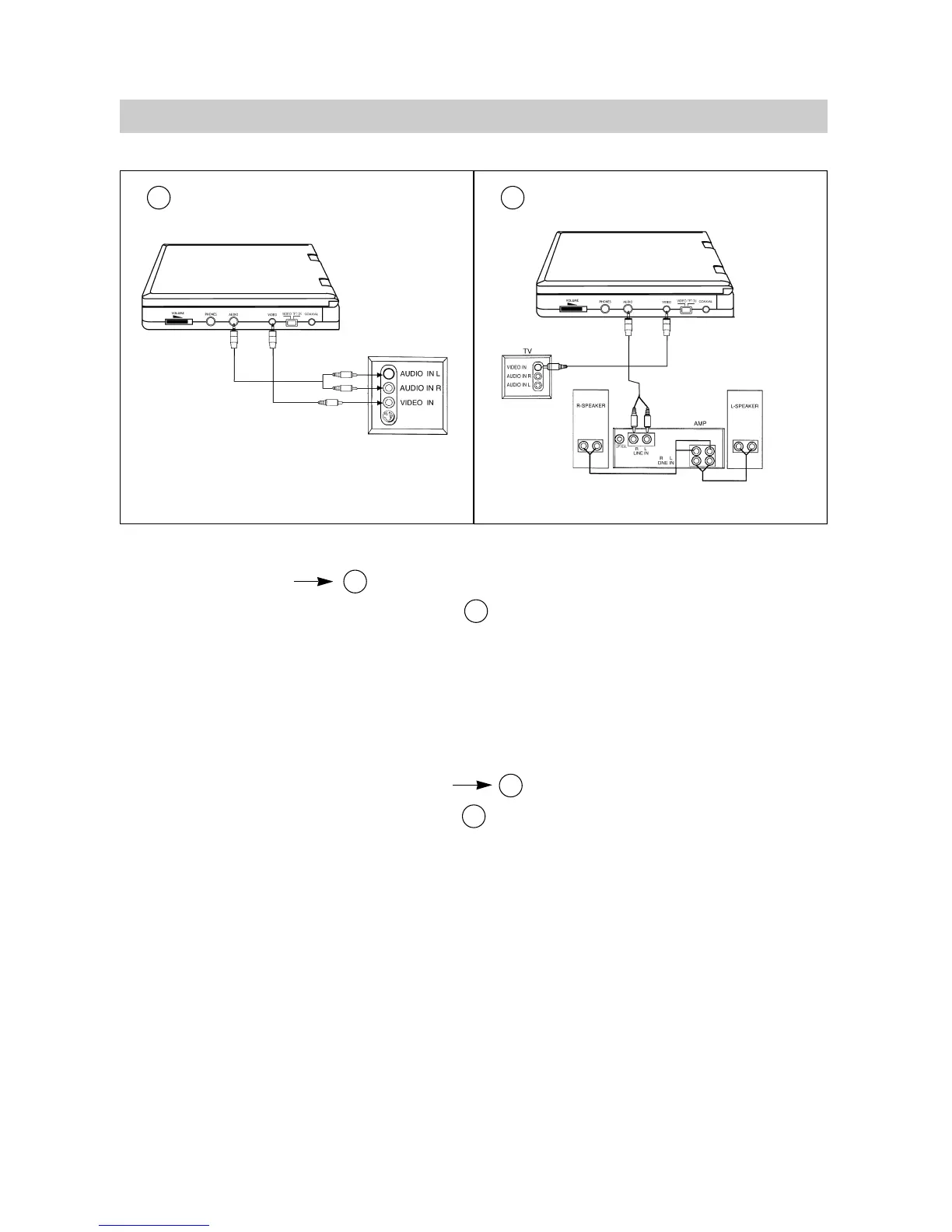
CONNECT TO TV
The AV cords are connected according to diagram :
1.Mini - plug: connect to the VIDEO OUT jack of the unit.
2.Yellow plug: connect to the VIDEO IN jack of the TV.
3.Mini - plug: connect to the AUDIO OUT jack of the unit.
4.Red - plug: connect to the AUDIO IN R jack of the TV.
5.White - plug: connect to the AUDIO IN L jack of the TV.
CONNECT TO TV AND AMPLIFIER
The AV cords are connected according to diagram :
1.Mini - plug: connect to the VIDEO OUT jack of the unit.
2.Yellow plug: connect to the VIDEO IN jack of the TV.
3.Mini - plug: connect to the AUDIO OUT jack of the unit.
4.Red - plug: connect to the LINE IN R jack of the amplifier.
5.White - plug: connect to the LINE IN L jack of the amplifier.
6.If your amplifier has coaxial digital input terminal, you can connect the DVD player to the amplifier
with a coaxial cable through the coaxial terminal.
NOTE:When the unit is connected to a TV, the slide switch must be set to "VIDEO" position.
·10·
CONNECTIONS
C
C
C
D
D
D


 To Next Page