·26·
PLAY DISCS IN VARIOUS WAYS
WHEN PLAYING DVD
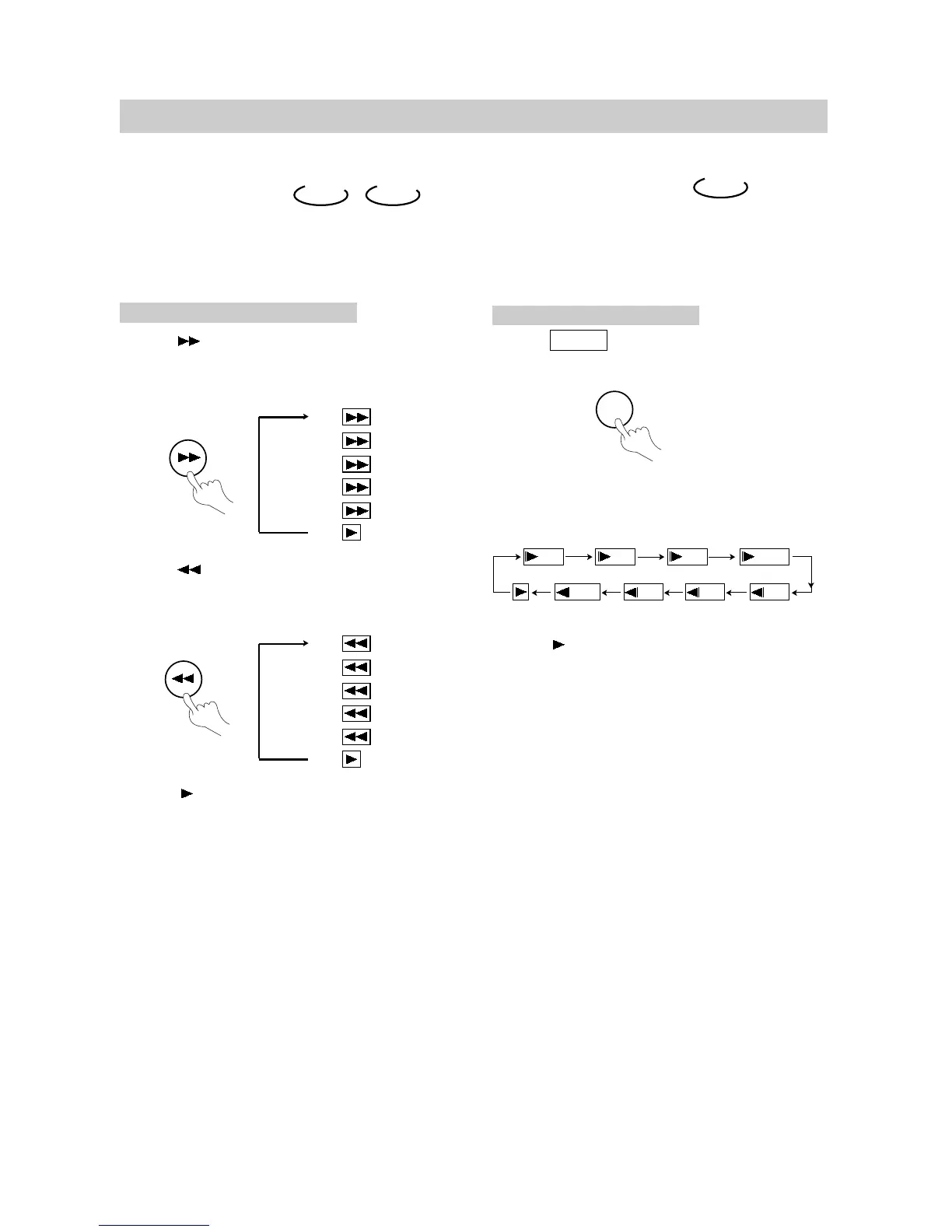
1. Press SLOW to play slowly.
The screen shows orderly:
SLOW PLAY
Enjoy slow motions by the following
steps.
DVD
SLOW
2.Press (PLAY) to play normally.
1/4
FAST PLAY
When playing a disc, you may play it forward
fast or reverse it fast to find what you want.
WHEN PLAYING DVD OR CD
1. Press to play forward fast. Each time
you press the button, the screen shows
orderly:
2. Press to reverse the disc fast. Each
time you press the button, the screen
shows orderly:
3. Press (PLAY) to switch to normal play
while FF or FR playing.
DVD CD
1/8
1/41/81/16
1/2 1/16
1/2
① 2X
② 4X
③ 8X
④ 16X
⑤ 32X
⑥
① 2X
② 4X
③ 8X
④ 16X
⑤ 32X
⑥


 To Next Page