PLAY DISCS IN VARIOUS WAYS
·29·
TIME SEARCH
TIME SEARCH
You may directly enter a time, title or chapter
number to search fast on a disc, the unit plays
from that point.
■ PLAY DVD
1. Search a title or a chapter.
Example: Search chapter 2 in title 6.
●
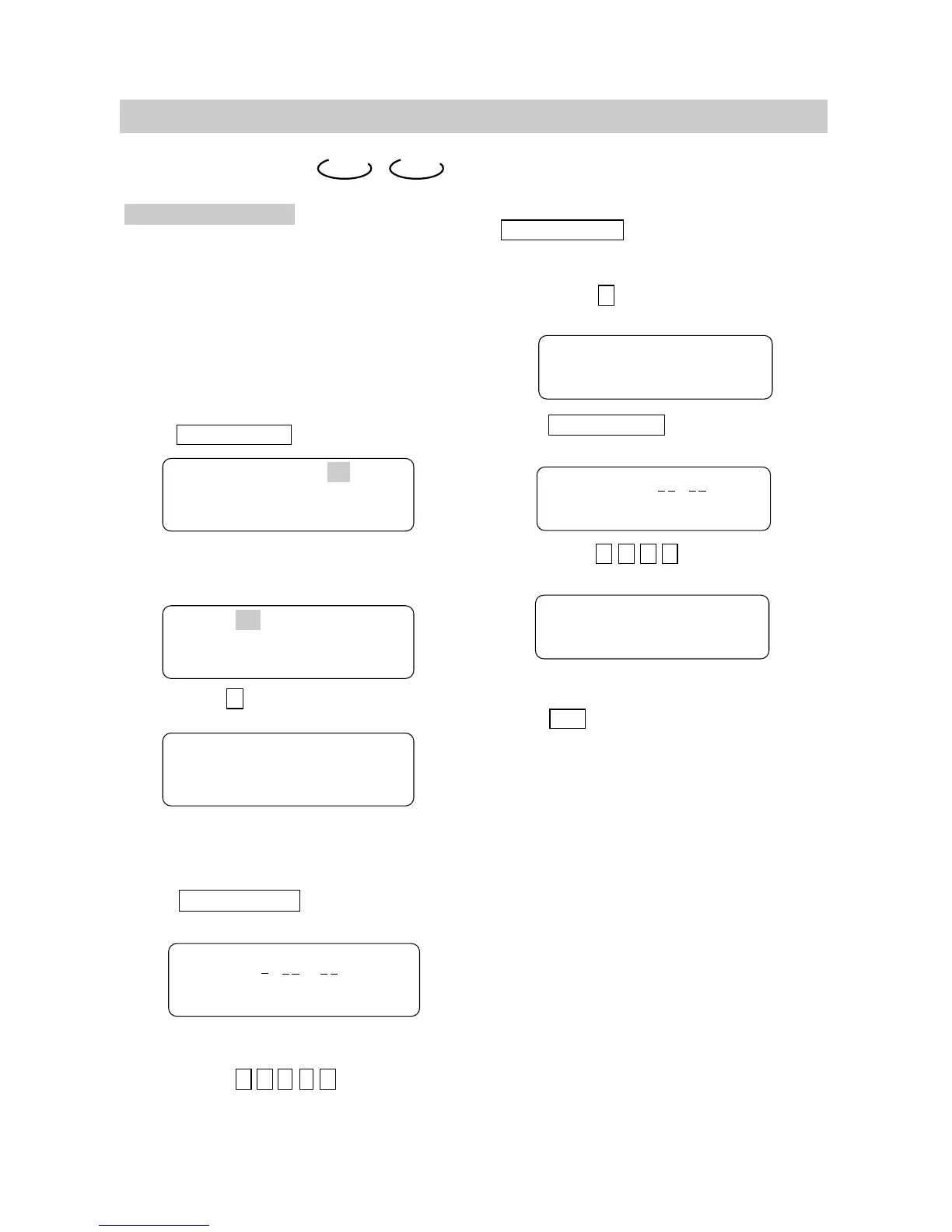
Press TIME SEARCH , the screen shows:
●
Press the direction button and move
the cursor to illuminate the title number.
The screen shows:
●
Press button 6 to select title 6, the screen
shows:
●
Repeat the steps above, select chapter 2
in title 6.
DVD CD
■ PLAY CD
To jump to a specific time, use
TIME SEARCH to set the time for the desired
location.
Example: Play from 00:01:38 of track 6.
1. Press button 6 to select track 6.
The screen shows:
2. Press TIME SEARCH until the screen
shows:
3. Press button 0 , 1 , 3 , 8 to enter the time.
The screen shows:
●
The unit plays from 00:01:38 of track 6 after
setting.
●
Press 10/0 to enter 0.
Note: CD discs have three options in time search
function:
●
You can enter the elasped time of a disc to
play.
●
You can enter the elasped time of a track to
play.
●
You can go to a track you want play by entering
the track number.
2. TIME SEARCH
●
Press TIME SEARCH until the screen
shows:
●
Press number buttons to enter hour, minute
and second.
Example: Enter 1 , 0 , 2 , 3 , 8
After setting, the unit will play the disc from
1:02:38.
Title 03/30 Chapter 01 /04
Title 03 /30 Chapter 01/04
Title 06/30 Chapter 01/04
Time : :
Track Go To :
Track 06/20 00:01
Track 06/20 01:38


 To Next Page