© The contents of this document are the property of Iskratel, Kranj, Slovenia, and may not be copied, reproduced or disclosed to a third party without written consent of the owner.
5.2 Privacy Tab
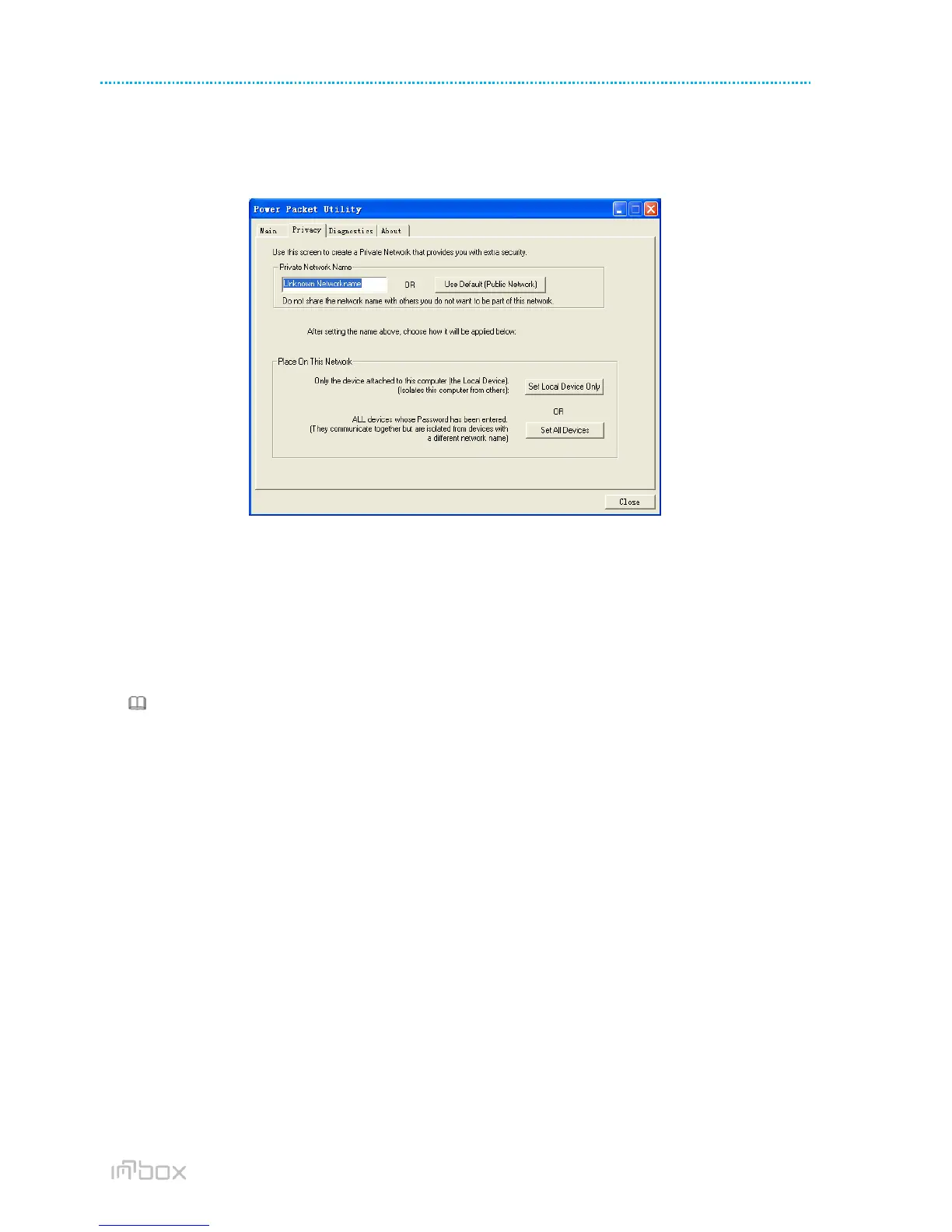
In the Privacy screen, you can maintain security for the logical network and select the device included in the network.
See Figure 13.
Figure 13 Privacy tab
All HomePlugAV devices are loaded using a default logical network (network name), which is normally “HomePlugAV”.
In the Privacy screen, you can modify a private network by changing the network names and the passwords of the
devices.
You can always reset to the HomePlugAV network (Public) by entering “HomePlugAV” as the network name or by
clicking on the Use Default button.
Note:
If the network name changes to anything other than HomePlugAV, the network type in the main screen is displayed as
Private.
Set Local Device Only
This button is used to change the network name and password of the local device. If a new network password is
entered, all the devices appeared in the main panel prior to this are no longer present in the new network, effectively
making the local devices not to communicate to the devices which are in the old logical network. Click Set Local Device
Only, the devices previously set up with the same logical network (same network name) appears in the device list.
Set All Devices
This button is used to change the logical network of all devices that appear in the main panel. If these devices whose
passwords have been entered for the same logical network, a dialog box appears, indicating the success of this
operation. For the devices whose passwords are not entered, this operation will fail and it will report a failure
message.



 To Next Page