8
Product Operation
2.Start/stop
Standby mode: the power switch is ON, the machine does not move.
Operating mode: the machine sweeps.
! Note:
a.Please switch off power in time when the machine does not need to work.
b.The machine shall not start sweeping when it is being charged.
In case of low power, the red light of the button “start/suspend” will flicker.
In the charging process, the green light of the button “start/suspend” will flicker.
After the product is charged fully, the green light of the button “start/suspend” will be
on constantly.
When the product is charged for the first time, please ensure charging it for 6h at
least.
When the product is turned on and charged, if you remove the power adapter, the
“start/suspend” light will flicker in red and green alternatively to remind you that the
power switch is not turned off. If you do not use the machine, please turn off the
power switch.
Please charge the machine fully after you finish using it every time.
In order to protect the battery, please charge it every 2 months when the machine is
not in use for a long time.
A.
B.
C.
D.
E.
F.
G.
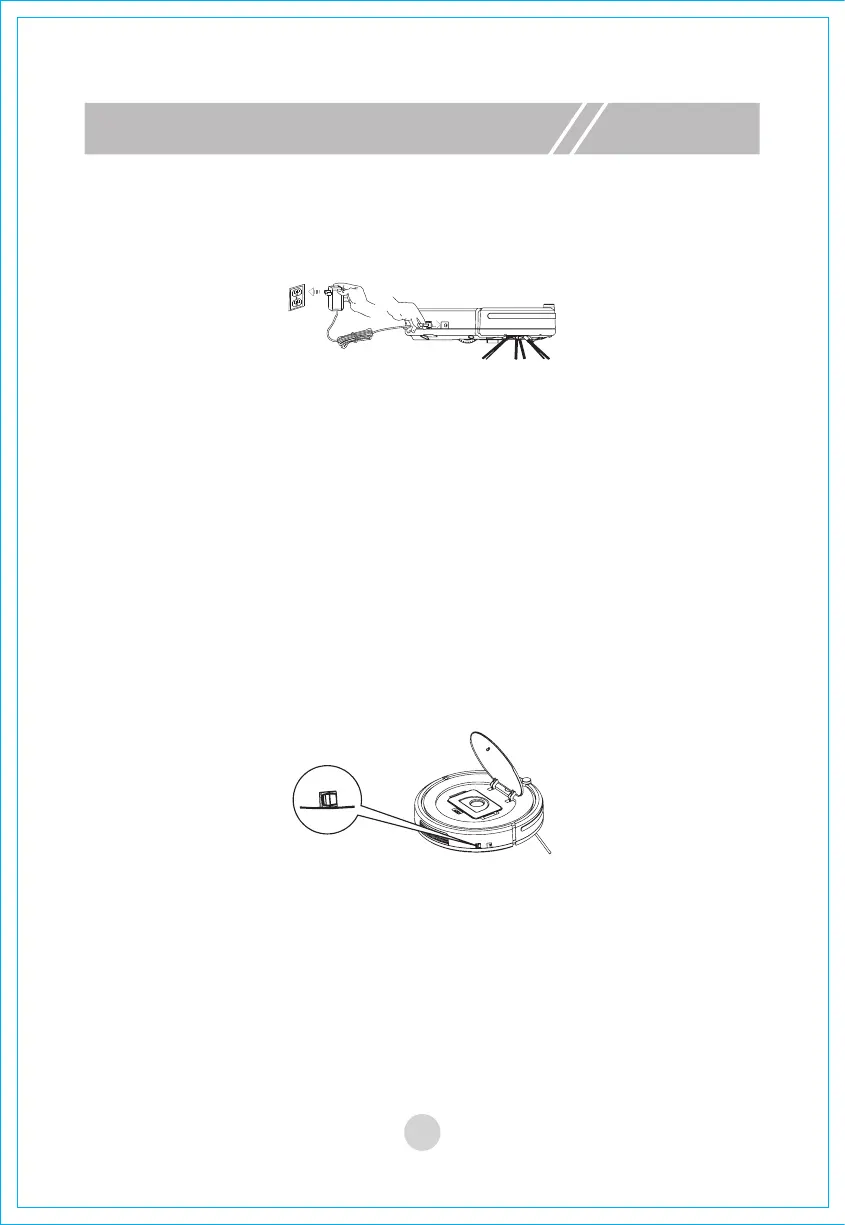
1. Charging
After switching off the power switch of the machine, connect the power adapter
to power supply and insert the other end into the charging interface of the
machine. See the diagram below.
A. Switch on power and press the button “Start/Stop” on the remote control.
B. When the machine works normally, the orange light of the button “Start/Stop”
is on constantly.
C. When the machine works normally, after you press the button “Start/Stop” or
turn off power, it will stop working.



 To Next Page