EasyManua.ls Logo

Insignia NS-BC1ZSS9 - User Manual

Insignia NS-BC1ZSS9
24 pages
Print Icon
To Next Page IconTo Next Page
Loading...
Before using your new product, please read these instructions to prevent any damage.
USER GUIDE
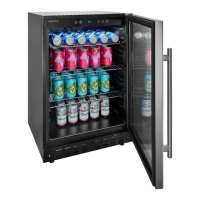
165-Can
Beverage Cooler
NS-BC1ZSS9

Questions and Answers

  • Y
    yharrisAug 2, 2025
    What to do if my Insignia NS-BC1ZSS9 Refrigerator does not operate?
    • O
      Olivia CookAug 2, 2025
      If your Insignia Refrigerator isn't turning on, there are several things to check: * Ensure the refrigerator is properly plugged into the outlet. * Check your home's fuse or circuit breaker and replace the fuse or reset the breaker if necessary. * In the event of a power failure, the refrigerator will turn off. Wait for the power to be restored, and then turn it back on.
  • V
    Vanessa MillerAug 7, 2025
    Why is my Insignia Refrigerator not cold enough?
    • S
      Shawn RomanAug 7, 2025
      If your Insignia Refrigerator isn't cooling sufficiently: * First, ensure that the door is closing correctly. * Allow some time for newly added beverages to cool down before checking the temperature again. * If the issue persists, try adjusting the temperature control to a colder setting.
  • J
    James OlsenAug 12, 2025
    How to fix Insignia NS-BC1ZSS9 door that does not close completely?
    • E
      Emma ScottAug 12, 2025
      If the door of your Insignia Refrigerator isn't closing properly: * Make sure that the shelves are adjusted correctly. * Clean the door gaskets to ensure a proper seal. * Adjust the leveling feet to level the refrigerator.
  • J
    Joshua BarnesAug 18, 2025
    Why does my Insignia NS-BC1ZSS9 Refrigerator turn on and off frequently?
    • C
      Christopher DaltonAug 18, 2025
      If your Insignia Refrigerator is turning on and off frequently, consider the following: * Ensure the refrigerator is in a room with a temperature between 50 ~ 85°F (10 ~ 29.4°C), or move it to a cooler location. * Make sure the door is closing properly. * Clean the door gaskets. * Try setting the control to a colder setting.
  • C
    Christian HoweAug 23, 2025
    What to do if Insignia NS-BC1ZSS9 Refrigerator makes unusual noises?
    • V
      vazquezjessicaAug 23, 2025
      If your Insignia Refrigerator is making unusual noises or vibrating: * Level the refrigerator using the leveling feet. * Move the refrigerator slightly away from the wall. * Note that the circulation of refrigerants can produce sounds, which is normal. * A buzzing sound may occur when the compressor is running, especially during start-up or shut-down. * The solenoid valve or electric switch valve may clatter; this is also normal.
  • W
    Wendy ParkAug 27, 2025
    Why is moisture building up in my Insignia NS-BC1ZSS9 Refrigerator?
    • D
      Donald RomeroAug 28, 2025
      If you notice moisture building up inside your Insignia Refrigerator: * First, ensure that the door is closing correctly. * Move the refrigerator to a location with lower humidity. * Condensation can occur in high humidity; wipe the exterior and door seals with a towel to remove excess moisture.

Summary

Introduction and Safety

Important Safety Instructions

Critical warnings and precautions for safe operation and handling of the appliance.

Setup and Installation

Finding a Suitable Location

Guidance on selecting an appropriate and well-ventilated placement for the cooler.

Leveling Your Cooler

Instructions for adjusting the cooler's feet to ensure it is level and stable.

Reversing the Door

Comprehensive guide for changing the door swing direction.

Operation and Maintenance

Connecting to Power

Proper procedures for connecting the cooler to a power outlet.

Troubleshooting and Warranty

Error Codes

A list of error codes and their meanings for troubleshooting.

Problems and Solutions

Common issues encountered with the cooler and their resolutions.

Insignia NS-BC1ZSS9 Specifications

General IconGeneral
BrandInsignia
ModelNS-BC1ZSS9
CategoryRefrigerator
LanguageEnglish

Related product manuals