TESTING THE SYSTEM
Signal
Press a button to illuminate the Thermostat display and ensure there are at least
3 signal bars showing on the top left of the display.
Central Heating
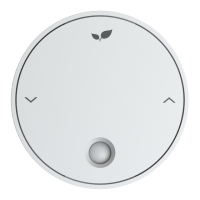
Press the 'CH MODE' key until the CH Selector hovers over Man.
Press the ' /\' key to raise the temperature until you see a flame icon appear on
the Thermostat.
Check the Ignite Receiver. After a few moments, CH will flash, the flame will
illuminate and the unit will call for heat on the CH circuit.
Check that the boiler has fired up and any zone valves (if applicable) have moved
to their appropriate positions. Press the 'CH MODE' key again to turn the central
heating off.
Hot Water
(if applicable)
Press the 'HW MODE' key until the HW Selector hovers over Man.
Check the Ignite Receiver. After a few moments, HW will flash, the flame will
illuminate and the unit will call for heat on the HW circuit.
Check that the boiler has fired up and any zone valves have moved to their
appropriate positions. Press the 'HW MODE' key again to turn the hot water off.
If the boiler does not fire up, you may already have a full tank of hot water. In
which case, temporarily increase the cylinder stat to max for this test.
If one of the above tests fail, then please see Troubleshooting on page 16.
CONNECTING THE SYSTEM
The final step is to add the Thermostat to an online account.
Android / iPhone
Search "Inspire Home Automation" in the app store, install our app, then follow the
instructions. If this is an additional Thermostat, then select User -> Add Device
from within the app.
Windows / Mac
Follow our simple, 3 step, online setup.
To start, please browse to:
www.inspirehomeautomation.co.uk/start
12
Important
You will need to be in the same location as the inspire system to complete the
initial setup.



 To Next Page