INSTALLATION - THERMOSTAT
Preparing your new Thermostat
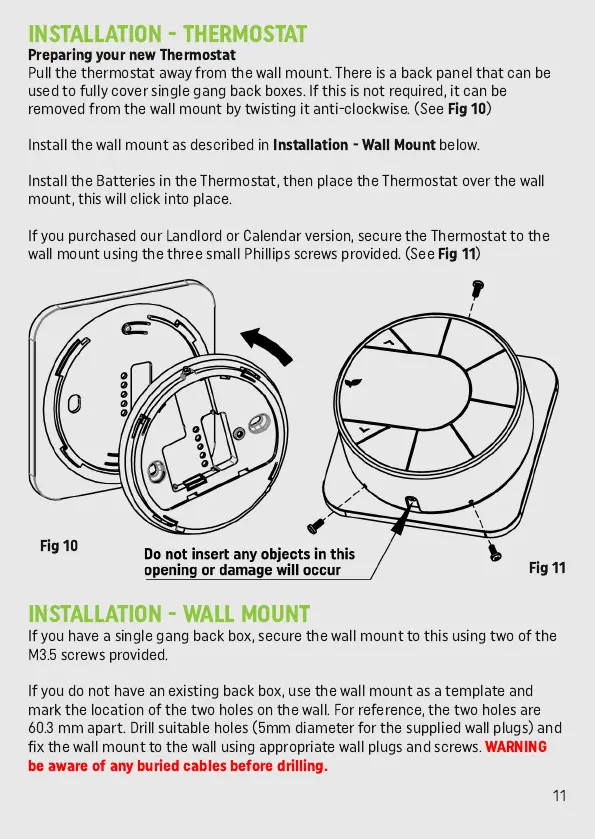
Pull the thermostat away from the wall mount. There is a back panel that can be
used to fully cover single gang back boxes. If this is not required, it can be
removed from the wall mount by twisting it anti-clockwise. (See
Fig 10
)
Install the wall mount as described in
Installation - Wall Mount
below.
Install the Batteries in the Thermostat, then place the Thermostat over the wall
mount, this will click into place.
If you purchased our Landlord or Calendar version, secure the Thermostat to the
wall mount using the three small Phillips screws provided. (See
Fig 11
)
INSTALLATION - WALL MOUNT
If you have a single gang back box, secure the wall mount to this using two of the
M3.5 screws provided.
If you do not have an existing back box, use the wall mount as a template and
mark the location of the two holes on the wall. For reference, the two holes are
60.3 mm apart. Drill suitable holes (5mm diameter for the supplied wall plugs) and
fix the wall mount to the wall using appropriate wall plugs and screws.
WARNING
be aware of any buried cables before drilling.
11
Fig 10
Fig 11



 To Next Page