IF1200A Pilot Operating Handbook 15. Flight Modes
Selecting Flight Modes on the Hand Controllers
This section describes the location and function of the flight mode controls on the hand
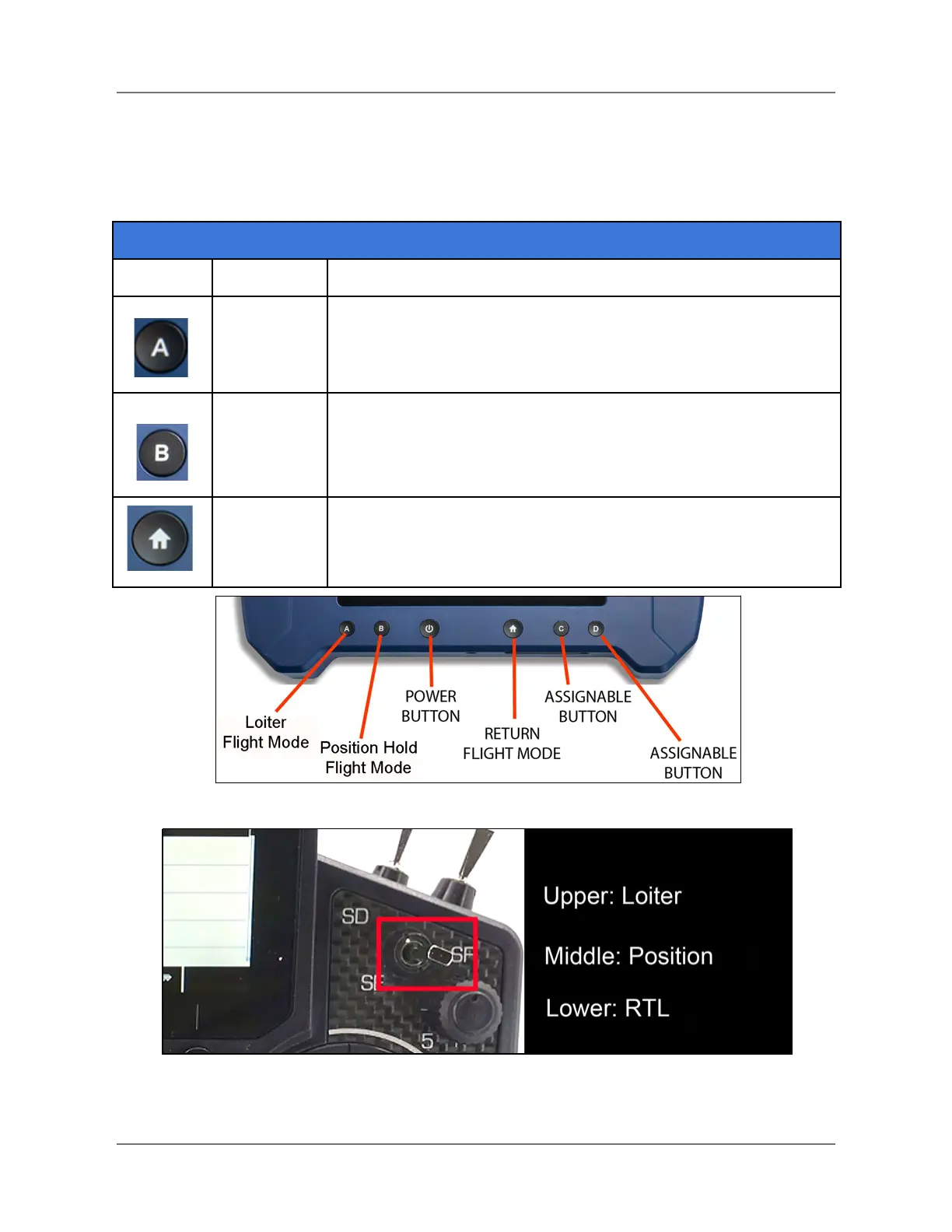
controllers. See Figure 16 and Figure 17 below for control locations.
Location on Hand Controller
HereLink: Button labeled “A” on bottom of the front panel (see
Figure 16).
Jeti DS-12: Top of three-way switch on upper-right of front panel
(see Figure 17).
HereLink: Button labeled “B” on bottom of the front panel (see
Figure 16).
Jeti DS-12: Mid-position of three-way switch on upper-right of
front panel (see Figure 17).
HereLink: Button on bottom of the front panel (see Figure 16).
Jeti DS-12: Bottom position of three-way switch on upper-right of
front panel (see Figure 17).
Figure 16. Flight Mode Buttons on HereLink Hand Controller
Figure 17. Flight Mode Switch on Jeti DS-12.
IFT Doc Num 102094, Rev 1.02 Page 36



 To Next Page