Need help?
Do you have a question about the Inspur NF5266M6 and is the answer not in the manual?
Introduction to the server manual's content and purpose.
Identifies the intended readers of this server manual.
General safety guidelines for server installation and use.
Critical warnings to prevent injury or damage.
Important considerations for safe system handling.
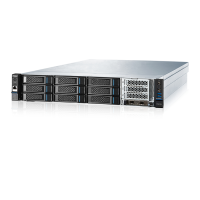
Overview of the Inspur NF5266M6 server features.
Details the server's 3.5-inch drive bay configuration.
Description of components on the server's front panel.
Visual and descriptive guide to the front drive layout.
Identification of connectors and components on the rear panel.
Explanation of front panel status indicators and buttons.
Status indicators for individual drive trays.
Status indicators for the server's power supply units.
Details of various server interface ports and their functions.
Diagram showing motherboard connectors and locations.
Explanation of motherboard jumper settings and their functions.
Exploded view of server components for understanding assembly.
Step-by-step guide for rack mounting the server.
Instructions for installing rack cage nuts for secure mounting.
Method for fastening server mounting ears with screws.
Procedures for powering the server on and off safely.
Essential safety and preparation steps before component removal.
Steps to remove and install the server's main access panel.
Procedure for replacing the server's super-capacitor.
Instructions for removing and installing the internal air duct.
Steps to replace server fan modules without powering down.
Procedure for replacing the M.2 SSD drive.
Guide for installing and removing memory modules (DIMMs).
Steps to replace the processor heatsink and fan assembly.
Procedure for installing or removing PCIe cards.
Instructions for replacing front-mounted 3.5-inch drives.
Instructions for replacing rear-mounted 2.5/3.5-inch drives.
Procedure for replacing hot-swap power supply units.
Steps to replace the OCP Network Interface Card.
Procedure for replacing E1.S SSD drives.
Precautions to prevent damage from static electricity.
Proper grounding techniques to avoid ESD damage.
Common hardware issues and their troubleshooting steps.
Diagnosing and resolving server power-on failures.
Troubleshooting steps when the server has no video output.
Interpreting and resolving front panel LED error indicators.
Solutions for server freezes during boot or POST.
Troubleshooting power supply status indicator lights.
Diagnosing issues indicated by abnormal drive status LEDs.
Identifying and resolving excessive fan noise.
Troubleshooting audible alarms originating from the server.
Steps to resolve input device (keyboard/mouse) issues.
Diagnosing and fixing problems with USB ports.
Solutions for common operating system installation errors.
Solutions for common operating system installation errors.
Troubleshooting issues with PXE network booting.
Addressing reported memory capacity discrepancies.
Resolving network connectivity and performance problems.
Acceptable ambient temperature ranges for server operation.
Specifications for resistance to vibration and shock.
Acceptable altitude and air pressure limits for the server.
Requirements for fluctuating environmental conditions.
Conditions for operating the server outside standard temperatures.
Specific limits for extended temperature operation.
Thermal limitations based on server configuration.
Detailed server room environmental requirements.
Guidelines regarding organisms in the server room.
Limits for corrosive airborne contaminants in data centers.
Requirements for mechanically active materials in the server room.
Electromagnetic compatibility standards for the server.
Specifications for the AC power input.
Requirements for DC power supply systems.
Advice for stable AC power supply setup.
Information on high-voltage DC power supply systems.
Specific requirements for HVDC power supply systems.
Recommendations for HVDC power supply configuration.
Details on the server's standard DC power supply.
Details of Inspur's warranty support services.
Procedures for returning parts for repair or replacement.
Overview of service level agreements offered by Inspur.
Conditions and items not covered under the product warranty.
Reference table for neodymium content in various drive models.
Glossary of technical terms and abbreviations used in the manual.
 General
| Product Model | NF5266M6 |
|---|---|
| Category | Server |
| Form Factor | 2U |
| Processor | Intel Xeon Scalable processors |
| Max Processors | 2 |
| Memory | 32 x DDR4 DIMM slots |
| Max Memory | Up to 8TB (with 256GB LRDIMMs) |
| Storage | Up to 24 x 2.5" drives or 12 x 3.5" drives |
| RAID Support | RAID 0/1/5/10 |
| Network | 2 x 10GbE or 4 x GbE ports |
| Power Supply | Redundant power supplies |
| Management | IPMI 2.0 |
| Operating System Support | Windows Server, Linux |

 To Next Page