EasyManua.ls Logo

Inspur NF5468M5 - User Manual

Inspur NF5468M5
2 pages
Print Icon
To Next Page IconTo Next Page
Loading...
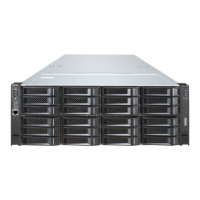
4U Rack-Mounted Server
Installation Guide
V1.0
15kg
30kg
50kg
Please keep this document for future reference.
Warnings!
When installing 4U or bigger servers, at least 4 people are needed.
During the installation process, please do not block the vents on the server, especially
the vents on the front and rear of the server.
Please remove the protective film from the server surface before using.
Please leave a minimum of 15cm clearance on the front and rear sides of the server
for proper ventilation.
Please install air baffles in place prior to device installation, to make sure that the
server can get enough air flow, and to avoid air turbulence in the server room.
Servers are high-power electrical appliances, and they should be installed into
dedicated cabinets with vents or professional water-cooled cabinets, to prevent
system failures caused by overheating.
If it needs to install more than one device, please load them from the bottom to the
top, and load the heaviest items first.
Please note the cabinet’s load-bearing capacity, power supply capacity and heat
dissipation capacity, be sure not to install devices beyond the cabinet’s threshold
capacity.
For the convenience of using the front and rear ports of the server and cabling, leave
a minimum clearance of 70mm between the front end of the server and the inner side
of the cabinet’s front door, and 150mm between the rear end of the server and the
inner side of the cabinet’s rear door.
The cabinet, chassis or guide rails may cause serious
scratches, please be careful while handling.
When installing new servers into the cabinet in use, please be
aware of electric shock.
If the device is more than 15kg, at least 2 people are needed.
If the device is more than 30kg, at least 3 people are needed.
If the device is more than 50kg, at least 4 people are needed.
Question and Answer IconNeed help?

Do you have a question about the Inspur NF5468M5 and is the answer not in the manual?

Summary

General Safety and Installation Warnings

Handling and Electrical Safety

Handle chassis carefully to avoid scratches and be aware of electric shock when installing into live cabinets.

Server Installation Personnel Requirements

Minimum of 4 people required for 4U or larger servers, with additional requirements based on server weight.

Ventilation and Airflow Management

Ensure server vents are unobstructed and maintain specified clearances for proper airflow and cooling.

Cabinet and Load Capacity

Adhere to cabinet capacity limits for load, power, and heat dissipation; install heaviest items first.

Rail Kit Installation Guide

Identify Rail Kit Components

Identify the inner rail, middle rail, outer rail, and screws provided in the rail kit.

Install Outer Rails in Cabinet

Install the rear and front bracket sides of the outer rails into the cabinet's post holes.

Install Inner Rails on Server

Attach the inner rails to the server chassis using screws, ensuring they are level.

Chassis Installation Guide

Prepare Inner Rails

Pull out, extend, and release the latch of the server's inner rail.

Install Server into Cabinet

Align server inner rails with cabinet middle rails and push in, then tighten handles.

Inspur NF5468M5 Specifications

General IconGeneral
ProcessorIntel Xeon Scalable Processors
Max Processors2
StorageUp to 24 x 2.5" or 3.5" HDD/SSD
PCIe SlotsUp to 10 PCIe 3.0 slots
Network Interface2 x 10GbE ports; Optional OCP 2.0/3.0 mezzanine cards
RAID SupportRAID 0/1/5/6/10
ManagementIPMI 2.0 compliant; Inspur iKVM
Form Factor4U

Related product manuals