EasyManua.ls Logo

Instant Omni - User Manual

Instant Omni
31 pages
Print Icon
To Next Page IconTo Next Page
Loading...
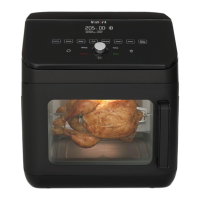
Omni
TM
Toaster Oven
26 Litre
User Manual
Welcome
Important Safeguards
Getting Started
Cooking with the Omni Toaster Oven
Care and Cleaning
Troubleshooting
Warranty
Contact and Support Information

Questions and Answers

  • E
    Elizabeth WoodAug 17, 2025
    Why is my Instant Oven plugged in but will not turn on?
    • A
      Alex RobinsonAug 17, 2025
      If your Instant Oven is plugged in but not turning on, there could be a few reasons. First, ensure the power cord is firmly plugged into a 120V outlet. If it still doesn't work, plug another appliance into the same outlet to check if the outlet has power. Try moving the Instant Oven to another outlet to ensure nothing else is plugged into the same circuit. Finally, inspect the power cord for any damage; if you notice damage, stop using the appliance and contact Customer Care.
  • T
    Tara WilliamsAug 21, 2025
    Why is white smoke coming from my Instant Oven?
    • J
      Jennifer BakerAug 21, 2025
      White smoke coming from your Instant Oven can be caused by a few things. Cooking foods with excess fat, like bacon or sausage, can produce white smoke, so avoid air frying foods with high fat content. Also, check the cooking pan for excess oil or fat and carefully remove it after cooking if needed. If you're cooking moist foods, make sure to pat them dry before air frying and avoid adding water or liquids to the oven's cooking chamber. Lastly, be careful when seasoning food; spray vegetables and meats before adding seasoning so it sticks to the ingredients.
  • A
    Adam SanchezAug 25, 2025
    Why is condensation forming on my countertops from Instant Omni Oven?
    • L
      Lorraine RamosAug 26, 2025
      Condensation forming on your countertops when using the Instant Oven is often due to a lack of proper ventilation. Make sure the Instant Oven has at least 5 inches of space around all sides while you're using it.
  • M
    Molly HolmesAug 28, 2025
    How to fix an Instant Omni that is plugged in but not turning on?
    • K
      Kristen RoweAug 28, 2025
      If your Instant Oven is plugged in but not turning on, first ensure the power cord is plugged firmly into a 120 V outlet. If it is, plug in another appliance to the same outlet to check the outlet for power. You can also move the toaster oven to another outlet to ensure there is nothing else plugged in on the same circuit or in the general area. Finally, inspect the power cord for damage. If you see damage, discontinue use and contact Customer Care.
  • A
    Amy MorrowSep 1, 2025
    What to do if condensation is forming on countertops when using Instant Omni Oven?
    • I
      igreenSep 1, 2025
      If condensation is forming on your countertops when using the Instant Oven, it's likely that the toaster oven does not have proper ventilation. Make sure the toaster oven has at least 5" / 13 cm of space around all sides while in use.
  • J
    Jerry ObrienSep 5, 2025
    Why won't the oven light turn on in my Instant Oven?
    • M
      Mr. Paul NewmanSep 5, 2025
      If the oven light in your Instant Oven will not turn on, first ensure that the toaster oven is plugged in securely. If it is and the light still doesn't work, the oven light may have burnt out, and you should contact Customer Care.
  • J
    Justin MorenoSep 8, 2025
    How to fix Instant Oven that is plugged in but will not turn on?
    • A
      Amy CookSep 8, 2025
      If your Instant Oven is plugged in but won't turn on, first ensure the power cord is firmly plugged into a 120 V outlet. If it still doesn't work, plug another appliance into the same outlet to check if the outlet has power. You can also try moving the toaster oven to another outlet to ensure nothing else is plugged into the same circuit. Finally, inspect the power cord for damage and discontinue use if damage is noticed, then contact Customer Care.
  • L
    Lisa SanchezNov 12, 2025
    Why is black smoke coming from my Instant Omni?
    • R
      Robert AndersonNov 12, 2025
      Black smoke from your Instant Oven could be due to several reasons. It might be caused by using an oil with a low smoke point. In this case, press Cancel, unplug the appliance, let it cool, and then use a neutral oil with a high smoke point, such as Canola, Avocado, Soybean, Safflower, or Rice Bran. Another cause could be food particles or residue on the accessories or cooking chamber. To resolve this, press Cancel, unplug the oven, let it cool, remove and thoroughly clean all accessories and the cooking chamber. You can also line the crumb tray with aluminum foil for easier cleanup. A faulty circuit or heating element can also be the reason. If this is the case, stop using the appliance immediately, press Cancel, unplug the toaster oven, let it cool, and contact Customer Care. Do not atte...

Summary

Welcome to Instant Cooking

Important Safeguards

General Safety Precautions

Lists essential safety rules for operating the appliance.

Electrical Safety and Cord Usage

Details risks of shock, grounding, and cord safety.

Appliance Usage Restrictions and Warnings

Covers limitations on use, materials, placement, and specific hazards.

Power Cord and Plug Safety

Explains the power cord requirements and grounding plug.

Product Specifications Overview

Lists key dimensions, weight, voltage, and power.

Getting Started

Initial Setup Steps

Steps for preparing the oven before first use.

Product and Parts Identification

Identifies key components of the toaster oven.

Included Accessories

Details the various accessories that come with the oven.

Control Panel Overview

Explains the functions of the display and control dials.

Status Messages and Settings

Describes display indicators and how to adjust settings.

Omni Toaster Oven Features

Smart Programs and Cooking Methods

Details the 7 Smart Programs and 2 cooking methods.

User-Friendly Display and Adjustments

Explains the text-based display and ease of adjustments.

Omni Toaster Oven Functions

Function Descriptions

Describes the operation of each function like Standby, Start, Pause, Cancel.

Cooking with the Omni Toaster Oven

Initial Test Run Guide

A step-by-step guide for the first use of the oven.

Smart Program Cooking Parameters

Reference table of time, temp, and convection for each smart program.

Rotisserie Cooking Guide

Steps for setting up and using the rotisserie spit.

Removing Rotisserie Food

Steps to safely remove food from the rotisserie.

General Cooking Tips and Advice

Tips for optimal results and using the oven effectively.

Recommended Cooking Times for Foods

Recommendations for popular foods.

Care and Cleaning

Cleaning Instructions by Part

How to clean each component of the oven.

Cleaning Safety Warnings

Safety precautions during cleaning.

Troubleshooting

Common Issues and Solutions

Addresses scenarios like oven not turning on, smoke, and error codes.

Contacting Customer Care

Information on how to get help for other issues.

Warranty

Warranty Disclaimers and Limitations

Legal statements on warranty coverage and damages.

Warranty Registration and Service

How to register your product and obtain service.

Limited Warranty Details and Exclusions

Duration, coverage, and specific exclusions of the warranty.

Instant Omni Specifications

General IconGeneral
BrandInstant
ModelOmni
CategoryOven
LanguageEnglish

Related product manuals