LCR-800 Series User Manual
22
4-5-3. D/Q in PPM (parts per million)(Invalid for LCR-816/826)
If the value of D or Q is less than 0.0100, user can select DQ in PPM to improve
the resolution by a factor of 100. The units of D and Q in PPM are dimensionless
and expressed as a decimal ratio with the multiplier of 1000000. User can just
press compound key
4 to select the unit of D or Q in PPM. To disable the DQ in
PPM feature, press the same key again.
4-5-4. Test Voltage
The range of test voltage is from 5mV to 1.275V in increments of 5mV. The
actual voltage through the DUT is never more than the source voltage. The DUT
impedance and the source resistance of the LCR Meters decide the actual test
voltage. The smallest voltage through the DUT will be 20% smaller of the source
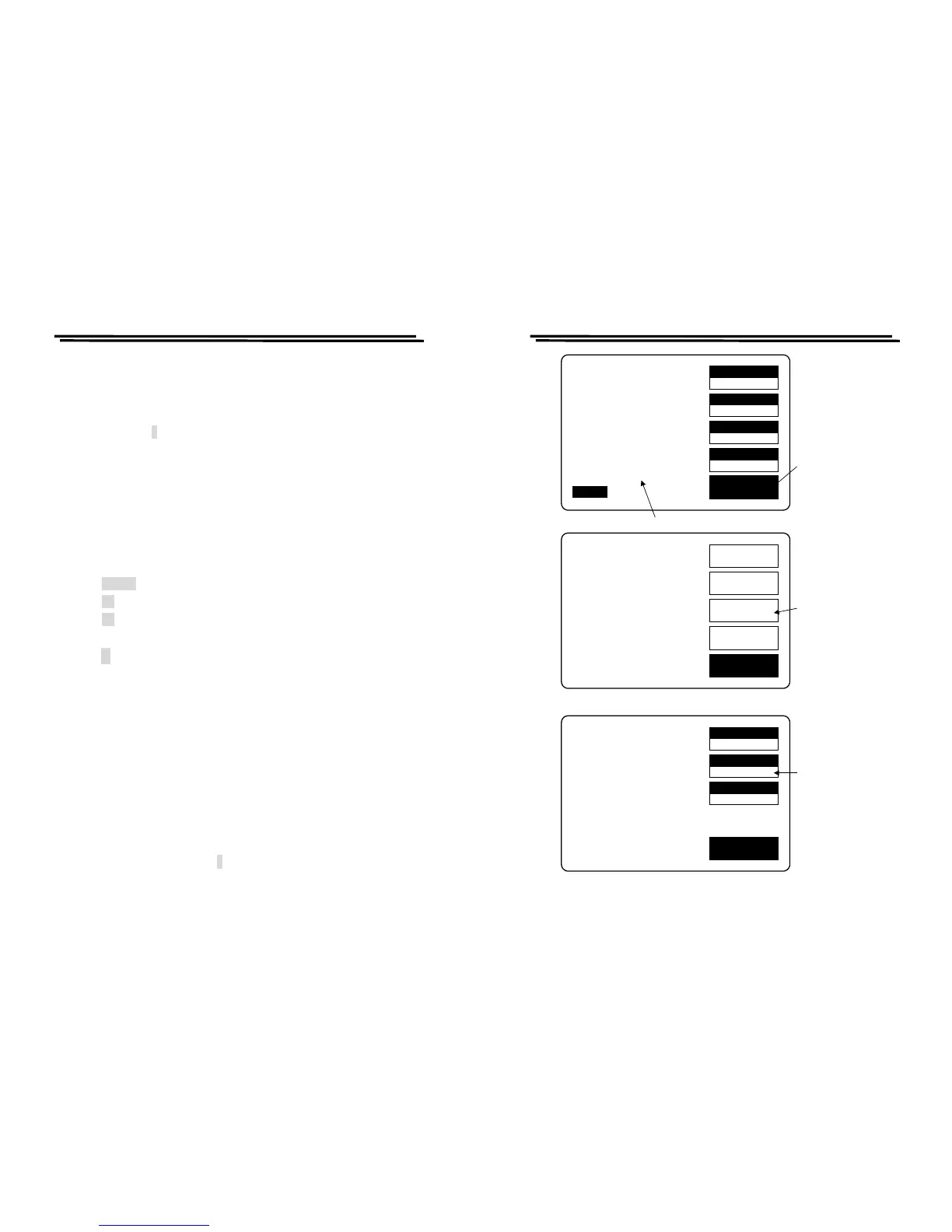
voltage in general. The programming of test voltage is as follows (Figure 4-10):
z Press MENU key.
z Press F3 key to select “SETTING” menu.
z Press F2 key to select “VOLT” menu.
z Input the desired value via the numeral keys.
z Press ↵ key
z After the BAR at the bottom of LCD monitor is filled fully, the “Test
Voltage” input is done.
Note: When the test frequency is at 200kHz, the test voltage must be more than
100mV.
4-5-5. Constant Voltage Source
If the DUT have to be measured at a particular test voltage, the LCR Meters
provides the constant voltage feature. After “Constant Voltage” is selected, The
LCR Meters will keep a source resistance of 25Ω. Therefore, the test voltage is
constant for any DUT impedance which large than 25Ω. If “Constant Voltage” is
selected, the measurement accuracy will cause a reduction by a factor of three.
User can just press compound key
1 to select the feature of “Constant Voltage”.
To disable this feature, press the same key again.
LCR-800 Series User Manual
23
SPEED
SLOW
DISPLAY
VALUE
MODE
L/Q
CIRCUIT
SERIES
MENU
L 1.2345H
Q 0.6789
TESTING
F : 1.000 kHz
V : 1.000 V
AUTO MANU
R.H OFF
C.V OFF
INT.B OFF
OFFSET
SORT
SETTING
CALBRAT
EXIT
CAP. R/L OFFSET
SET SORT
SET PARAMETER
CALIBRATION
Press menu
key
Press F3 key
to the setting
menu
MOMORY
1
VOLT
1.000
AVGE
1
EXIT
MOMORY NO: 1
VOLTAGE = 1.000 V
AVERAGE = 1
Press F2 key to
input the desired
test voltage
Test Voltage
Figure 4-10. Programming of test voltage.



 To Next Page