EasyManua.ls Logo

Instek Digital LCR-821 - BIN Parameters: INT.B, Range, C.V

Default Icon
40 pages
Print Icon
To Next Page IconTo Next Page
To Previous Page IconTo Previous Page
Loading...
LCR-800 Series User Manual
54
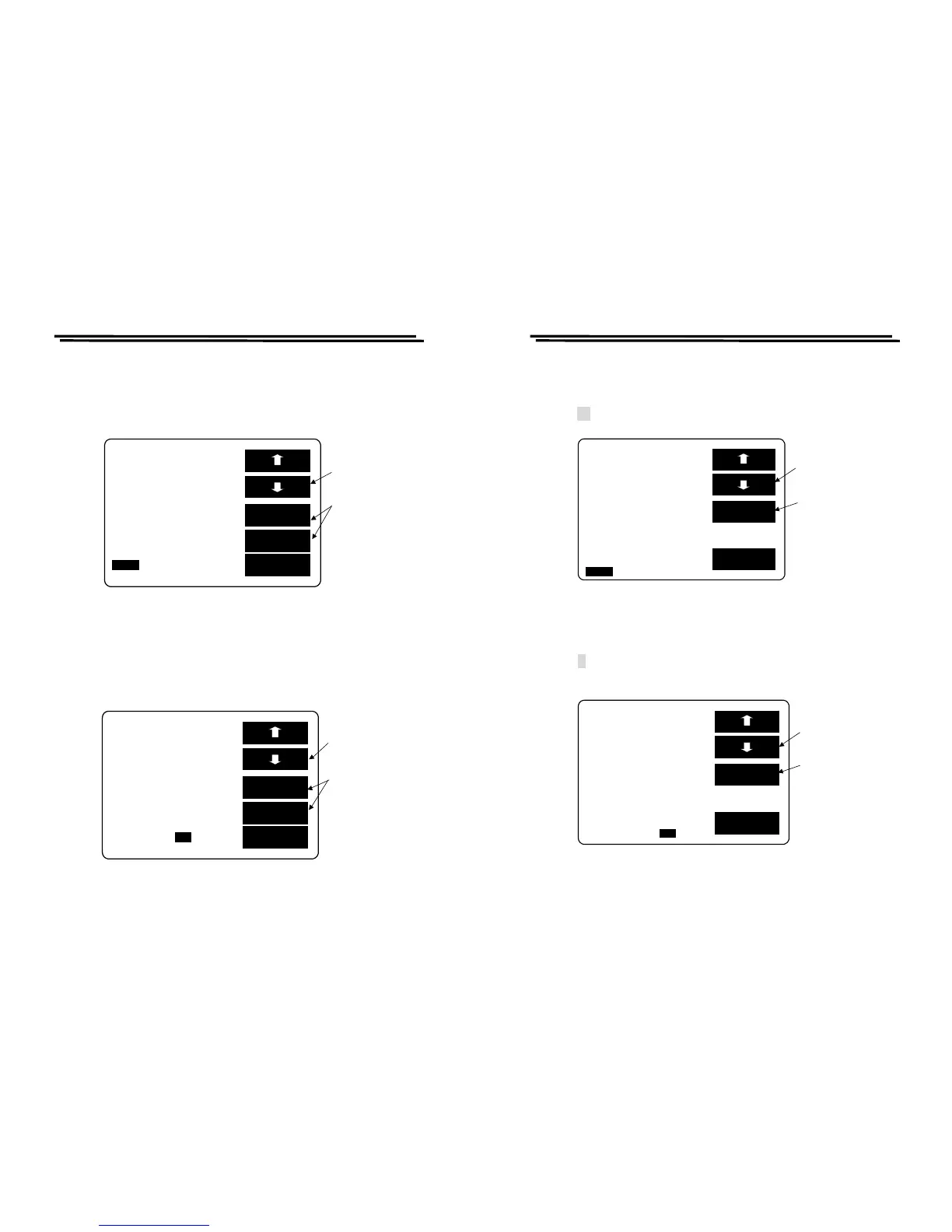
RANGE setting:
z Press F1/F2 key to select the white inverted characters “RANGE”.
z PressF3 or F4 key to select UP or DOWN value within 1~4 range shown as
Figure 8-10 below.
Figure 8-10
C.V setting:
z Press F1/F2 key to select the white inverted characters “C.V”.
z Press F3 or F4 key to select ON or OFF shown as Figure 8-11 below. For
further details, please refer to 4-5-5.
Figure 8-11
EXIT
SET BIN BIN SUM
M
ODE:C/D CIRCUIT:SER.
SPEED:SLOW DISPLAY:BIN
C D
BIN
F:1.0000kHz MANU
V
:1.000 V INT.B OFF
RANGE:1
C.V: OFF
DELAY:00000mS AVG : 1
ON
Press
F1/F2
ke
y
to the C.V
Press F3/F4
ke
y
to selec
t
ON or OFF
OFF
EXIT
SET BIN BIN SUM
M
ODE:C/D CIRCUIT:SER.
SPEED:SLOW DISPLAY:BIN
C D
BIN
F:1.0000kHz MANU
V
:1.000 V INT.B OFF
RANGE:1 C.V : OFF
DELAY:00000mS AVG : 1
UP
Press F1/F2 ke
y
to the RANGE
Press F3/F4
ke
y
to selec
t
UP or DOWN
DOWN
LCR-800 Series User Manual
55
DELAY setting:
z Press F1/F2 key to select the white inverted characters “DELAY”.
z Key-in Delay value(0~99999ms) through panel keyboard.
z Press key. Please refer to Figure 8-12 below.
Figure 8-12
AVG setting:
z Press F1/F2 key to select the white inverted characters “AVG”.
z Key-in average value through panel keyboard.
z Press key shown as Figure 8-13 below. For further details, please refer to
4-5-7.
Figure 8-13
8-3. BIN Range Setting: Component Sorting Range
EXIT
SET BIN BIN SUM

M
ODE:C/D CIRCUIT:SER.
SPEED:SLOW DISPLAY:BIN
C D
BIN
F:1.0000kHz MANU
V
:1.000 V INT.B OFF
RANGE:1 C.V : OFF
DELAY:00000mS AVG : 1
CLR
Press
F1/F2
key
to the DELAY
Press
F3
key
to delete the
values input
in erro
r
EXIT
SET BIN BIN SUM
M
ODE:C/D CIRCUIT:SER.
SPEED:SLOW DISPLAY:BIN
C D
BIN
F:1.0000kHz MANU
V
:1.000 V INT.B OFF
RANGE:1 C.V : OFF
DELAY:00000mS
AVG: 1
CLR
Press
F1/F2
key
to the AVG
Press
F3
key
to delete the
values input
in erro
r

Related product manuals