LCR-800 Series User Manual
26
4-5-8. Memory
The LCR Meters have two memory functions: Recall and Store. The current
measurement conditions can be saved into the memory unit or recalled a
previously saved measurement conditions set from the LCR Meters memory.
There are 100 memory blocks totally. The programming of “Memory Store /
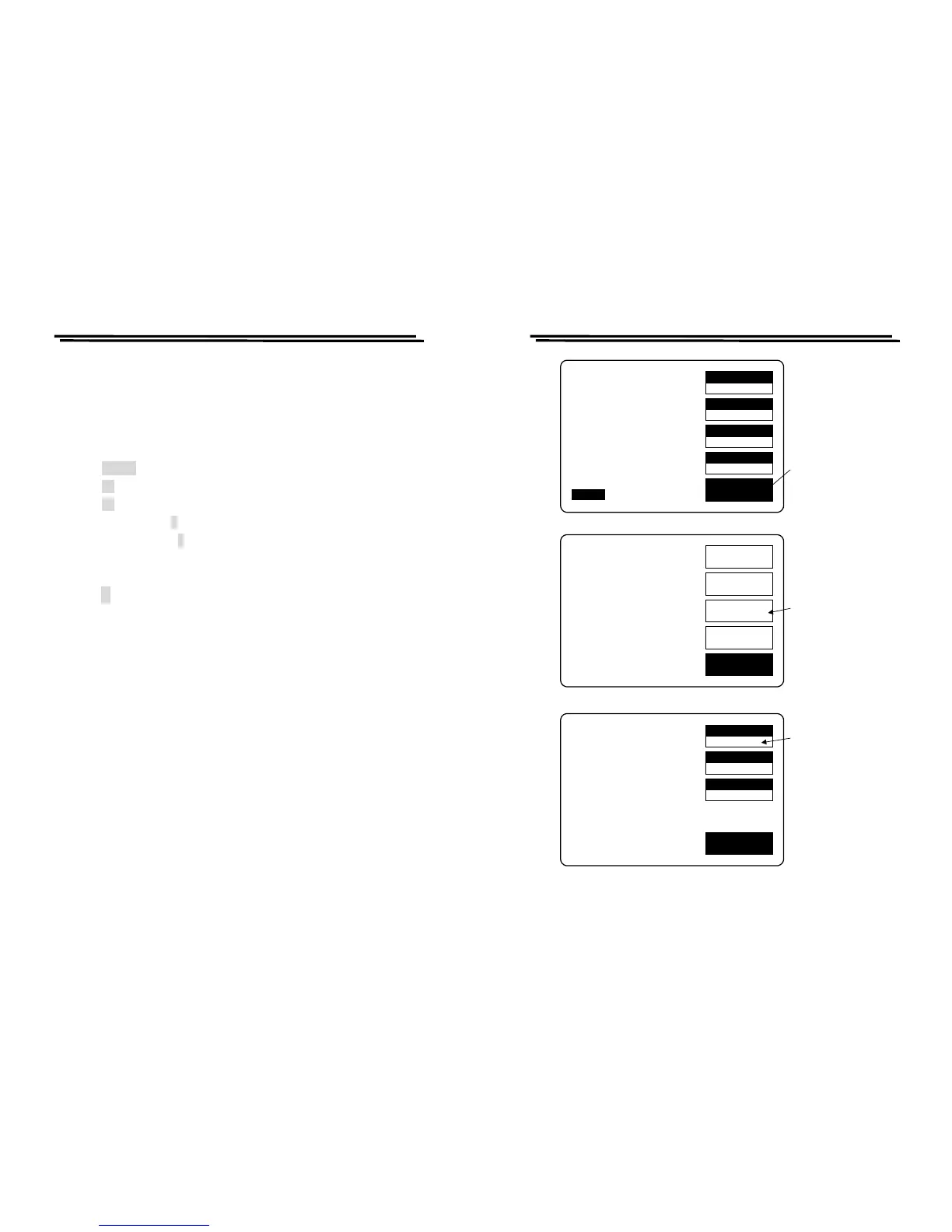
Recall” can be used as described below (Figure 4-12):
z Press MENU key.
z Press F3 key to select “SETTING” menu.
z Press F1 key to select “MEMORY” menu.
z Press compound key 1 to recall a previously saved memory block. or
z Press compound key 2 to store the current measurement conditions into
memory.
z Input the number of desired memory block. (1~100)
z Press ↵ key
z After the BAR at the bottom of LCD monitor is filled to the full, the process
of “Memory Store/Recall” is done.
Remark: For LCR-827/829, the function of Recall and Store is not only used in
the normal memory status, also it can be extended to sorting and BIN-
SUM setting.
LCR-800 Series User Manual
27
SPEED
SLOW
DISPLAY
VALUE
MODE
L/Q
CIRCUIT
SERIES
MENU
L 1.2345H
Q 0.6789
TESTING
F : 1.000 kHz
V : 1.000 V
AUTO MANU
R.H OFF
C.V OFF
INT.B OFF
OFFSET
SORT
SETTING
CALBRAT
EXIT
CAP. R/L OFFSET
SET SORT
SET PARAMETER
CALIBRATION
Press menu
key
Press F3 key
to the setting
menu
MOMORY
1
VOLT
1.000
AVGE
1
EXIT
MOMORY NO: 1
VOLTAGE = 1.000 V
AVERAGE = 1
Press F1 key to
select the memory
store/recall function
Figure 4-12. Programming of memory store/recall.



 To Next Page