LCR-800 Series User Manual
70
2) Option
Settings
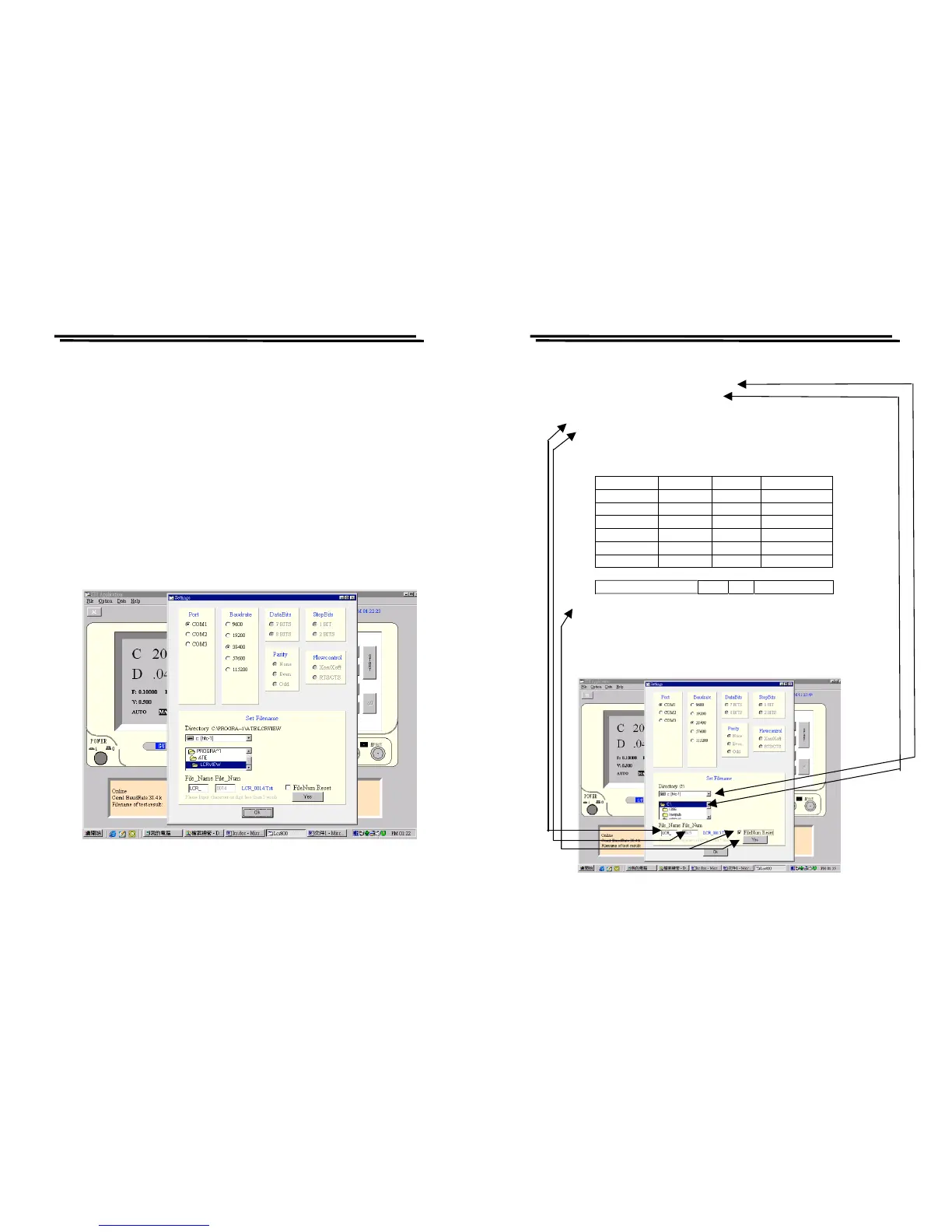
Port: There are three Ports available for selection including
Com1, Com2 and Com3. The default value is Com1.
Baudrate: After online, there are five Baudrates available for
selection including 9600, 19200, 38400, 57600 and
115200. The default value is 38400
。
DataBits: There are 8 bits of Data bits and User can not change it.
Parity: None. User can not change it.
StopBits: There is only 1 Bit of StopBits, and User can not change it
(Figure 9-7).
Figure 9-7
LCR-800 Series User Manual
71
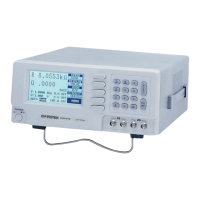
3) Set Filename
This filename setting is the route for saving test result.
Driver: Set driver
。
Directory: Set directory。
File_Name: Set file name with 4 alphabets or 4 numbers input.
File_Num: Set 4 codes of file numbers from 0001 to 9999. When
the test results data reaches to the number of 10000 can
be stored with a file number.
Test Resul
FileNum Reset (refer to the following figure): File_Num is 0001.
Ps. File_Num will be continued from last file number of test result. If
last file number is end at 0006, next file number is started from 0007
when re-power on the unit.
If want to start from 0001, reset the FileNum (refer to Figure 9-8).
Figure 9-8



 To Next Page