EasyManua.ls Logo

Instrutech CVM211 - User Manual

Instrutech CVM211
30 pages
Print Icon
To Next Page IconTo Next Page
Loading...
p/n 000452-109
InstruTech®
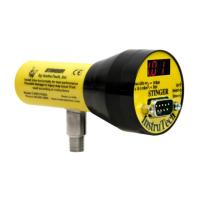
CVM211 Convection Vacuum Gauge Module
The Stinger
User Manual
(Unit of measure in bar / mbar)
InstruTech
1475 S. Fordham St.
Longmont, CO 80503
USA
Phone: +1-303-651-0551
Fax: +1-303-678-1754
E-mail info@instrutechinc.com
www.instrutechinc.com

Questions and Answers

  • D
    debrahaleyAug 14, 2025
    What to do if Instrutech Measuring Instruments readings are noisy or erratic?
    • A
      Amanda James MDAug 14, 2025
      Noisy or erratic readings on your Instrutech Measuring Instruments can stem from a few potential issues. First, check all cables and connections to ensure they are secure and properly tightened. Another cause could be contamination within the gauge. Inspect it for any signs of particles, deposits, or discoloration on the gauge inlet. If contamination is suspected, the gauge may need professional cleaning. Return to factory for possible cleaning. Excessive vibration can also cause unstable readings, so ensure the gauge is mounted in a location free from significant vibration.
  • W
    William GoodmanAug 17, 2025
    Why Instrutech Measuring Instruments display is off / blank?
    • C
      Chelsey ClarkeAug 17, 2025
      If the display of your Instrutech Measuring Instruments is off or blank, the most likely cause is a lack of power. Check the power supply and power cable to ensure they are properly connected and functioning.
  • J
    Joyce AdamsAug 21, 2025
    What to do if Instrutech Measuring Instruments readings appear very different from expected pressure?
    • C
      Christopher GreenAug 21, 2025
      If the readings from your Instrutech Measuring Instruments are significantly different from the expected pressure, it could be due to a calibration issue or using a different process gas than what the CVM211 Module was calibrated for. You should correct readings for different gas thermal conductivity. See section 5 on using the gauge on different gases. Check that zero and span are adjusted correctly.
  • N
    Natalie GrayAug 25, 2025
    What to do if Instrutech Measuring Instruments atmospheric pressure reads too high and can’t be set to correct value?
    • A
      Alexis HubbardAug 25, 2025
      If your Instrutech Measuring Instruments indicate that atmospheric pressure is too high and cannot be adjusted, this could be due to contamination or a damaged sensor wire. Return to factory for possible cleaning or evaluation.
  • J
    Jonathan SmithAug 28, 2025
    What to do if Instrutech Measuring Instruments atmospheric pressure reads too low and can’t be set to correct value?
    • R
      Rachael CookAug 28, 2025
      If your Instrutech Measuring Instruments indicate that atmospheric pressure is too low and cannot be adjusted, this could be due to a damaged sensor wire or contamination. Return to factory for evaluation or possible cleaning.
  • R
    Richard MurphySep 1, 2025
    What to do if Instrutech Measuring Instruments gauge cannot be calibrated - zero and span can’t be adjusted?
    • S
      Samantha MillerSep 1, 2025
      If the Instrutech Measuring Instruments gauge cannot be calibrated, and zero and span adjustments are ineffective, the cause may be contamination or sensor failure. In either case, return to factory for possible cleaning or evaluation.
  • E
    emilygarciaSep 5, 2025
    What to do if Instrutech Measuring Instruments setpoint does not actuate?
    • R
      Robin GentrySep 5, 2025
      If the setpoint on your Instrutech Measuring Instruments does not actuate, the issue is likely due to incorrect setup. Verify the setpoint setup to ensure it is configured correctly.
  • E
    elizabethjonesSep 9, 2025
    What does it mean if Instrutech Measuring Instruments display shows “bAd”?
    • L
      lindsay98Sep 9, 2025
      If your Instrutech Measuring Instruments display shows “bAd”, it indicates that the sensor wire is damaged. Return to factory for evaluation.

Summary

Important User Information

General Safety Precautions

General safety warnings and precautions for safe operation.

Safety Symbols and Definitions

Explanation of WARNING, CAUTION, NOTICE, and SHOCK HAZARD symbols.

Safety Precautions and Warnings

General Safety Guidelines

Warnings regarding internal parts, modifications, and environmental exposure.

Service and Operation Safety

Safety rules for servicing, operation, and grounding procedures.

Electrical Safety and Grounding

Hazards of high voltage and importance of proper equipment grounding.

Overpressure and Hazardous Gas Handling

Precautions for overpressure limits and using hazardous gases.

Gas Usage and Explosive Atmosphere Warnings

Warnings for using gases other than N2/air and in explosive atmospheres.

Installation and Setup Guide

Initial Setup and Calibration

Steps for initial setup, including setting zero and span for accuracy.

Using the Gauge with Various Gases

Service, Support, and Warranty

Calibration Procedure

Guide for calibrating the gauge by setting zero and span for accurate measurements.

Instrutech CVM211 Specifications

General IconGeneral
BrandInstrutech
ModelCVM211
CategoryMeasuring Instruments
LanguageEnglish

Related product manuals