14 15
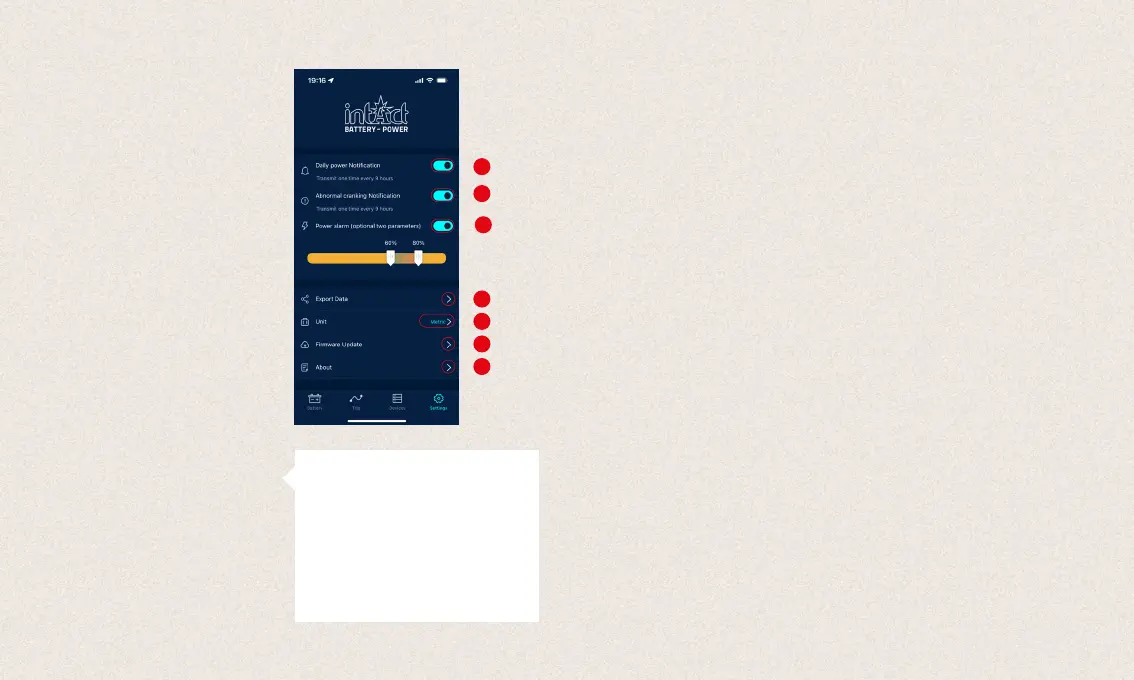
1. Daily notification: Blue is on, white is off.
The system default is no more than one
notification in 9 hours, the notification fre-
quency can be adjusted.
2. Abnormal startup notification: Blue is on,
white is off. The system default is no more
than one notification in 9 hours, the notifi-
cation frequency can be
3. Voltage alarm: Two limits can be set with
the sliders. When the battery power falls
below or rises above these values, the user
will receive an app notification about the
state of charge.
4. Export data: Here you can email the history
data of the selected month in Excel or share
it via WhatsApp, Skype, Facebook, etc.
5. Unit: Here you can set the unit to metric or
imperial.
6. Firmware update: Here you can check the
hardware version and also update new
firmware when new version is available.
7. About: Here you can find privacy, FAQ, feed-
back and app version.
1
4
5
3
7
6
2
5.0 Further notes4.6 Settings
1. The product should not be used beyond the specified voltage range
(6-19 V), too high input voltage may damage the device.
2. The app requires smartphones with: Android 5.0 and above, iOS 10.0
or newer systems.
3. When the smartphone comes into Bluetooth range, it will receive a
notification.
4. If the daily test alert function is not enabled, when the smartphone is
in range, it also cannot receive the daily test result notification. You can
enable this both in the app and in the phone’s settings.
5. If the alert function is not enabled, when the smartphone is near the
device, it also cannot receive alert notification. You can enable the no-
tification both in the app and in the phone’s settings.
6. The firmware update will delete all data in the device. Please open the
app and wait for the sync to complete before updating the firmware.
7. All recorded data will be saved on the phone, when you upgrade the
app, this data will not be lost. But if the app is uninstalled, the data will
be deleted.
8. The device automatically monitors the vehicle battery, starting and
charging system. The device can store data up to 72 days. Please
connect the app at least once in 72 days to make sure the data is
saved for a long time.
9. If the app can not connect to the Battery Guard device, please make
sure the Bluetooth of the smartphone is on, you are near the device
and the device is added correctly.
FAQ: This submenu lists the frequently
asked questions and provides the corre-
sponding answers.
Feedback: Here you can give feedback
about the app or the device or report
problems.
App version: Display the current app version
number.


 To Next Page
 Loading...