6 7
4.2-1
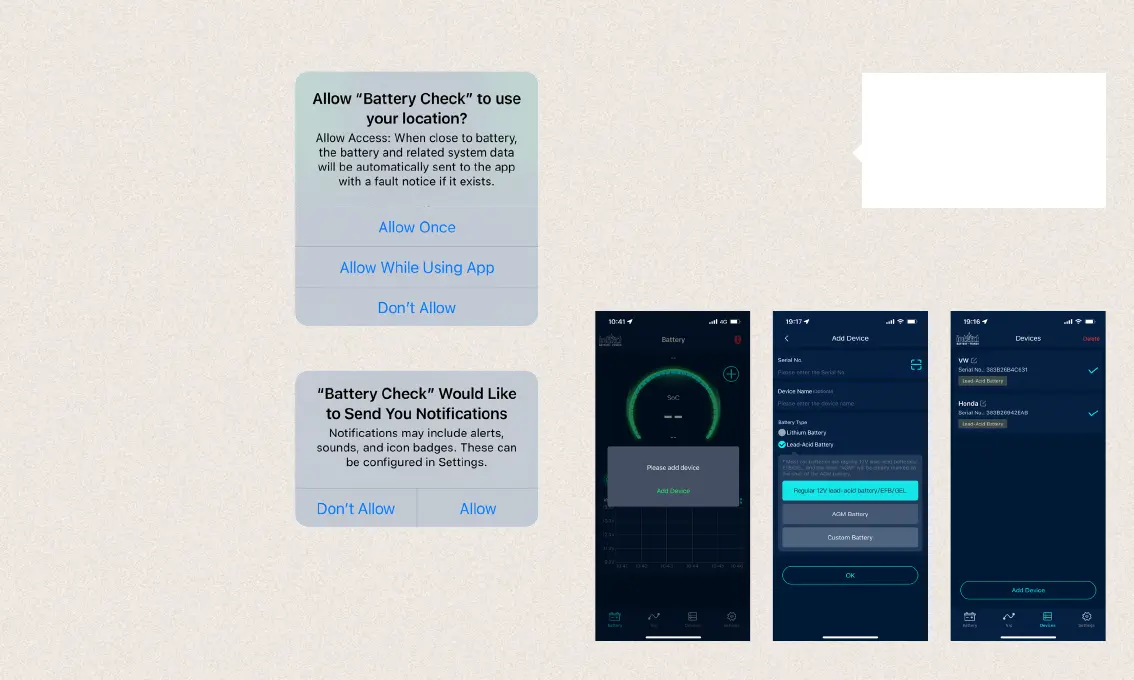
Click on the app icon, run the app and turn on the
Bluetooth of your smartphone.
4.2-2
Please allow the app to access the location even if
you are not using the app.
If you do not, the product will not automatically
notify the user when a problem is detected on the
battery.
4.2-3
Please allow to receive notifications.
Then the device will send you notifications re-
garding the car battery, start system and prob-
lems. These notifications will be sent when your
smartphone is within the Bluetooth radius of the
device.
4.2-4
To add a device, it is necessary to enter the serial
number of the device, which can be scanned by
barcode or entered manually. The serial number
incl. barcode can be found on the subpage of
the device and on the page of the device. Please
select the battery type and name the device for
better recognition.
Notice:
The app supports multiple devices, and
up to four devices can be displayed in the
app at the same time. You can also click
the „Edit“ icon or the „Delete“ button to
rename or delete the device.
4.2 App operation4.2 App operation



 To Next Page