DTR-8.4
PANEL VIEWS
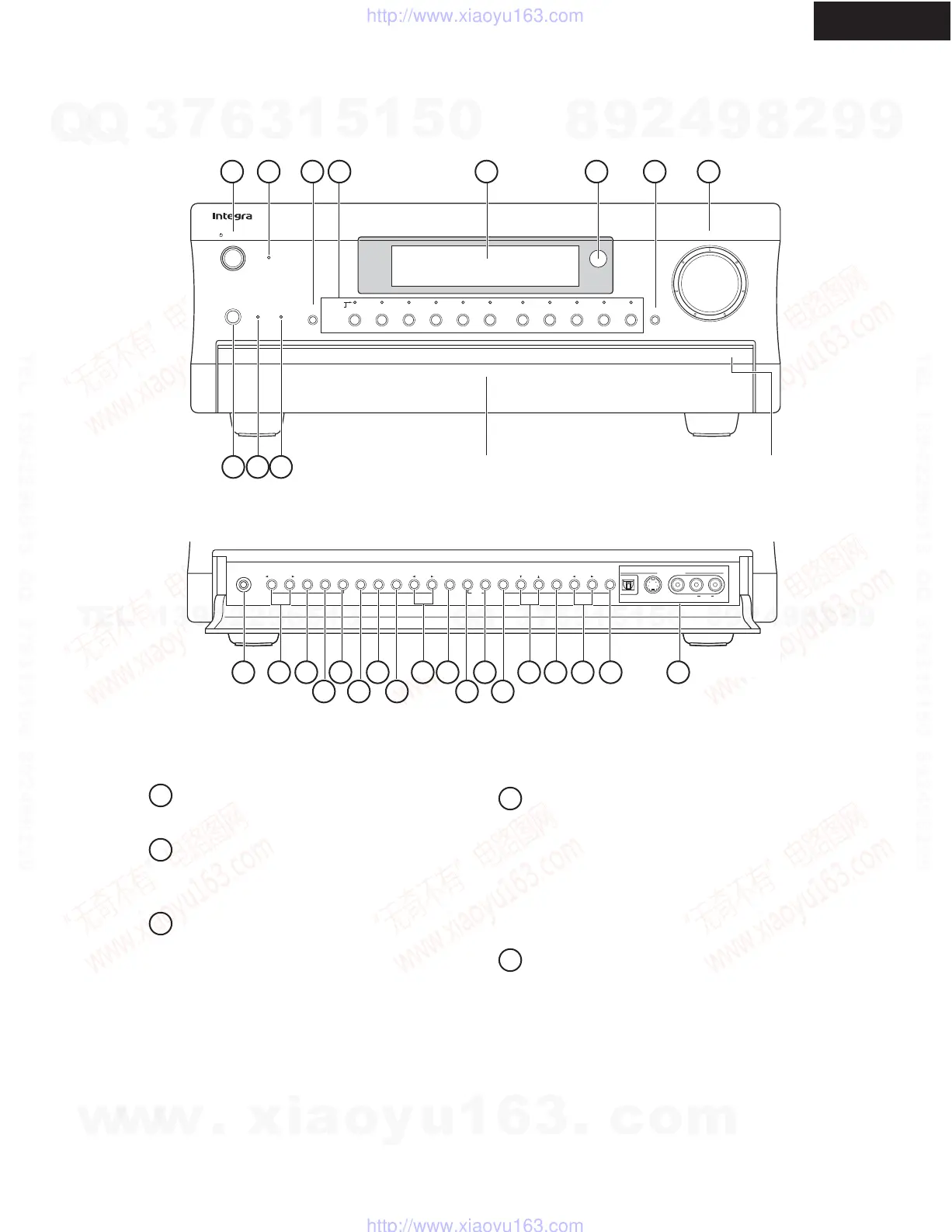
FRONT PANEL
Standby/On button
This button is used to set the DTR-8.4 to On or
Standby.
Standby indicator
This indicator lights up when the DTR-8.4 is in
Standby mode, and it flashes while a signal is being
received from the remote controller.
Audio Selector button
This button is used to select the audio input signal
format: analog, digital, or multichannel.
Input selector buttons & indicators
These buttons are used to select the following input
sources: DVD, VIDEO 1~5, TAPE, TUNER,
PHONO, CD, and NET AUDIO. The indicators
show the currently selected input source.
The indicators also show which input source is
selected for Zone 2, in which case they light up
green, or which input source is selected for record-
ing (REC OUT), in which case they light up red.
Display
See "Display" on page 3.
Display
Audio
Selector
Direct/
Pure Audio
Master Volume
Standby/On
Video 1
Video 3 Tape
Tuner Phono Net AudioCD
DVD
Video 2
VCR 1
VCR 2
Video 4 V
ideo 5
Zone 2
()
GRN
Rec
()
RED
Pure Audio psamplingU
Standby
Push To Open
DTR
-
8.4
Phones
Zone 2
Level
Stereo Surround THX
DSPRec Out Zone 2 Off Dimmer Memory
Clear
FM Mode
Setup Tuning
Enter Preset Return
S Video Audio
Video L R
Digital
Video 5
Input
Front door Push here to open the flap
1 2 3 4 5 6 7 8
9 10 11
12 13 14
15
16 18 20 21 23 25 26 27 28 29
24221917
1
2
3
4
5
w
w
w
.
x
i
a
o
y
u
1
6
3
.
c
o
m
Q
Q
3
7
6
3
1
5
1
5
0
9
9
2
8
9
4
2
9
8
T
E
L
1
3
9
4
2
2
9
6
5
1
3
9
9
2
8
9
4
2
9
8
0
5
1
5
1
3
6
7
3
Q
Q
TEL 13942296513 QQ 376315150 892498299
TEL 13942296513 QQ 376315150 892498299
http://www.xiaoyu163.com
http://www.xiaoyu163.com



 To Next Page