Desktop Board Features
17
LAN Subsystem
The LAN subsystem includes:
• Intel ICH7
• Realtek 8111E Gigabit Ethernet Controller for operation at 10/100/1000 Mb/s
• RJ-45 LAN connector with integrated status LEDs
The subsystem features:
• CSMA/CD protocol engine
• LAN connect interface between ICH7 and the LAN controller
• PCI bus power management
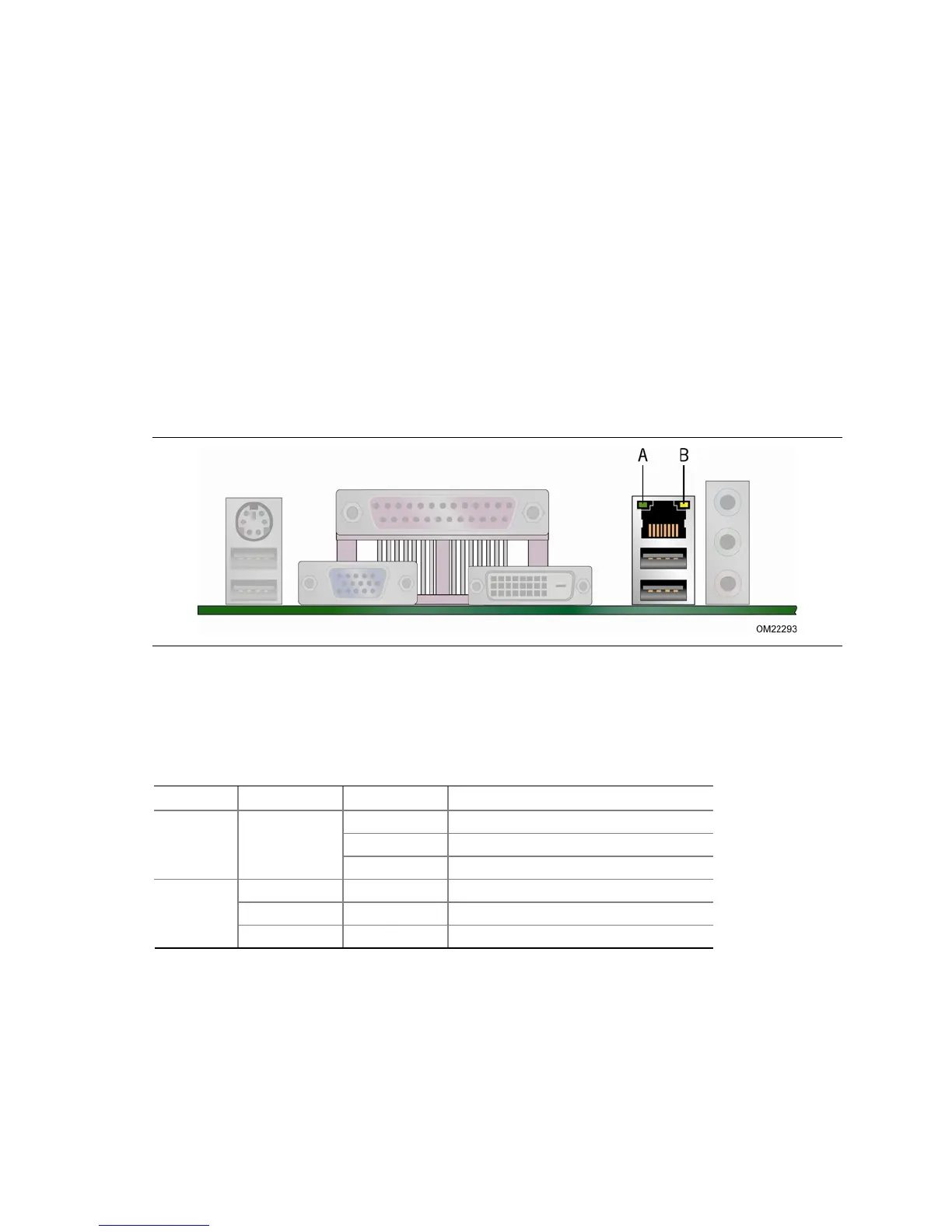
Two LEDs are built into the RJ-45 LAN connector located on the back panel (see
Figure 2). These LEDs indicate th
e status of the LAN.
Figure 2. LAN Connector LEDs
Table 5 describes the LED states when the board is powered up and the LAN
subsystem is operating.
Table 5. LAN Connector LEDs
LED LED Color LED State Indicates
A (Link) Off LAN link is not established.
Green
On LAN link is established.
Blinking LAN activity is occurring.
N/A Off 10 Mb/s data rate is selected.
Green On 100 Mb/s data rate is selected.
B (Data
Rate)
Yellow On 1000 Mb/s data rate is selected.





 To Next Page