Affinity
2.0
Additional Information Page 83
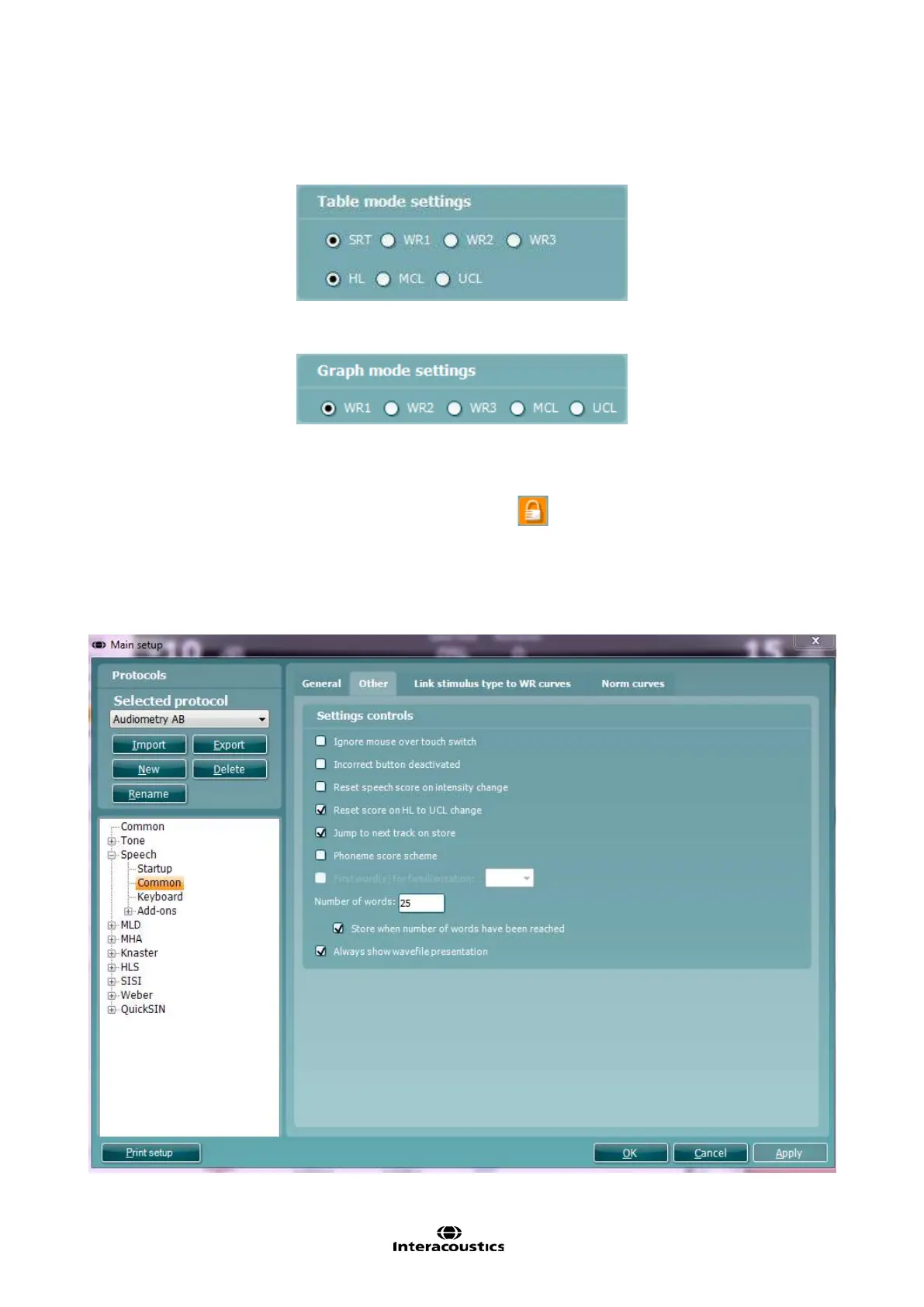
8) Under Table mode settings you can decide whether the testing should start with SRT, WR1, WR2,
WR3, HL, MCL, or UCL. The type of speech material for each WR can be selected in the Link stimulus
types to WR curves (see later in this section).
9) Under Graph mode settings you can decide whether the testing should start with WR1, WR2, WR3,
MCL, or UCL. The type of speech material for each WR can be selected in the Link stimulus types to
WR curves (see later this section).
10) Under Other settings you can tick Aided if audiograms usually are obtained with hearing aids and/or
Binaural if both ears are tested at the same time. This will result in a separate speech curve. Ticking
Synchrone will activate the corresponding button in the front screen by default locking the distance in
input level between Ch1 and Ch2 for masking purposes
.
11) Under Monitor one or both of the channels may be ticked if monitoring is preferred. The level of the
monitoring can be set using the slider bar.
12) Adjust the Input Levels for the selected input. It may be practical to set a default value in this screen if
you always use the same input. Note that the input level can also be selected in the speech screen by
pressing shift and adjusting the input to 0 VU (see section 1.6.5)
13) Under the Other tab additional speech test functions are available.



 To Next Page