Affinity
2.0
Additional Information Page 85
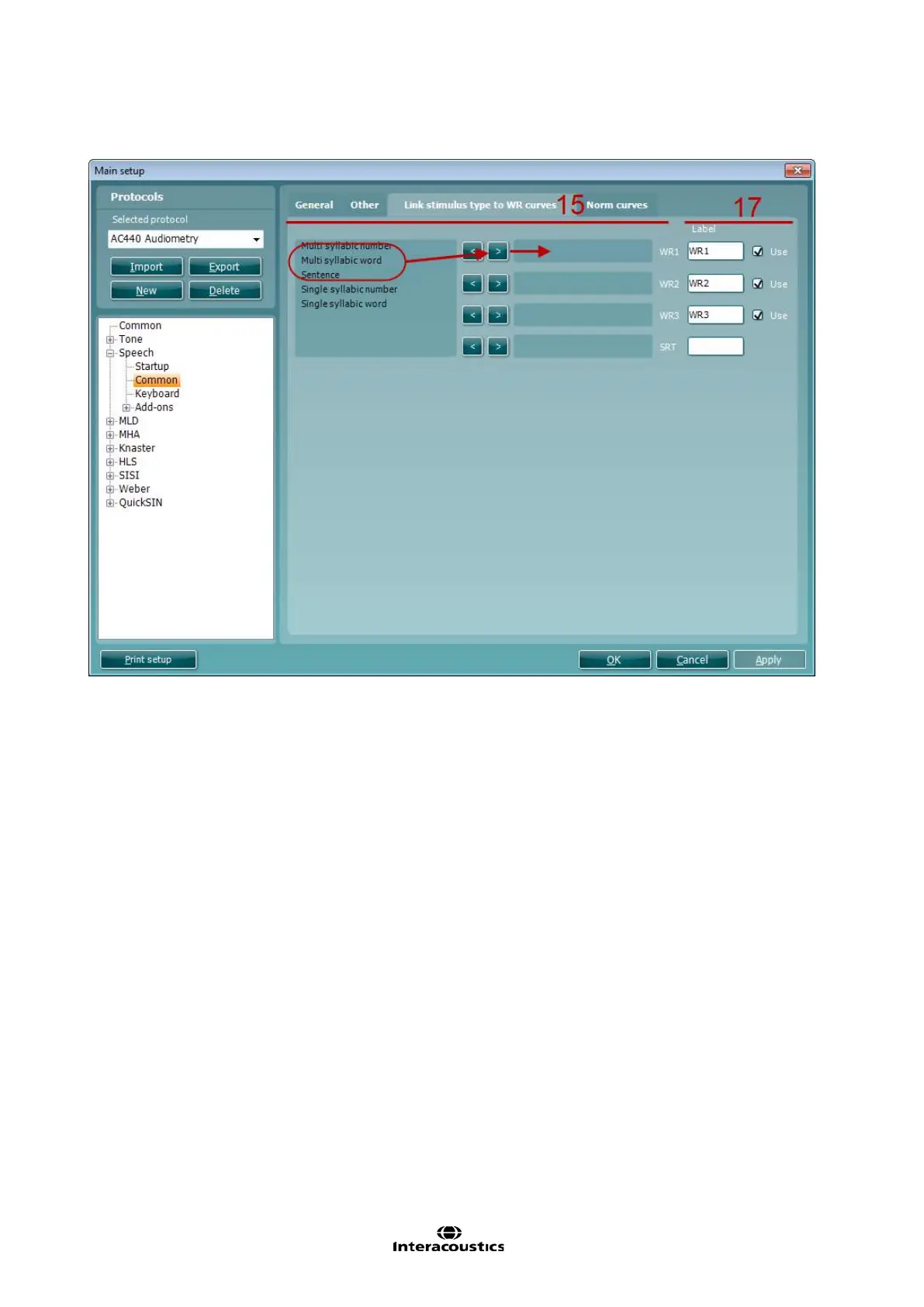
15) Linking a type speech material to a WR curve:
Under the Link stimulus to WR curve tab a certain type of speech material can be linked to the
individual WR curves. If a clinic for example always uses multi syllabic numbers for WR1 and single
syllabic words for WR2, you can link these materials to the curves and corresponding buttons in the
front screen.
Mark the type of material in the selection list
Click on the arrow pointing towards the WR curve to which the material should be linked
The material will then jump to the selected WR
16) Unlinking a type of speech material from a WR curve:
Mark the type of material
Click on the arrow pointing back to the selection
The material will then jump back to the selection list
17) User defined WR labels allow you to name or label the speech material which will then be selectable
for the print layout (see 0 for how to make a personal print layout). Additionally for table mode testing
the check boxes indicate which labels are available as buttons in the test screen.
18) Under the Norm curves tab the norm values appearing in the speech graph can be changed.



 To Next Page