D-0128588-D – 2022/02
VRA Screen - Instructions for Use - EN Page 10
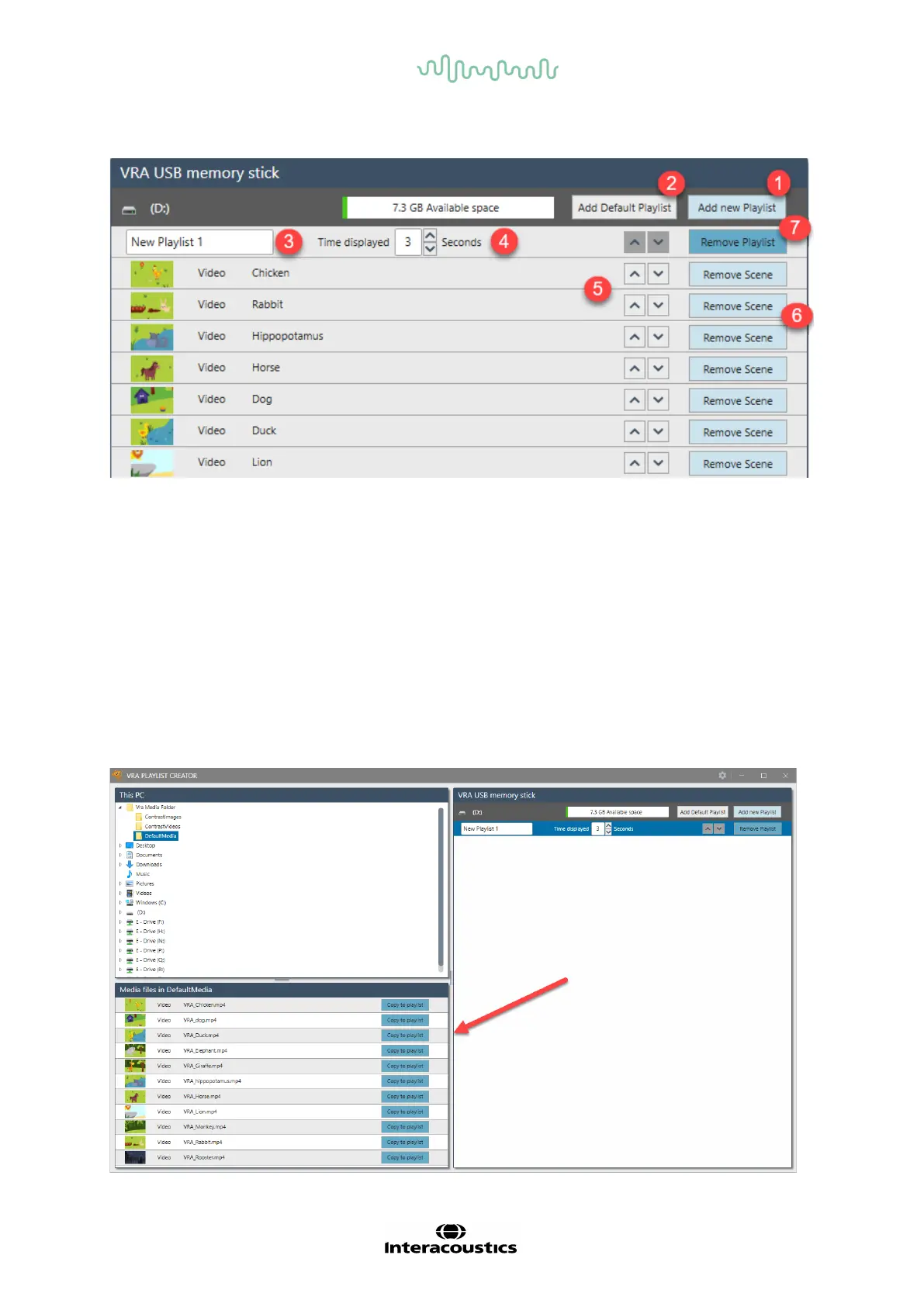
4.2.3 Getting started using the Playlist Creator
1. Add new playlist: Create new playlists.
2. Add default playlist: The def ault playlists with cartoon animals will be added.
3. Rename the playlist: Choose the name of the playlist. The playlist name will only be visible in
the lef t bottom corner of the screen when changing through playlists in use.
4. Time displayed: Set the time to how long the image or video should be visible on screen.
From 0 to 99 seconds.
5. Shuffle arrow: Replace the image or video on the playlist.
6. Remove Scene: Remove an image or video f rom the playlist.
7. Remove playlist: Remove entire playlist f rom USB. Default playlist can always be removed
and added again when needed.
A new playlist is created by using Add new playlist. Open the folders of the content in the upper left
corner. The supported files in the f older will be available in the lower lef t corner of the screen.
Choose the image or video to add to playlist and press Copy to Playlist or drag the content over to
the playlist on the right side of the screen.














 To Next Page