INSTALLATION
Resetting the Cams
NOTE: Refer back to Mounting Options on page 1,
standard plumbed and mounted values and Actuators
require no cam adjustments. Otherwise, follow
instructions below.
1. Find the mounting position of the Actuator in Figure 3,
Page 2.
2. Determine the COMMON and EXIT port(s) of the
valve.
3. Refer to table on page 2, find the proper cam settings.
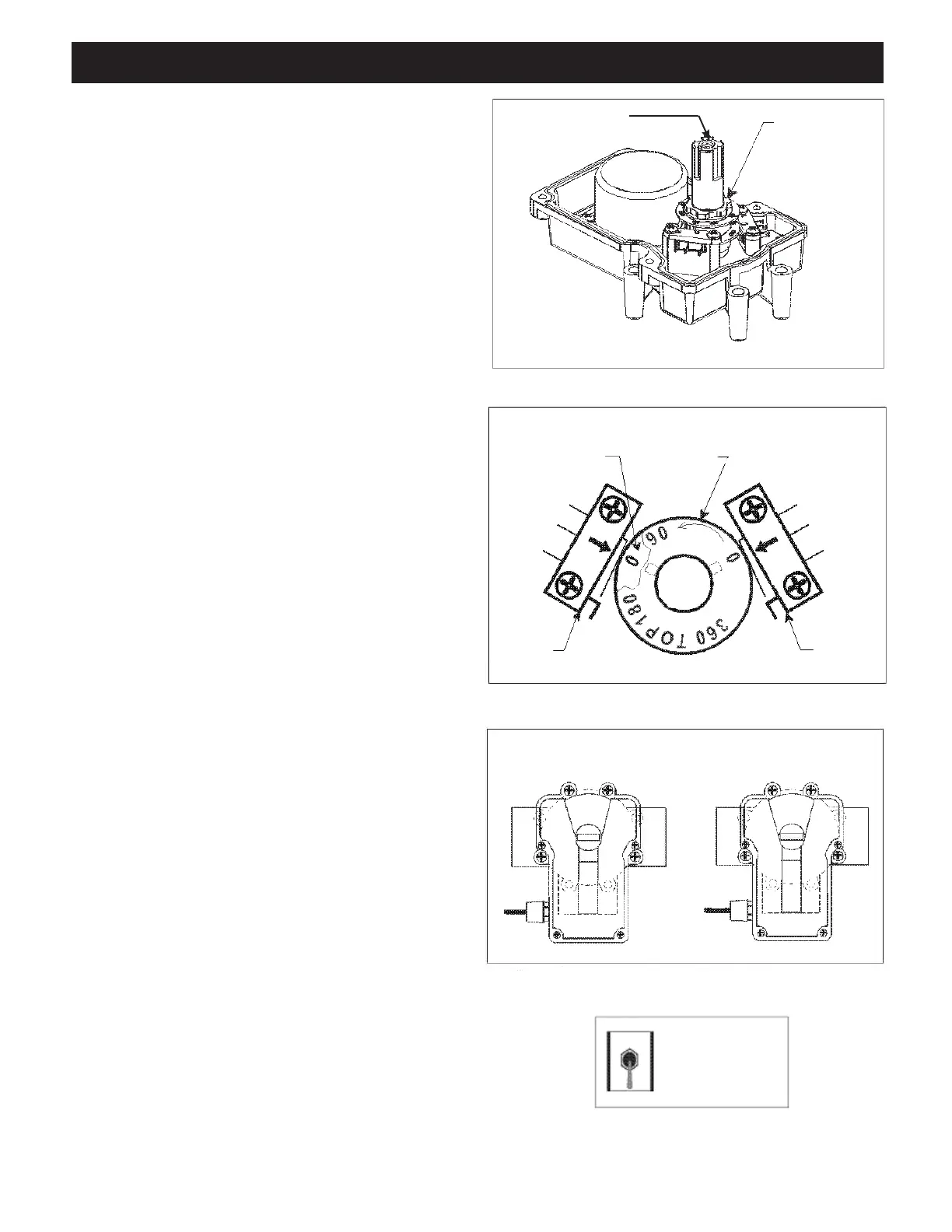
4. Remove four screws and Actuator lid in order to gain
access to cam/motor compartment. (See figure 5)
5. Push down and rotate Actuator shaft so that the 0
degree mark lines up with arrow on switch housing.
(Bottom cam should now also line up with the arrow.
See figure 6.)
6. Reset cams, as defined earlier in Step 3 by loosening
the locking nut 1/4 turn counter clockwise and line up
specified marking on cams with arrows on switch
housings (See figure 6).
7. Retighten the locking nut. Check cam settings and
tightness of shaft assembly.
8. Power up Actuator(s) and check valve rotation and stop
positions. Make adjustments if necessary. Refer to
“Synchronization” section below and Trouble Shooting
on page 6 if problems develop.
9. Replace lid, make sure screws are tight and the
assembly is watertight. Install handle and test
operation.
Synchronization
Out of sync means: the Actuator is rotating in the wrong
direction in respect to its controller or another Actuator.
In order to synchronize the system, connect Actuator(s)
to its/their controller and observe its/their function. If an
Actuator is out of sync, flip the 3-position switch at rear
of Actuator to extreme opposite position. An example of
how actuators can be out of synchronization is explained
below.
Figure 7 on the right represents the valves and actuators
for a pool/spa combination. The valve on the left (spa
on left and pool on right) is plumbed just the opposite as
the one on the right (pool on left and spa on right). If the
actuators are now activated one will turn to spa while the
other is turning to pool. Changing the cam settings within
the actuator will not correct this problem. To synchro-
nize the actuators, flip the toggle switch at the rear of the
actuator (which is out of sync) to the extreme opposite
position. (See figure 8. Note: center position is OFF).
Figure 5. Cam Adjustment.
Figure 6. Cams.
Figure 7. Synchronization, Example.
Figure 8. Synchronization, Toggle.
Push Down to Rotate
Loosen Star
Locking Ring
Final minor adjustments may be necessary
Lower
Cam
Upper
Cam
Left
Switch
Right
Switch
Suction Return
Spa
Pool
Pool Spa
On/OFF
Switch
on Back
of Actuator
AUTO
ON1
AUTO
ON 2
OFF
3


 To Next Page