UM094TW / UM594TW UDM094-04
38
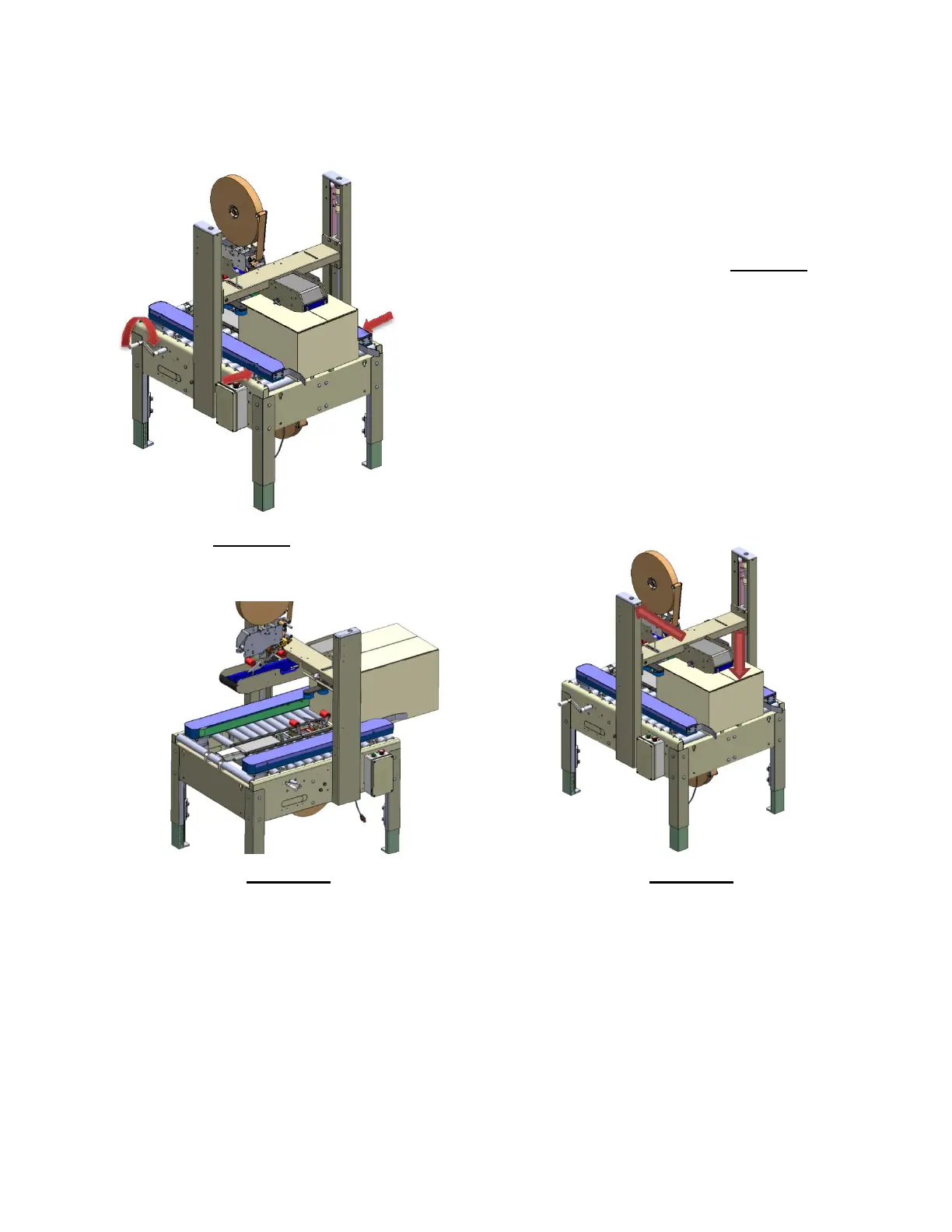
3. Case Width Adjustment
a. Turn Case Width Handle As Shown in Figure-31 Until
Side Drive Belts Contact Case. Side Drive Belts Should
Contact The Case Firmly Enough So Case Processes
Smoothly But Not So Firm As To Score The Side Of The
Case.
Figure-31
4. Case Width Adjustment
Figure-32 Figure-33
a. Insert The Case To Just Before Front Roller Of Lower Tape Head As Shown In
Figure-32
b. Move Locking Handle To Unlock Position. Lower Upper Head Until Upper Head
Contacts Top Of Case. Upper Head Should Contact Case Firmly Enough To
Keep Major Flaps Closed But Not Restrict Processing Of Case Or Score The Top
Of Case. Move Locking Handle Back To Locked Position.


 To Next Page