91239 7 08/20
6
Translation of the Original Operating Manual
Übersetzung der Originalbetriebsanleitung
3.3 Material feed
CAUTION!
Damage to the machine!
Ì Never feed the shredder with a quanti-
ty of material exceeding the maximum
indicated. Refer to „Technical Data“,
p.18!
Ì Should the machine become overloa-
ded, follow the instructions under „Ma-
terial jam in the machine“, p.15.
Feed paper to the cutting mechanism through the
feed slot (g. 3/1).
¾ Machine switches automatically to forward and
draws paper in.
¾ The motor switches o automatically after
shredding.
NOTE!
For shredding transparent lms, the machi-
ne must be manually switched to forwards
running (press and hold the forwards button
(g. 2/2)).
If the machine is not used for a period of approx.
15mins., it automatically switches o.
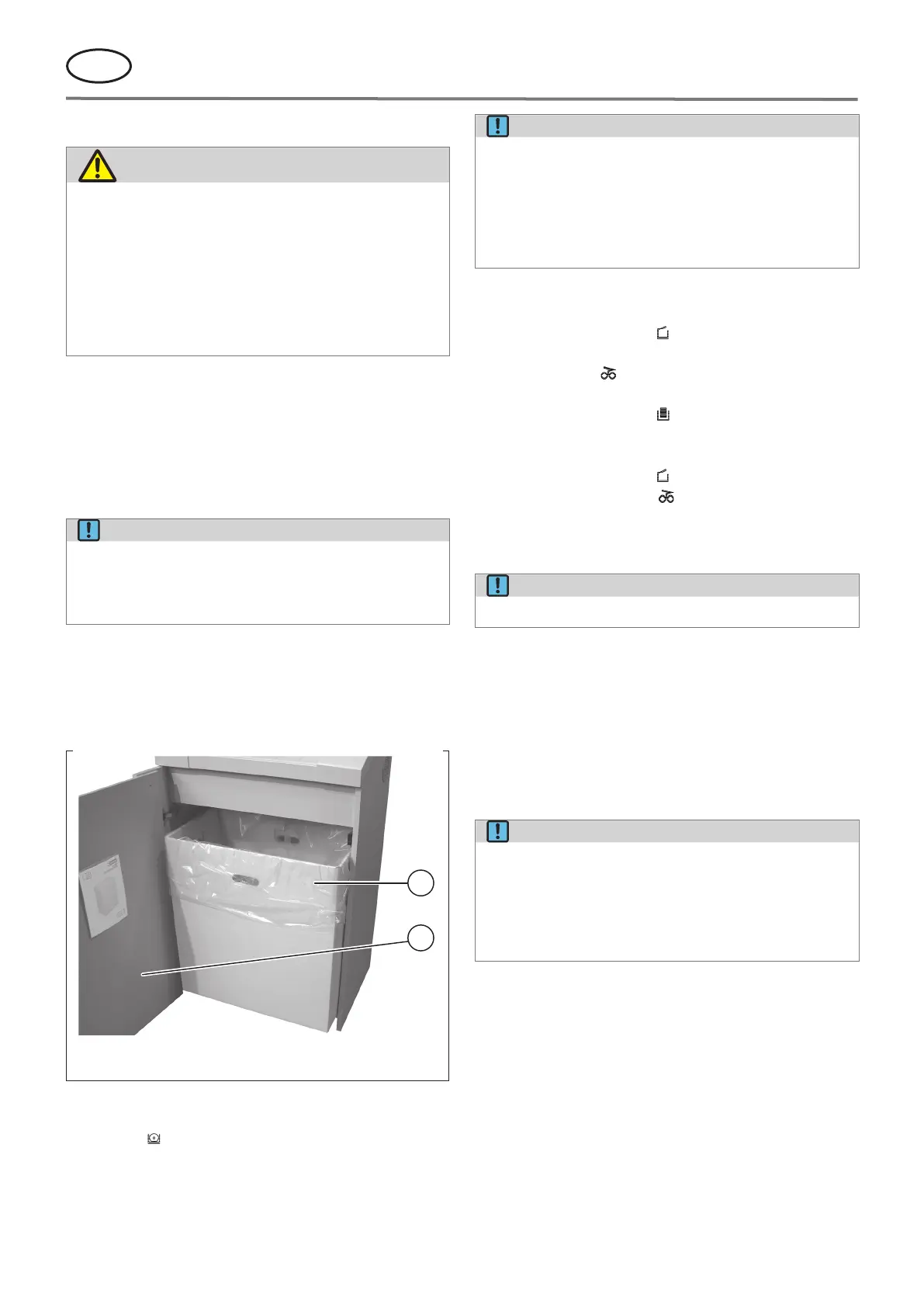
3.4 Emptying the receptacle
1
2
000153
1 Receptacle
2 Door
g. 4 Receptacle
The motor switches o if the receptacle is full. The con-
trol display (g. 2/4) comes on.
NOTE!
To complete the shredding process when the
motor is switched o, press and hold the for-
ward button (g. 2/2).
¾ The cutting mechanism continues to
run forward for approx. four seconds.
This process can only be activated once.
Empty the receptacle as follows:
1. Open the door (g. 4/2).
¾ The control display (g. 2/6) comes on.
¾ If there is still material in the feed slot, the con-
trol display (g. 2/8) also comes on.
2. Remove the bag and dispose of the contents.
¾ The control display (g. 2/4) goes out.
3. Place empty sack into receptacle.
4. Close the door.
¾ The control display (g. 2/6) goes out.
5. If the control display comes on, press the for-
ward button (g. 2/2) briey. The remaining mate-
rial in the feed slot is shredded and the display go
out.
NOTE!
The machine will only run if the door is closed!
3.5 Dynamic load display
During the shredding process, an LED control indicator
(g. 2/9) displays the extent of the load on the motor:
• Green light: load < 75 %
• Red light: load 75 - 100 %
The control display should remain on green to avoid a
material jam!
NOTE!
The load display system calibrates automati-
cally! By that the load display can dier (e.g.
at idle speed the control display comes on in
red). That is no quality decit. After several
shredding processes the load display norma-
lizes.


 To Next Page