16
FLOW CHART TO CUT MEDECO BIAXIAL
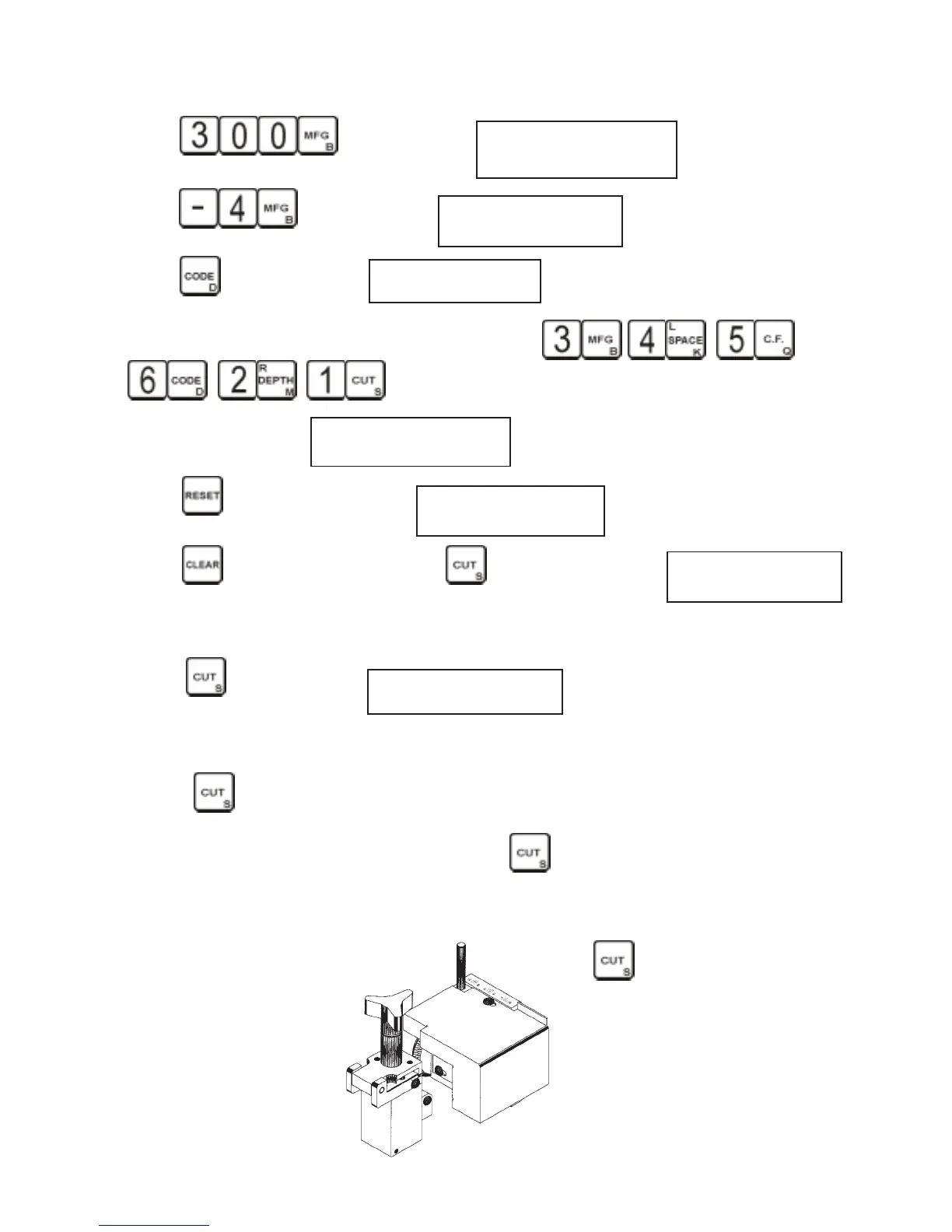
1 - Press Display will read MANUFACTURER 300
INSERT 2 FLAT 1
2 - Press Display will read BI-AXIAL ENTERY
M0DE SELECTED
3 - Press Display will read BI-CODE =
4 - Enter code, to use 3B, 4K, 5Q, 6D, 2M, 1S. Press , , ,
, , .
Display will now read: BI-CODE = BKQDMS
3 4 5 6 2 1
5 - Press , display will now read: BI-CODE =
345621
B K Q D M S
6 - Press , display will read RDY. Press , display will now read: CUT TO CONTINUE
BKQDMS
The machine makes center cuts first, then left cuts and last the right cuts. the letter B will be
flashing indicating the first cut to be made. (ignore the cursuor flashing under the S)
7 - Press , display will read MOVE VICE
S > |||||||||||||| BKQDMS The vise direction indicator will be
flashing, turn the space handle clockwise untill the bars disapear, the numbers count down to
0000 and the display reads CUT TO CONTINUE.
8 - Press , cutter motor will start and the first cut will be made. When the cutter motor stops
follow the direction indicator, counterclockwise, to the second cut. When the display
reads 0000 and CUT TO CONTINUE press . When all the center cuts have
been made the display will flash the letter of the first left cut to be made. Remember
to change the head angle.Pull out the lock pin on the back of the cutter head. Rotate
the head clockwise for left cuts and counter clockwise for right cuts. Make sure the
lock pin seats in each location. Press and follow bar graph to
next cut position.
Non biaxial medeco on page 13


 To Next Page