da Vinci SP Instruments and Accessories
Monopolar Curved Scissors
27
DRAFT/PRE-RELEASE/CONFIDENTIAL
12/5/19
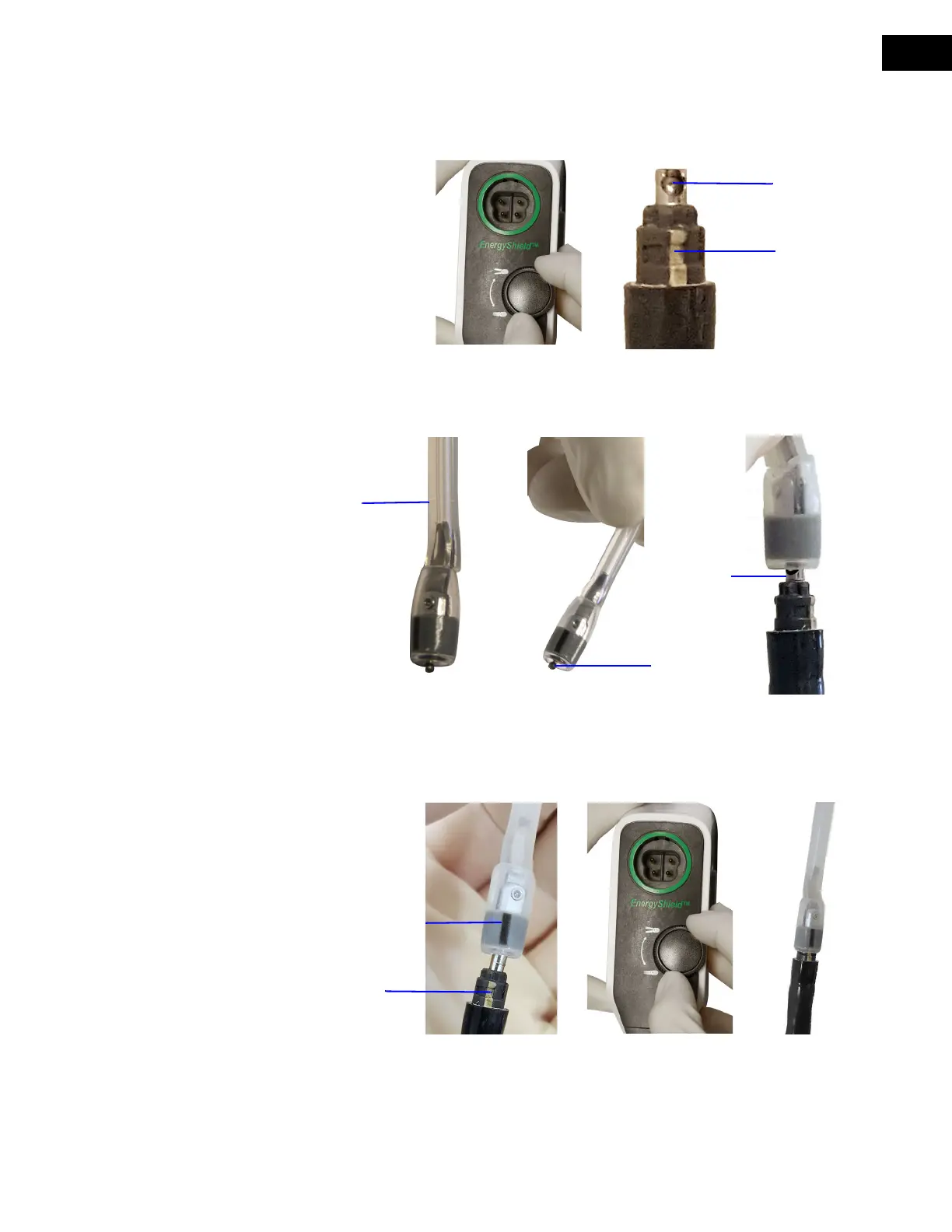
2. Rotate the Grip Release Dial on the instrument housing clockwise to extend the pin from
the distal end of the instrument shaft. Identify the white stripe on the instrument shaft
(
Figure 5.4 A and B).
Figure 5.4 Extend pin from instrument tip and identify white stripe (A and B)
3. Grasp the MCS Tip installation tool and insert the ball end of the MCS Tip into the pin
socket (
Figure 5.5 B and C).
Figure 5.5 Grasp installation tool (B) and insert ball end of MCS Tip into pin socket (C)
4. Rotate the installation tool to align the black stripe on the tip cover to the white stripe on
the instrument shaft, then rotate the Grip Release Dial counter-clockwise until the pin is
fully retracted into the instrument shaft (
Figure 5.6 A, B, and C).
Figure 5.6 Align stripes (A), then rotate Grip Release Dial to retract pin into shaft (B and C)
Installation
tool
Ball end in
pin socket
A
BC
Black stripe on tip cover
White stripe on
instrument shaft
B


 To Next Page