SECTION 12—BATTERIES
Zoom
™
300 and Zoom
™
400 54 Part No. 1118395
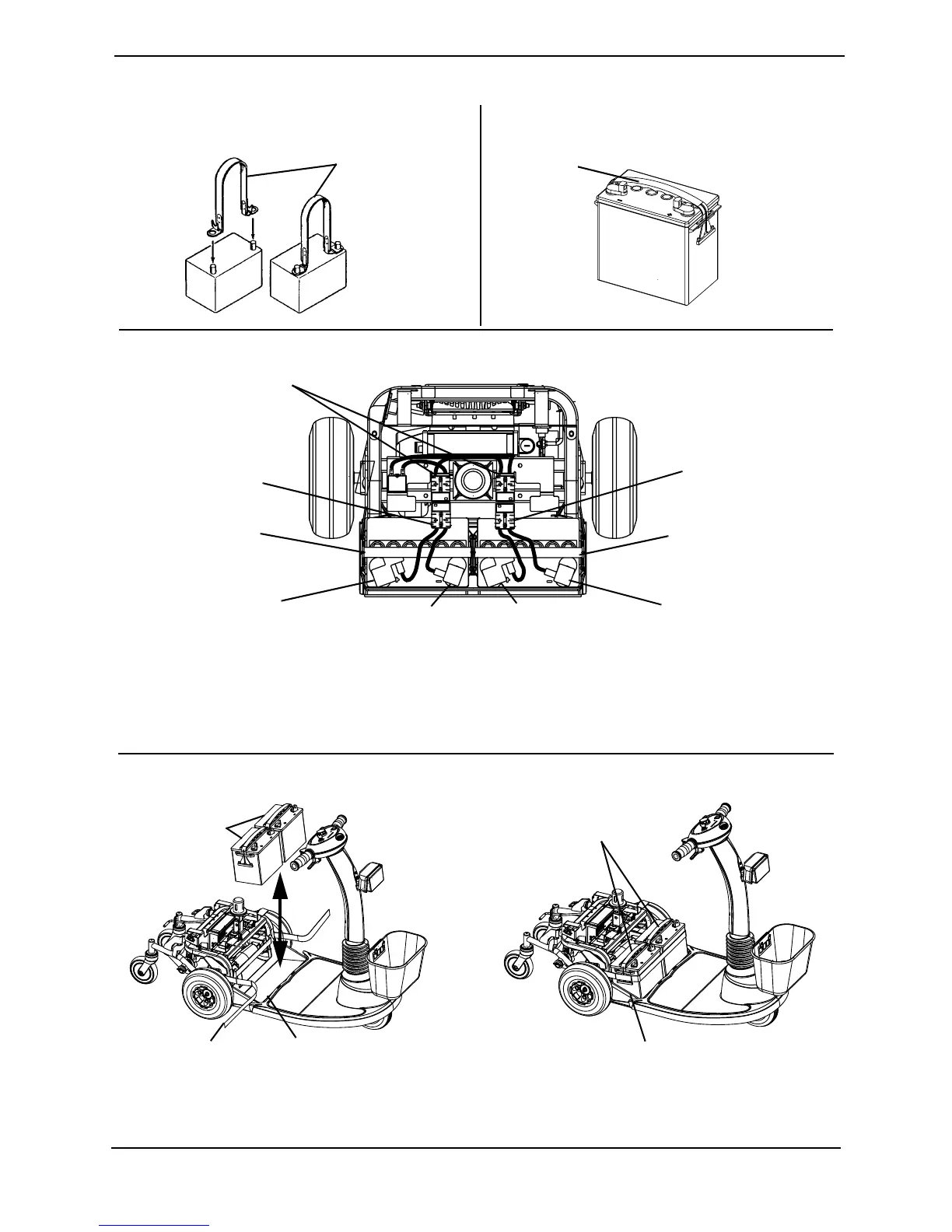
FIGURE 12.3 - REMOVING/INSTALLING THE BATTERIES ON ZOOM 400
Battery Tray
NOTE: Seat and Rear Shroud not shown for clarity.
Battery Tray
Batteries
Installed
Batteries
Removed
Battery Strap
BLACK Battery
Connector
POSITIVE (+) RED
Battery Terminal
NEGATIVE (-) BLACK
Battery Terminal
POSITIVE (+) RED
Battery Terminal
NEGATIVE (-) BLACK
Battery Terminal
DETAIL “C” - BATTERY WIRING HARNESS
LEFT Battery
RIGHT Battery
BLACK Battery
Connector
Wiring Harness Connectors
DETAIL “A” - BATTERY LIFTING STRAPS DETAIL “B” - BUILT-IN LIFTING STRAPS
Battery Lifting
Straps
Built-in Lifting
Straps
DETAIL “D” - REMOVING/INSTALLING THE BATTERIES
NOTE: NEVER defeat or bypass any fuse. ONLY replace with a fuse of the same rating.
NOTE: Do not remove fuse or mounting hardware from the POSITIVE (+) RED battery cable/
mounting screw.






 To Next Page