SECTION 12—BATTERIES
Part No. 1118395 55 Zoom
™
300 and Zoom
™
400
CONNECTING/DISCONNECTING THE BATTERY
CABLES ON THE ZOOM 400
WARNING
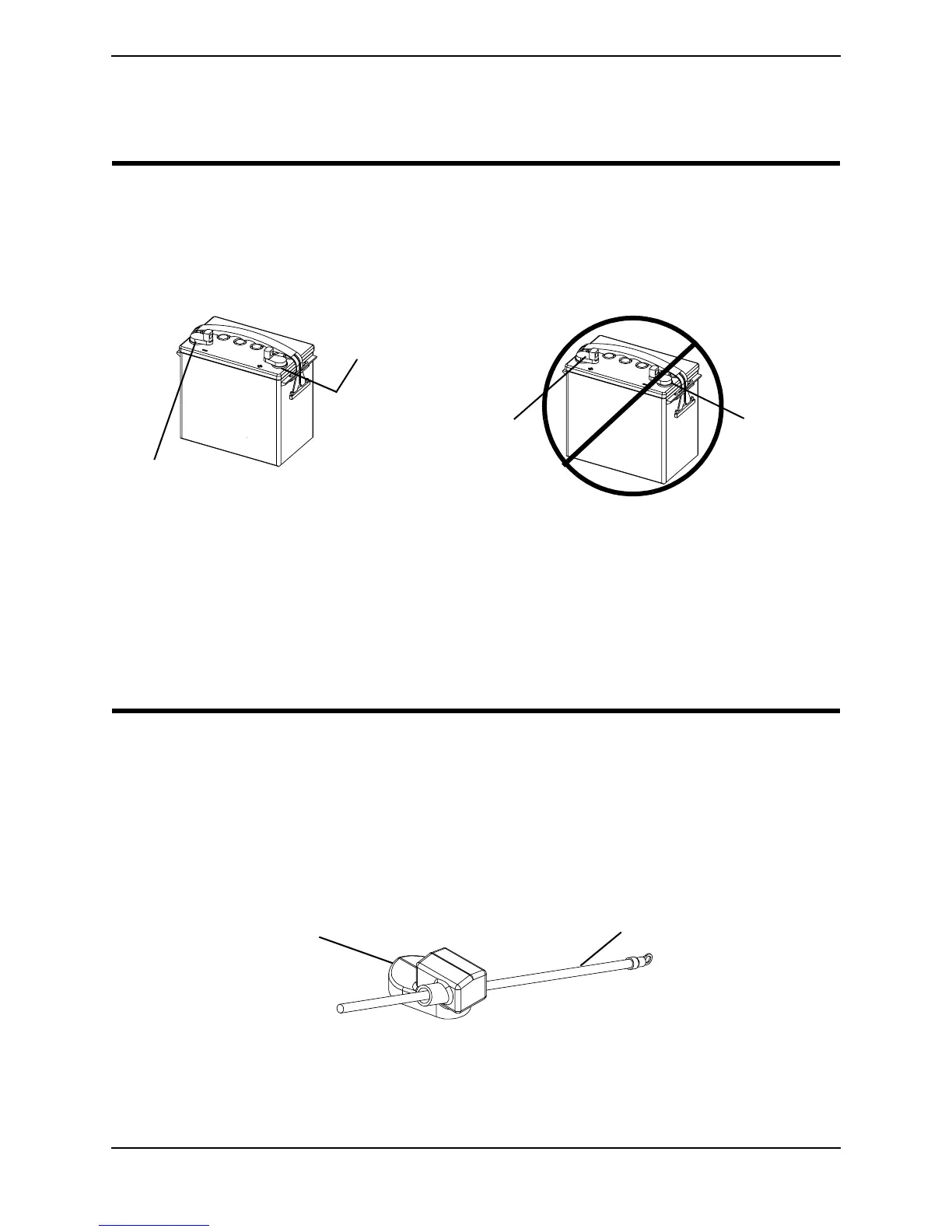
On Zoom 400 only - Battery terminal configuration shown below MUST be used.
Batteries that have the reversed terminal configuration MUST NOT be used -
otherwise serious injury or damage may occur.
NEVER allow any of your tools and/or battery cable(s) to contact BOTH battery
terminal(s)/post(s) at the same time. An electrical short may occur and serious
personal injury or damage may occur.
The use of rubber gloves and chemical goggles and face shield is recommended
when working with batteries.
Do not remove fuse or mounting hardware from the POSITIVE (+) RED battery
cable/mounting screw.
NEVER defeat or bypass any fuse. ONLY replace with a fuse of the same rating.
NOTE: For this procedure, refer to FIGURE 12.4 and FIGURE 12.5.
CONNECTING
1. Install battery terminal cap(s) onto battery cable(s) as follows (FIGURE 12.4):
A. RED battery terminal cap onto RED battery cable.
B. GREY battery terminal cap onto BLACK battery cable.
FIGURE 12.4 - INSTALLING BATTERY TERMINAL CAPS
NEGATIVE (-)
Battery Terminal
POSITIVE (+)
Battery
Terminal
NEGATIVE (-)
Battery
Terminal
DO NOT USE
POSITIVE (+)
Battery
Terminal
NOTE: Only battery cable and terminal cap
shown. Both caps install in the same manner
Battery Cable
Battery Terminal Cap






 To Next Page