SECTION 14—SCOOTER ACCESSORIES
Part No. 1118395 65 Zoom
™
300 and Zoom
™
400
INSTALLING/REMOVING THE CRUTCH/CANE
HOLDER
NOTE: The Crutch/Cane Holder, Safety Flag and Oxygen Holder all install into the accessory
tube; ONLY one (1) of these may be installed at a time.
WARNING
The installation of the crutch/cane holder onto the back of the scooter seat signifi-
cantly increases the length of the scooter. When turning the scooter or swiveling
the scooter seat, it is important to take note of this increased length - otherwise,
injury and/or damage to the surrounding property may result.
NOTE: For this procedure, refer to FIGURE 14.2.
INSTALLING
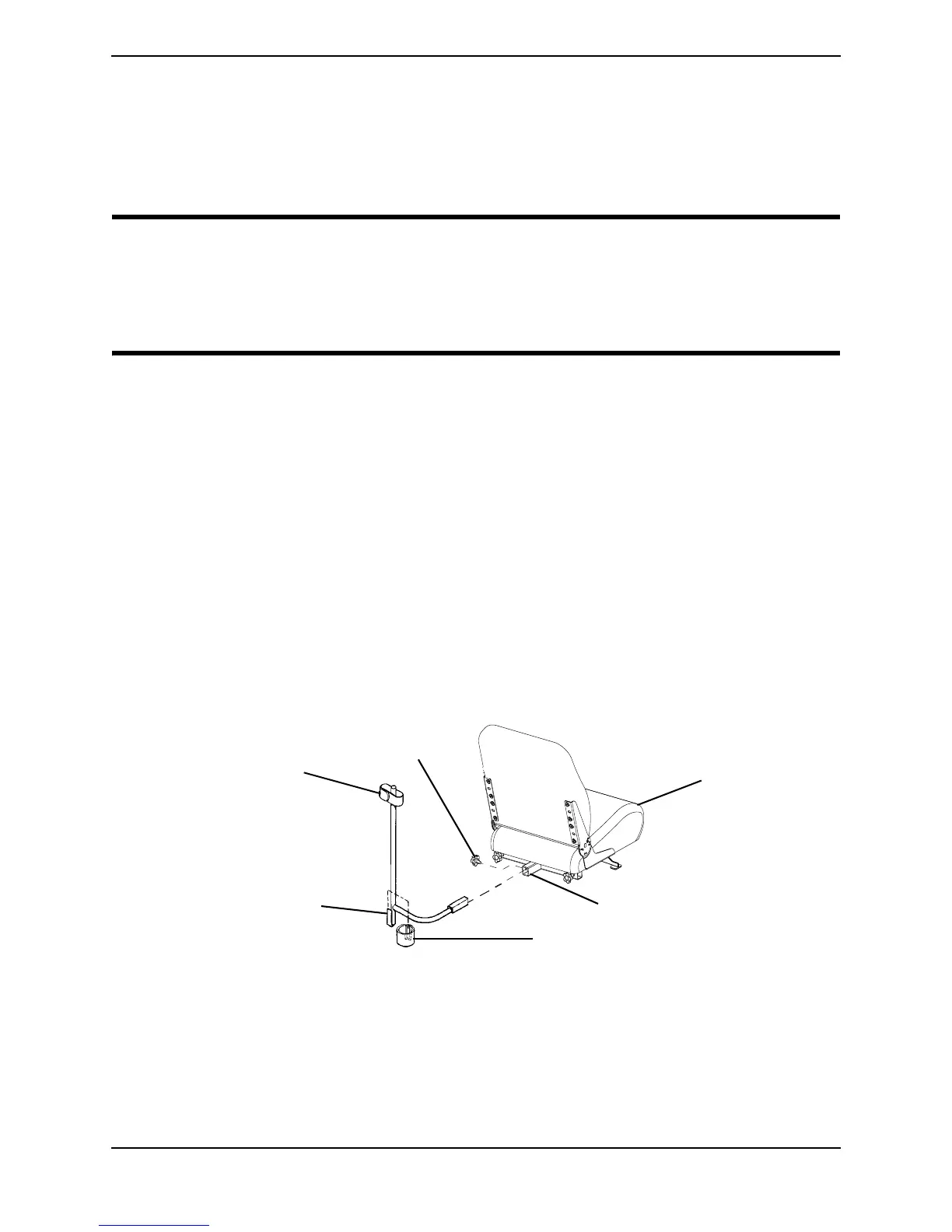
1. Install the crutch/cane holder into the accessory tube located on the back of the seat.
2. Install the mounting knob to secure the crutch/cane holder in place. Securely tighten.
3. Align the slot on the base with the hook on the crutch/cane holder and slide base
DOWN into position.
REMOVING
1. Remove the crutch/cane holder from the accessory tube.
2. Remove the mounting knob that secures the crutch/cane holder in place.
3. Remove the crutch/cane holder from the accessory tube.
FIGURE 14.2 - INSTALLING/REMOVING THE CRUTCH/CANE HOLDER
Seat
Accessory Tube
Base
Hook
Crutch Cane
Holder
Mounting Knob






 To Next Page