SECTION 12—BATTERIES
Part No. 1118395 57 Zoom
™
300 and Zoom
™
400
4. Cut the tie-wrap that secure each the battery terminal cap in place.
5. Slide terminal cap(s) UP on the battery cable(s).
6. Disconnect battery cable(s) from battery(ies) terminal(s)/post(s):
A. POSITIVE (+) RED battery cable from the POSITIVE (+) battery terminal/post.
B. NEGATIVE (-) BLACK battery cable from NEGATIVE (-) battery terminal/post.
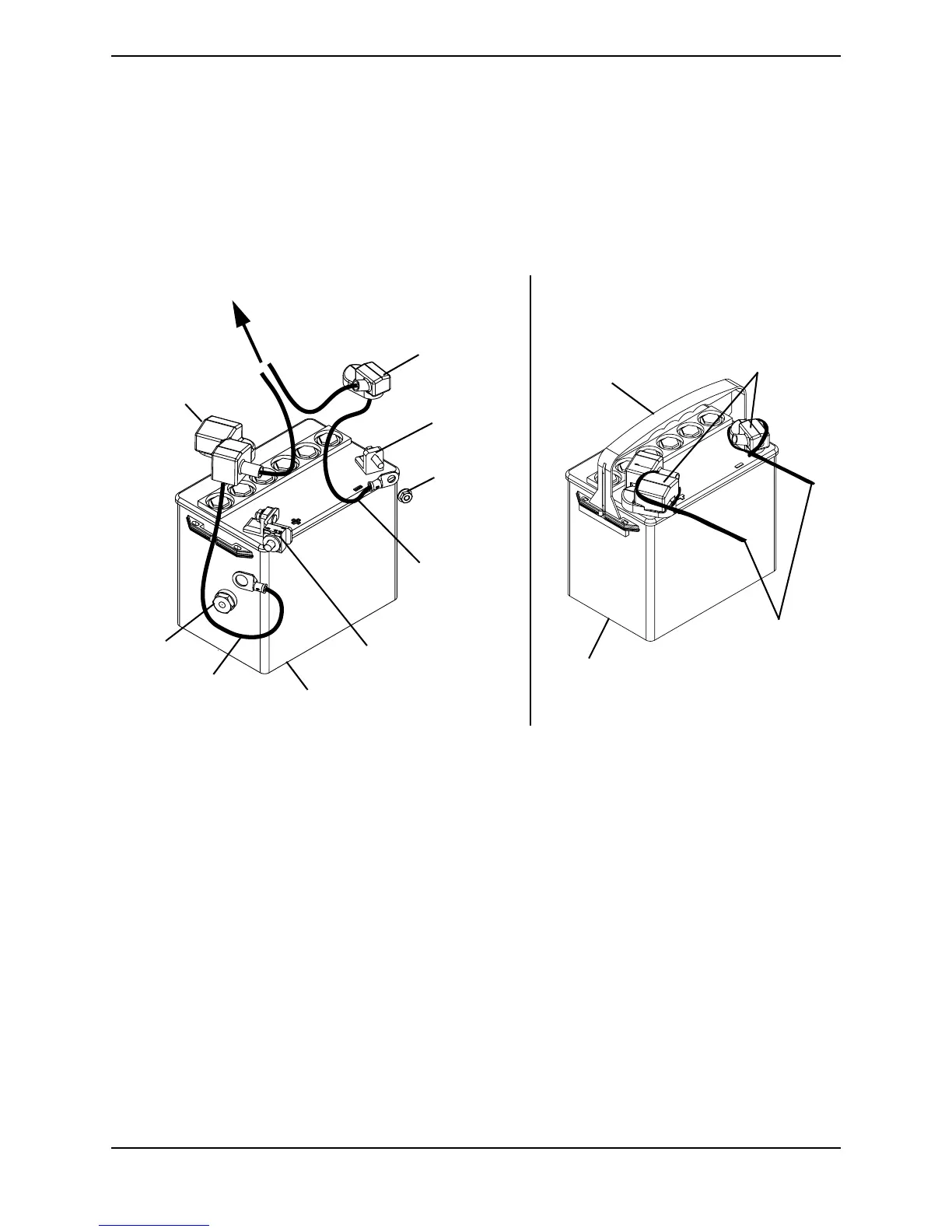
FIGURE 12.5 - CONNECTING/DISCONNECTING THE BATTERY CABLES ON
THE ZOOM 400
NOTE: Only battery cable and terminal cap shown. Both caps install in the same manner.
NOTE: Do not remove fuse or mounting hardware from the POSITIVE (+) RED battery cable/
mounting screw.
BLACK Battery
Cable
DETAIL “A” - TERMINAL CAPS TIE
WRAPS
Battery Handle
Battery Terminal
Caps
U1 Battery
Tie Wraps
POSITIVE (+)
Terminal Cap
U1 Battery
NEGATIVE (-)
Terminal Cap
TO BLACK BATTERY
CONNECTOR
RED Battery Cable
POSITIVE (+) Battery
Terminal with Bracket
NEGATIVE (-)
Battery
Terminal
Locknut
Locknut






 To Next Page