EasyManua.ls Logo

Invertek Drives ODE-3-120070-1F12 - Resetting a Fault

Invertek Drives ODE-3-120070-1F12
40 pages
To Next Page IconTo Next Page
To Previous Page IconTo Previous Page
Loading...
Version 1.00 | Optidrive ODE-3 User Guide | 17www.invertekdrives.com
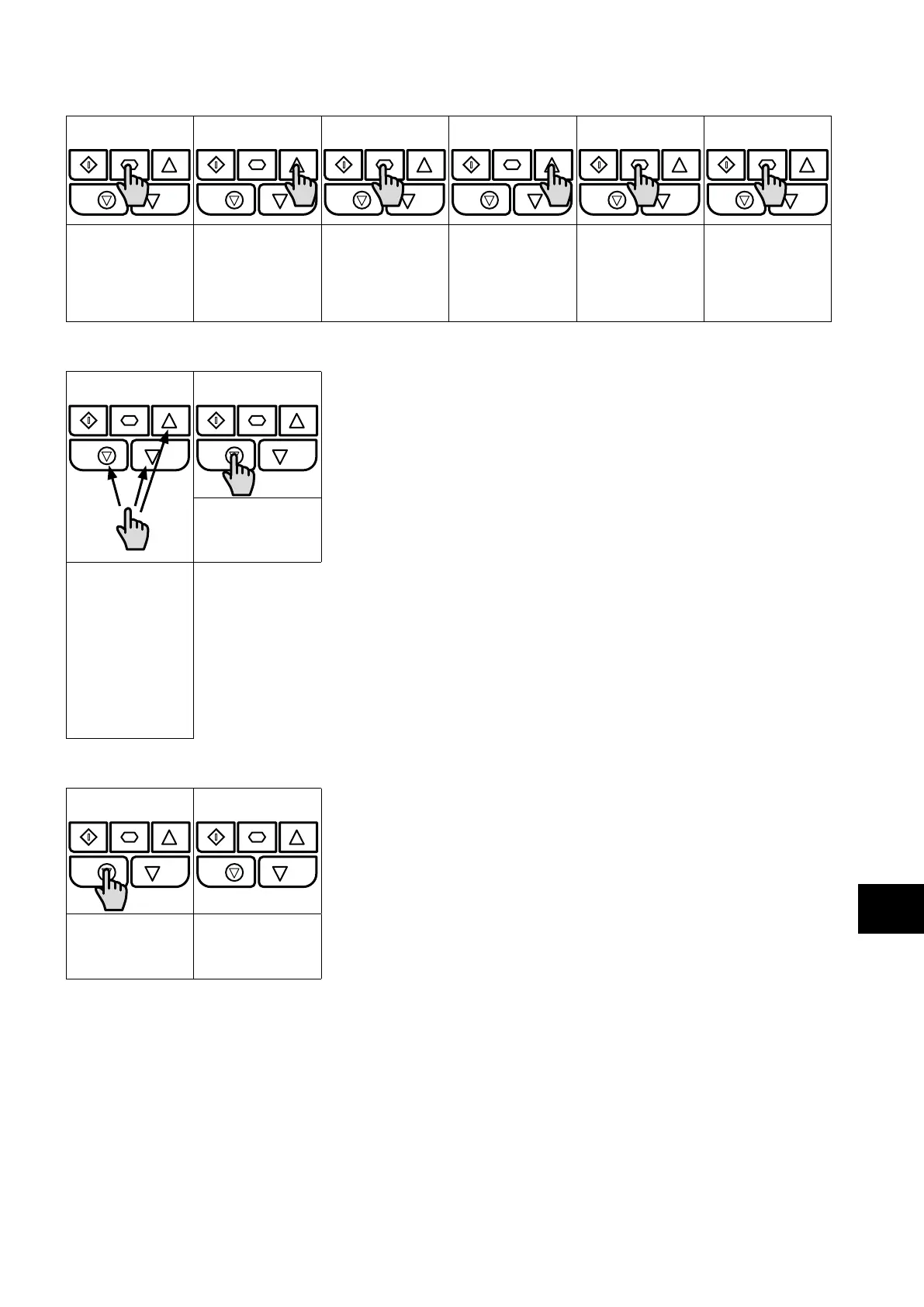
5.4. Read Only Parameter Access
     
Press and hold the
Navigate key > 2
seconds
Use the up and
down keys to select
P-00
Press the Navigate
key for < 1 second
Use the up and
down keys to select
the required Read
Only parameter
Press the Navigate
key for < 1 second
to display the value
Press and hold the
Navigate key > 2
seconds to return
to the operating
display
5.5. Resetting Parameters
 
Press the Stop key.
The display will
show “
To reset parameter
values to their
factory default
settings, press and
hold Up, Down and
Stop buttons for > 2
seconds.
The display will
show “
5.6. Resetting a Fault
 
Press the Stop key.
The display will
show “
Operation
5

Table of Contents

Related product manuals