5
GETTING READY
Locate a level surface on which to place your Ionic Pro® Elite near a
grounded 120v outlet. Position your Ionic Pro® Elite at least one foot from
the wall. Follow warnings described in the “SAFETY INSTRUCTIONS” section
of this manual.
Plug in the unit. You are now ready to turn on your Ionic Pro® Elite!
CONTROLS/SETTINGS
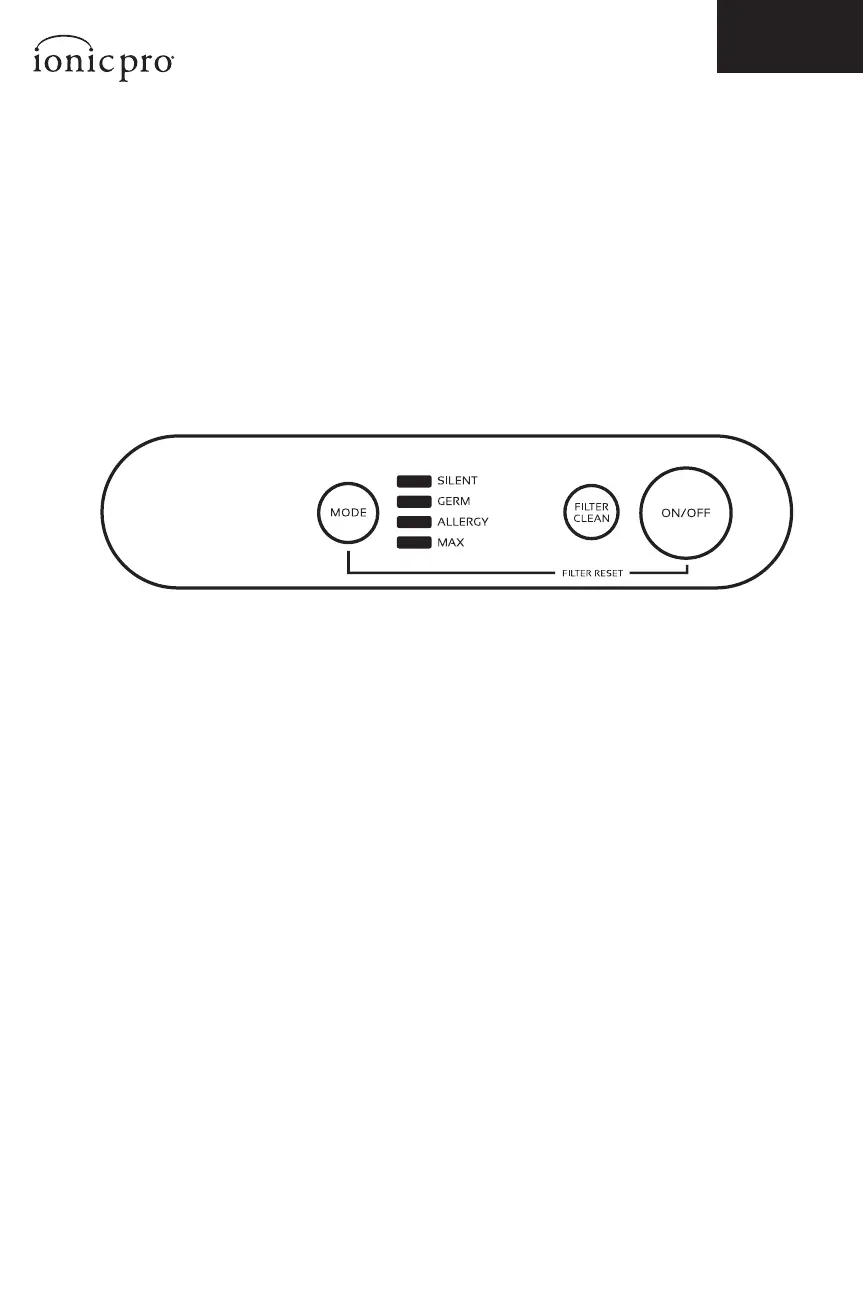
MODE BUTTON
SILENT
Lowest speed setting. Silent operation.
GERM
Medium speed. Quiet operation.
ALLERGY
High speed.
MAX
Highest speed.
CLEAN FILTER
This blue light goes on when the Ionic Pro® Elite needs to be cleaned, or the unit
is experiencing some other problem. See the “CLEANING & MAINTENANCE” and
the “TROUBLE-SHOOTING” sections of this manual for more information.
NOTE: It is recommended to clean the permanent ionic lter every 8 weeks.
ON/OFF BUTTON
Turns the unit on and o and controls the fan speed.
OPERATING THE ELITE
Control Panel
Figure 2


 To Next Page