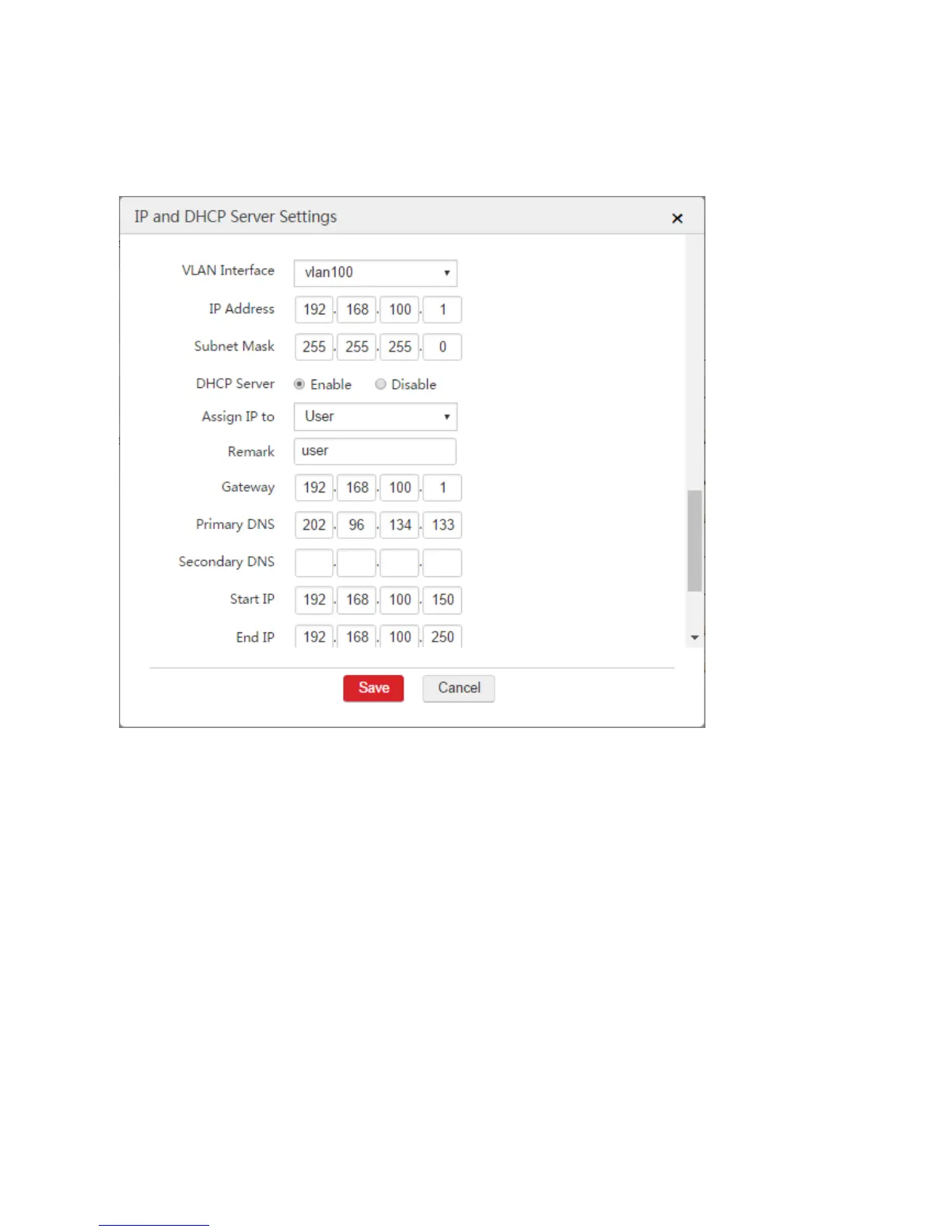
100
Primary DNS: In this example, enter "202.96.134.133".
Start IP: Set a start IP address of the DHCP address pool, such as "192.168.100.150".
End IP: Set an end IP address of the DHCP address pool, such as "192.168.100.250".
4. Click Save.
Tip: The primary DNS address must be a DNS server address or DNS proxy server address. In this
example, it is 202.96.134.133.
Step 3: Configure SSID Policy
1. Choose Wireless Policy > SSID Policy > SSID Policy.
2. Click Add.
3. Configure the parameters in the window.
Policy: Set a policy name for the SSID policy, such as "VIP".
SSID: Set a name for the wireless network, such as "VIP".
Security Mode: It is recommended to select "WPA2-PSK".
Encryption: It is recommended to select "AES".
Password: Set a password for wireless network, such as "12345678".
Forwarding Mode: Select "Centralized".



 To Next Page