Home
IP-COM
Controller
AC3000-32
Page 103
IP-COM AC3000-32 - Page 103
109 pages
Manual
Save Page as PDF
To Next Page
To Next Page
To Previous Page
To Previous Page
Loading...
102
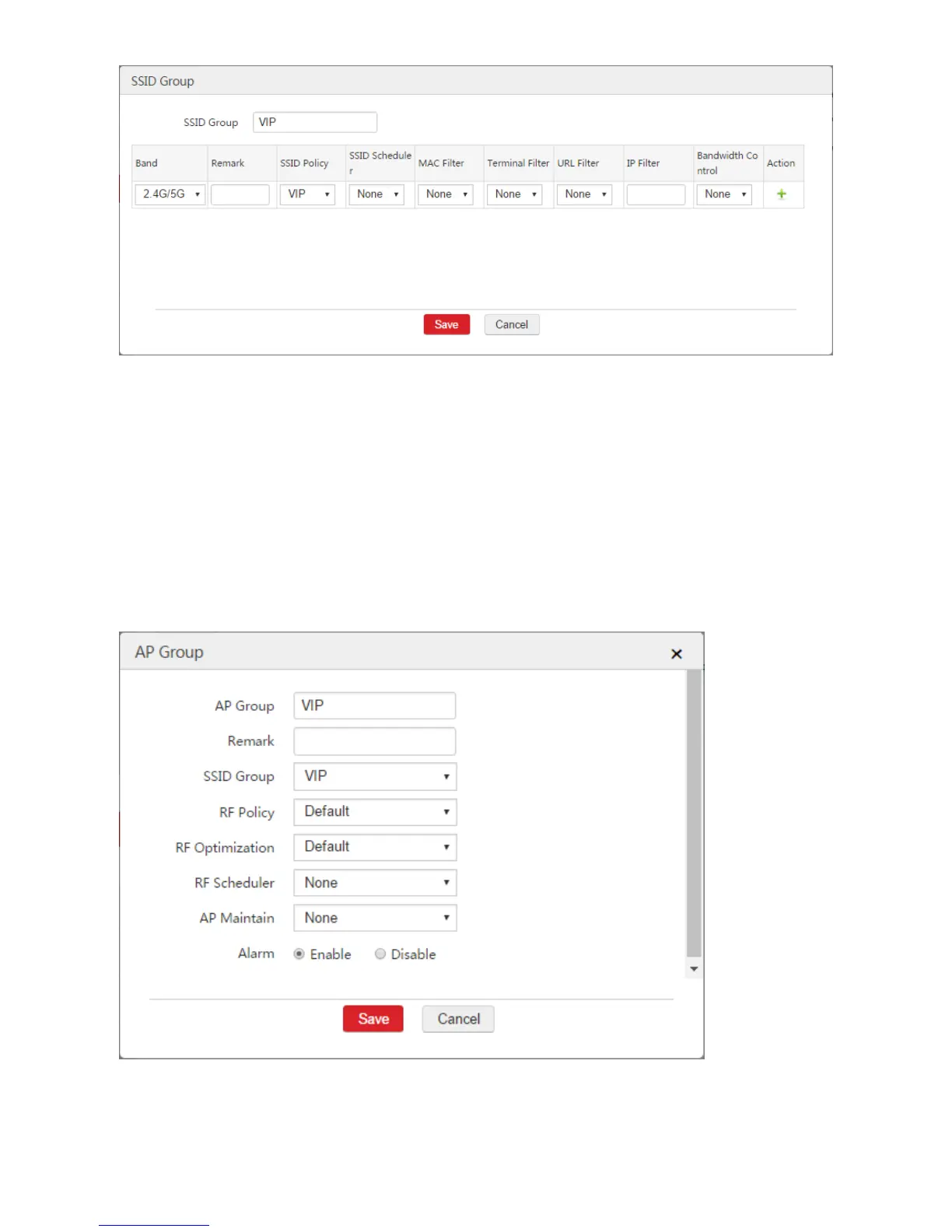
Step 5: Co
nfigure
A
P G
roup
1.
Choose
A
P
M
anagem
ent
>
AP
Group
.
2.
Click
A
dd
.
3.
Configure t
he parameters in t
he window
.
AP Group: Set a name for the
AP group, such as "VIP".
SSID Group: In this exam
ple, select "VIP
".
4.
Click
Save
.
102
104
Table of Contents
Main Page
Default Chapter
2
Default Chapter
2
Table of Contents
2
Network Setting
3
Interface Settings
3
Network Setting
4
Interface and DHCP Server
15
Internet Settings
26
NAT Rule
37
WAN Interface Settings
48
Multi-WAN Policy
50
2 IP Routing
60
Overview
60
Configuring IP Routing
60
Example of IP Routing
62
3 Example of Network Setting
75
WAN Interface Is Not Created
75
WAN Interface Is Created
94



 To Next Page