105
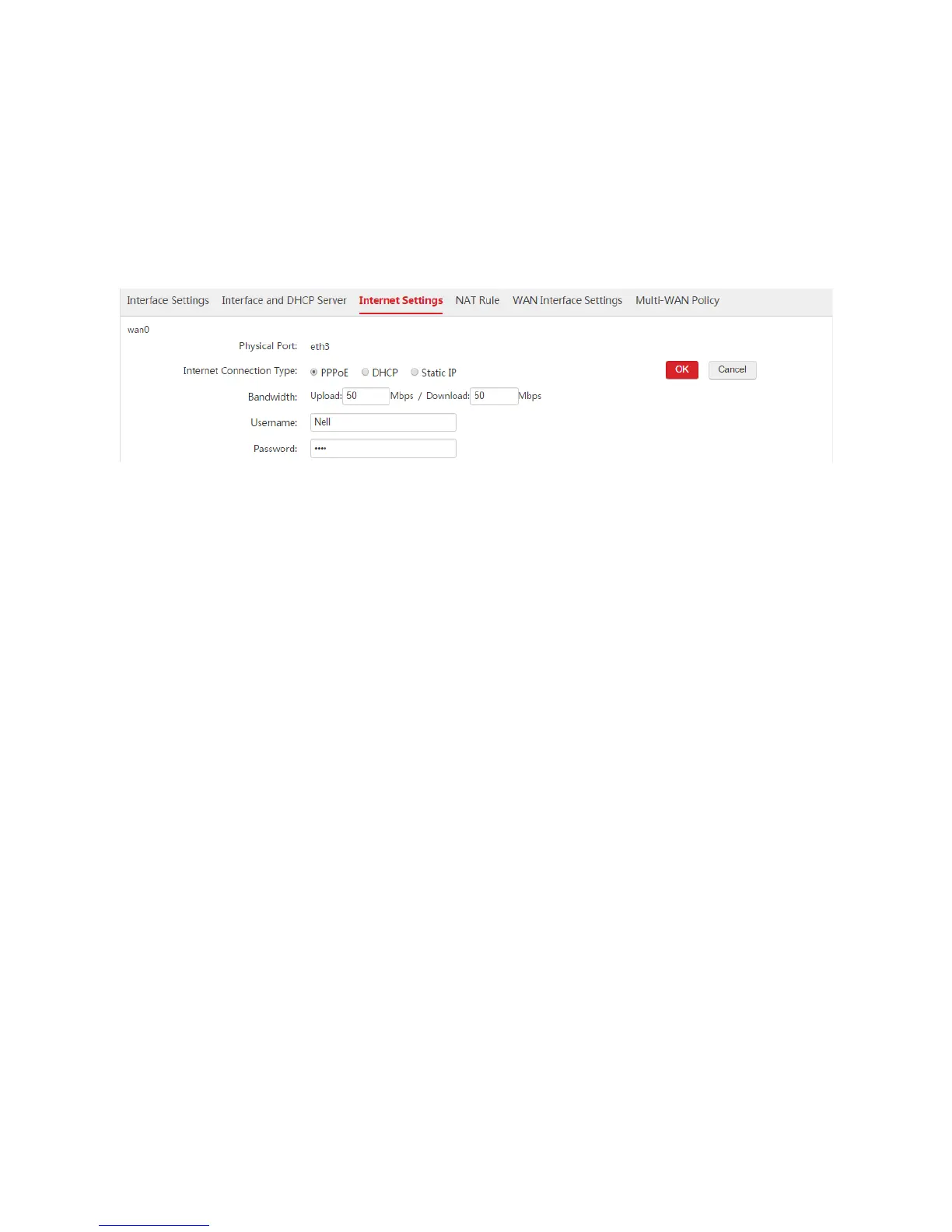
2. Internet Connection Type: Select "PPPoE".
3. Bandwidth: Enter the bandwidth provided by the ISP. In this example, both the upload and download
bandwidth are "50Mbps".
4. Username/Password: Enter the user name and password provided by your ISP. In this example, both
the user name and password are "Nell".
5. Click OK.
6. Click Connect.
Step 3: Configure IP Routing
1. Choose Network Setting > IP Routing.
2. Click Add.
3. Configure the parameters in the window.
Remark: Set a description for the route, such as "Internal".
Destination Network: Enter the network segment of the internal server, which is "172.16.100.0" in
this example.
Subnet Mask: Enter the subnet mask of the internal server, which is "255.255.255.0" in this example.
Next Hop: Enter the IP address of the next network node to which the packet is to be sent on the way
to the internal server. In this example, it is the LAN IP address of Router1: 192.168.100.100.
Interface: In this example, set the interface to "vlan100".
4. Click Save.



 To Next Page