14
1
4
2
3
3-Button Remote Control
6.2 AUTO SHUTDOWN FEATURE
If left inactive for a period of 20 minutes, the MUTT enters a Sleep Mode and
powers down.
• A sound is emitted every 20 seconds during Sleep Mode.
• Activation of the control knob will cancel Sleep Mode.
6.3 USING THE 3-BUTTON REMOTE CONTROL
The included remote control(s) is preprogrammed to your MUTT and should never lose
its programming. In the event that you suspect your remote has lost its programming,
contact technical support at 888-786-7899, or email tech247@ipatools.com.
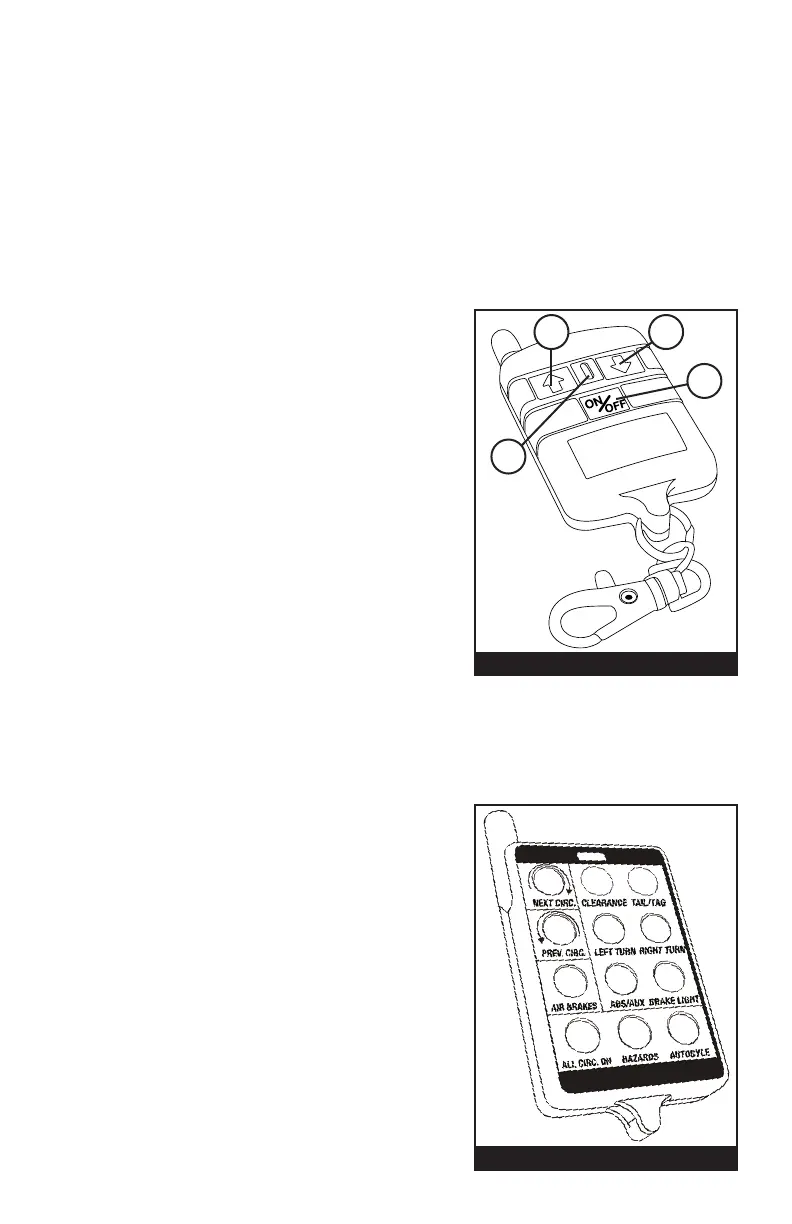
HOW TO USE THE WIRELESS REMOTE
1. UP ARROW
Press and release to select the next circuit
in clockwise rotation. Press and hold for
5 seconds to activate All Circuits On Mode.
2. DOWN ARROW
Press and release to select the next circuit in
a counterclockwise rotation. Press and hold
for 5 seconds to turn on hazard lights.
3. ON/OFF
Press and release to engage/disengage
Auto Cycle.
4. REMOTE CONFIRMATION INDICATOR
Press any of the buttons (1,2,3) and the blue
light (4) will illuminate to conrm the battery
power of the remote.
NOTE: Inclement weather, nearby power transformers and closely parked trailers
may reduce the remote signal.
The supplied, key fob battery for the remote control is 12V, Alkaline Energizer type
A23. A Gold Peak type 23A or Duracell MN21 battery can also be used.
6.4 PROGRAMMING THE
12-BUTTON REMOTE CONTROL
HOW TO PROGRAM THE WIRELESS REMOTE
1. Press and hold the top center button on
the 12-button remote while turning the
Trailer Tester’s main power ON.
2. Continue to hold the button for 2 seconds,
and then release.
3. Your Remote Control is now programmed.
12-Button Remote Control



 To Next Page