iPECS eMG800
Hardware Description and Installation Manual Issue 1.8
78
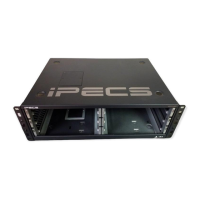
4) Insert and tighten two (2) screws through the DSS Console mounting flange into the LIP phone.
Caution: do not over-tighten the screws as this may damage the LIP phone housing.
5) For additional DSS/BLF Consoles, repeat the procedure connecting one console to the previous
console. A maximum of three consoles can be supported by LIP-8000 series phone.
6) For each LIP-8048DSS and LIP-8040LSS, insert the DC plug of an AC Adaptor-K to the DC input of
the DSS Console and plug the AC plug into an appropriate (110/240 VAC) outlet.
Figure 5.1.4.2-1 LIP-8000/8000E series Console Configurations




 To Next Page