C
HAPTER
7
| Address Table Settings
Clearing the Dynamic Address Table
– 201 –
WEB INTERFACE
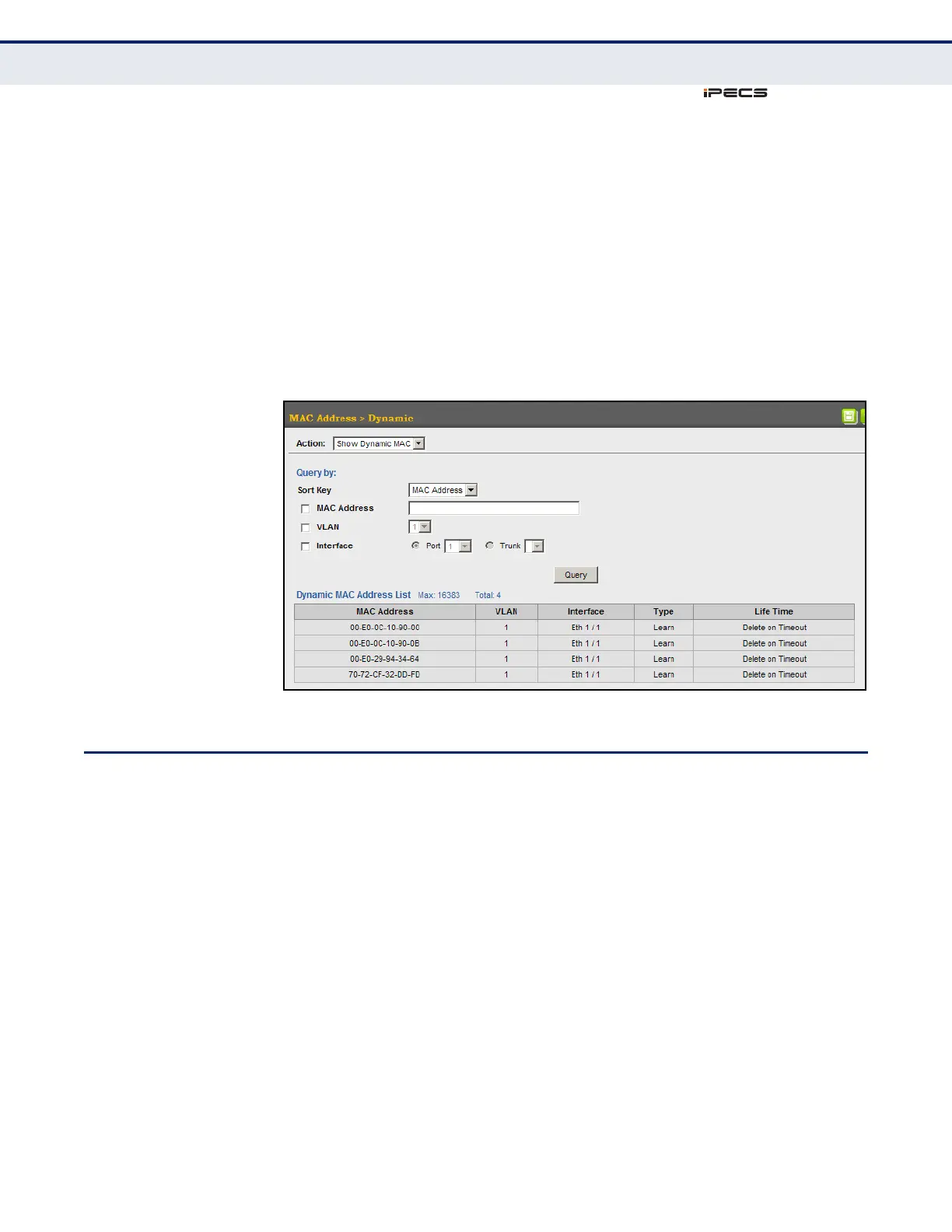
To show the dynamic address table:
1. Click MAC Address, Dynamic.
2. Select Show Dynamic MAC from the Action list.
3. Select the Sort Key (MAC Address, VLAN, or Interface).
4. Enter the search parameters (MAC Address, VLAN, or Interface).
5. Click Query.
Figure 87: Displaying the Dynamic MAC Address Table
CLEARING THE DYNAMIC ADDRESS TABLE
Use the MAC Address > Dynamic (Clear Dynamic MAC) page to remove any
learned entries from the forwarding database.
CLI REFERENCES
◆ "clear mac-address-table dynamic" on page 813
PARAMETERS
These parameters are displayed in the web interface:
◆ Clear by – All entries can be cleared; or you can clear the entries for a
specific MAC address, all the entries in a VLAN, or all the entries
associated with a port or trunk.



 To Next Page