C
HAPTER
13
| Security Measures
Network Access (MAC Address Authentication)
– 306 –
WEB INTERFACE
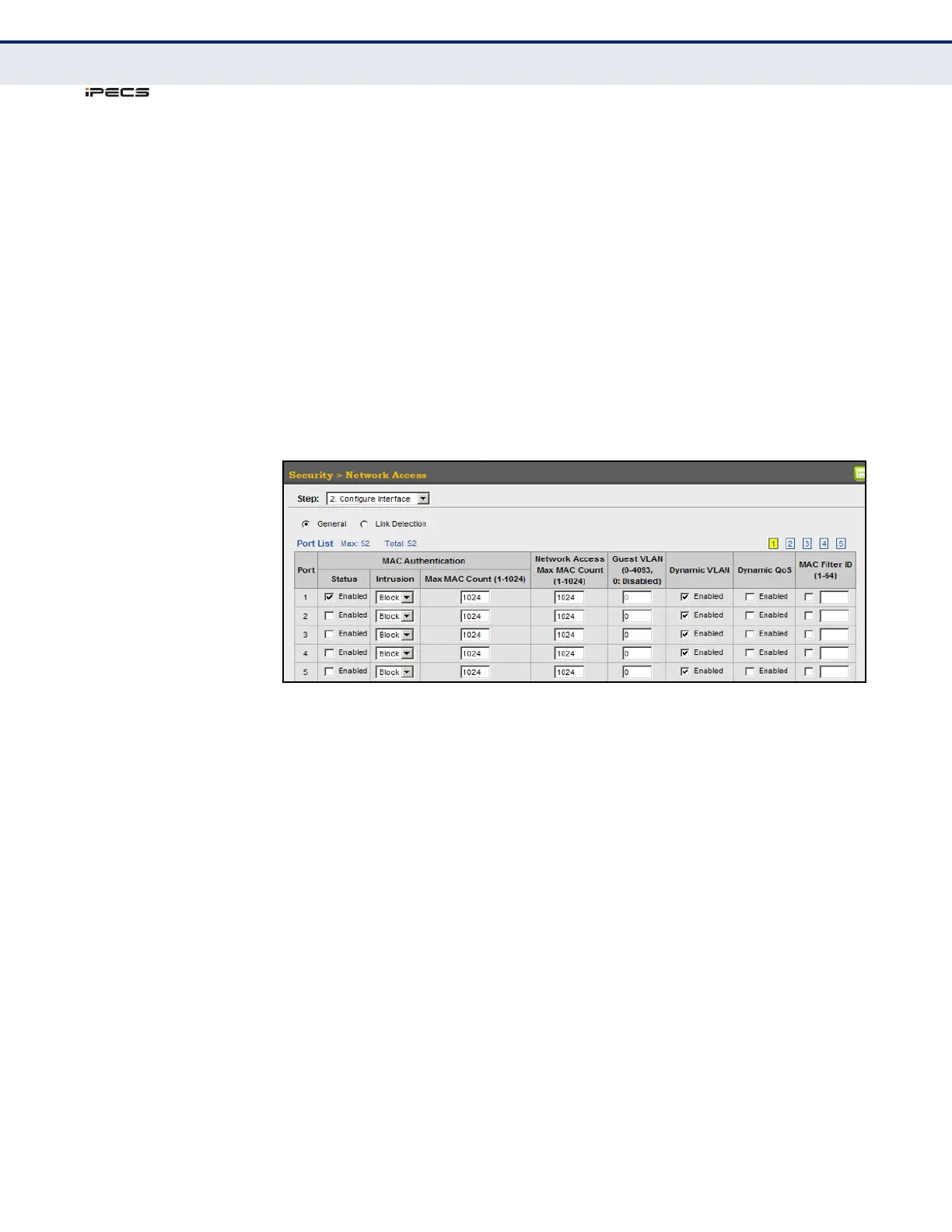
To configure MAC authentication on switch ports:
1. Click Security, Network Access.
2. Select Configure Interface from the Step list.
3. Click the General button.
4. Make any configuration changes required to enable address
authentication on a port, set the maximum number of secure addresses
supported, the guest VLAN to use when MAC Authentication or 802.1X
Authentication fails, and the dynamic VLAN and QoS assignments.
5. Click Apply.
Figure 160: Configuring Interface Settings for Network Access
CONFIGURING PORT
LINK DETECTION
Use the Security > Network Access (Configure Interface - Link Detection)
page to send an SNMP trap and/or shut down a port when a link event
occurs.
CLI REFERENCES
◆ "Network Access (MAC Address Authentication)" on page 678
PARAMETERS
These parameters are displayed in the web interface:
◆ Link Detection Status – Configures whether Link Detection is enabled
or disabled for a port.
◆ Condition – The link event type which will trigger the port action.
■
Link up – Only link up events will trigger the port action.
■
Link down – Only link down events will trigger the port action.
■
Link up and down – All link up and link down events will trigger
the port action.



 To Next Page