DIAL-UP DATA -----------------------------------------------------------------------------------------------------WINDOWS 2000 SETUP
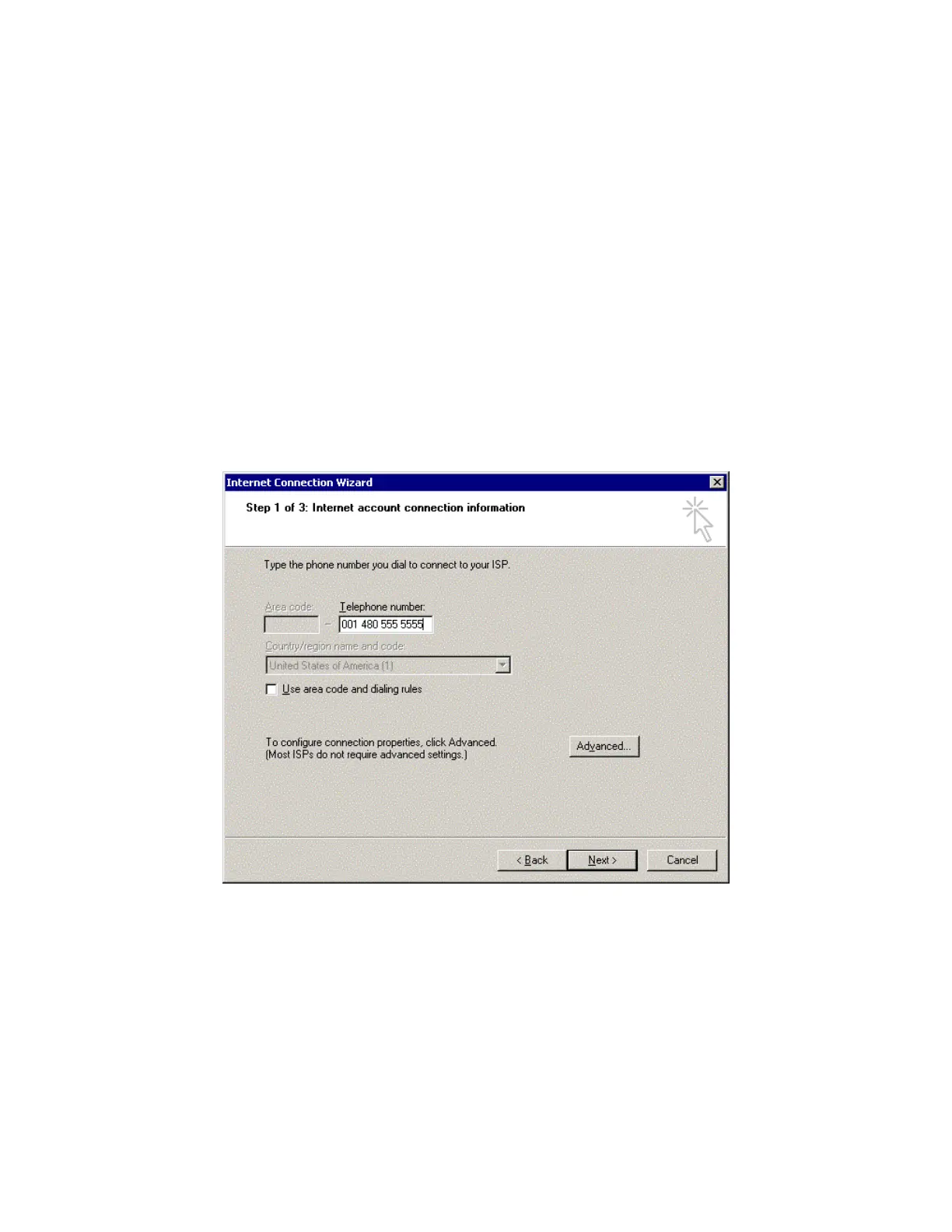
7. In the Internet Connection Wizard window, you must do the following:
In the Telephone number box, enter the telephone number you wish to use for your
connection. Enter the number in international dialing format:
•
•
00 + Country Code + Area Code/Phone Number.
For example, if you are dialing an ISP in Tempe, Arizona, USA, you would enter
00 1 480 555 5555, where 1 is the country code and 480.555.5555 is the ISP’s telephone
number. Please note that this is not a valid telephone number!
Note: This is the same dialing pattern used for voice calls. In fact, you can verify that you are dialing
the correct number for your ISP by dialing the number as a voice call on your satellite phone. You
should hear your ISP’s modem tones if dialed properly.
De-select the checkbox for “Use area codes and dialing rules.” (Note: This will “gray-out”
the Area code and Country/Region name and code boxes. Because they are grayed-out,
it does not matter what these boxes contain)
Click Next >.
Iridium Satellite LLC 32 Rev. 4; February 1, 2002



 To Next Page