22
3.7. PARAMETER PROGRAMMING
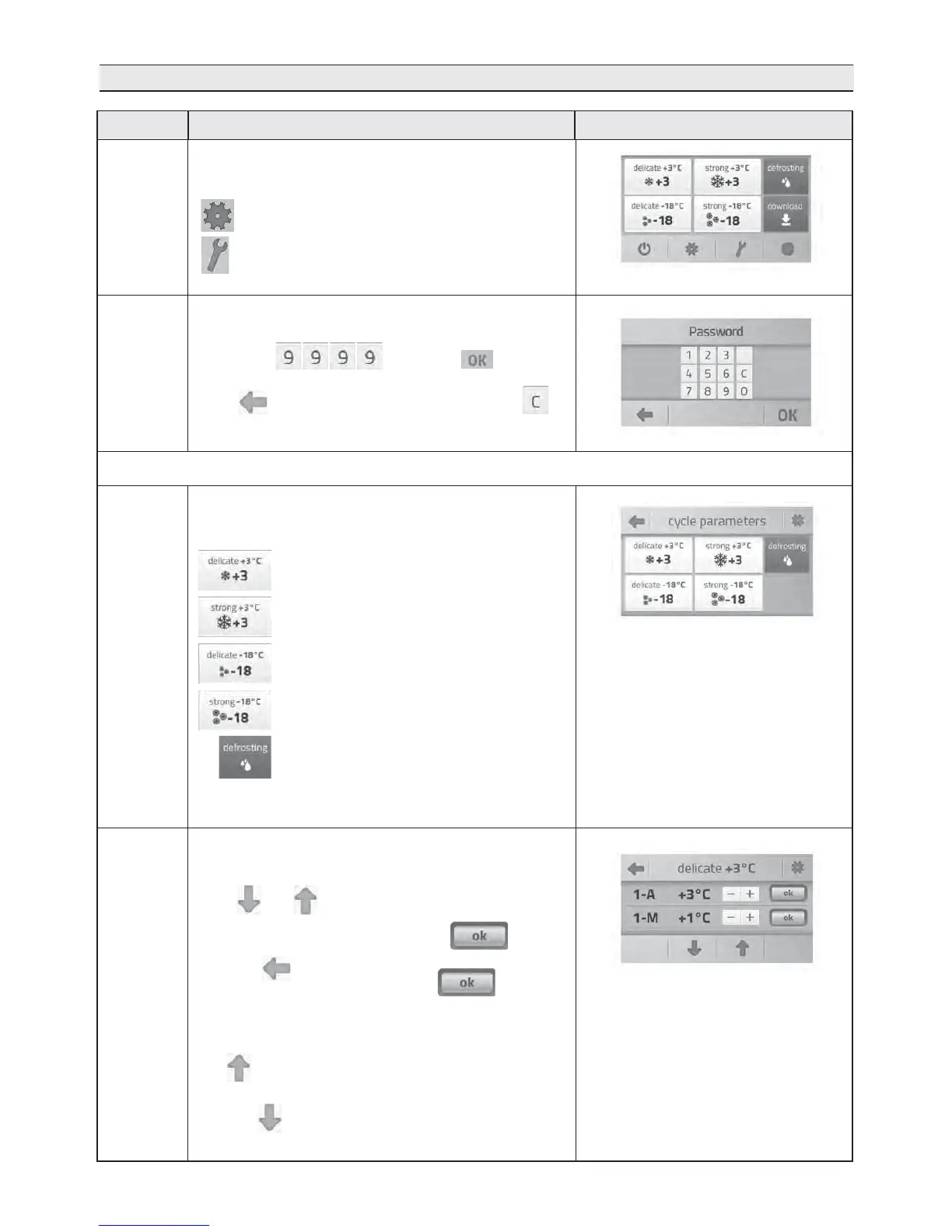
On the initial grid, press the following to access the
parameter programming mode:
to access the cycle parameters (“PrC”);
to access the user parameters (“PrO”)
DescriptionFunction
0
The password is requested.
Enter code and press to access
the parameters;
press to go back to the initial grid, press the
key to delete the entered number.
1
After accessing the cycle parameters page, select the
cycle to be modified:
for the DELICATE +3°C cycle
for the STRONG +3°C cycle
for the DELICATE -18°C cycle
for the STRONG -18°C cycle
for the defrosting cycle
The list of parameters that can be modified appears after
selecting the cycle.
Press and to switch to the next/previous
parameters.
To save the modified parameter, press
Press the key
to go back to the previous screen; if
is not pressed after modifying a parameter, and you go
back, the modification is cancelled.
The key can be used to go back to the first
parameter, without exiting the cycle parameters page.
Likewise can be used to reach the last parameter
2A
Front panel screen
3A
CYCLE PARAMETERS


 To Next Page