IPU 40108
Page 21 of 29
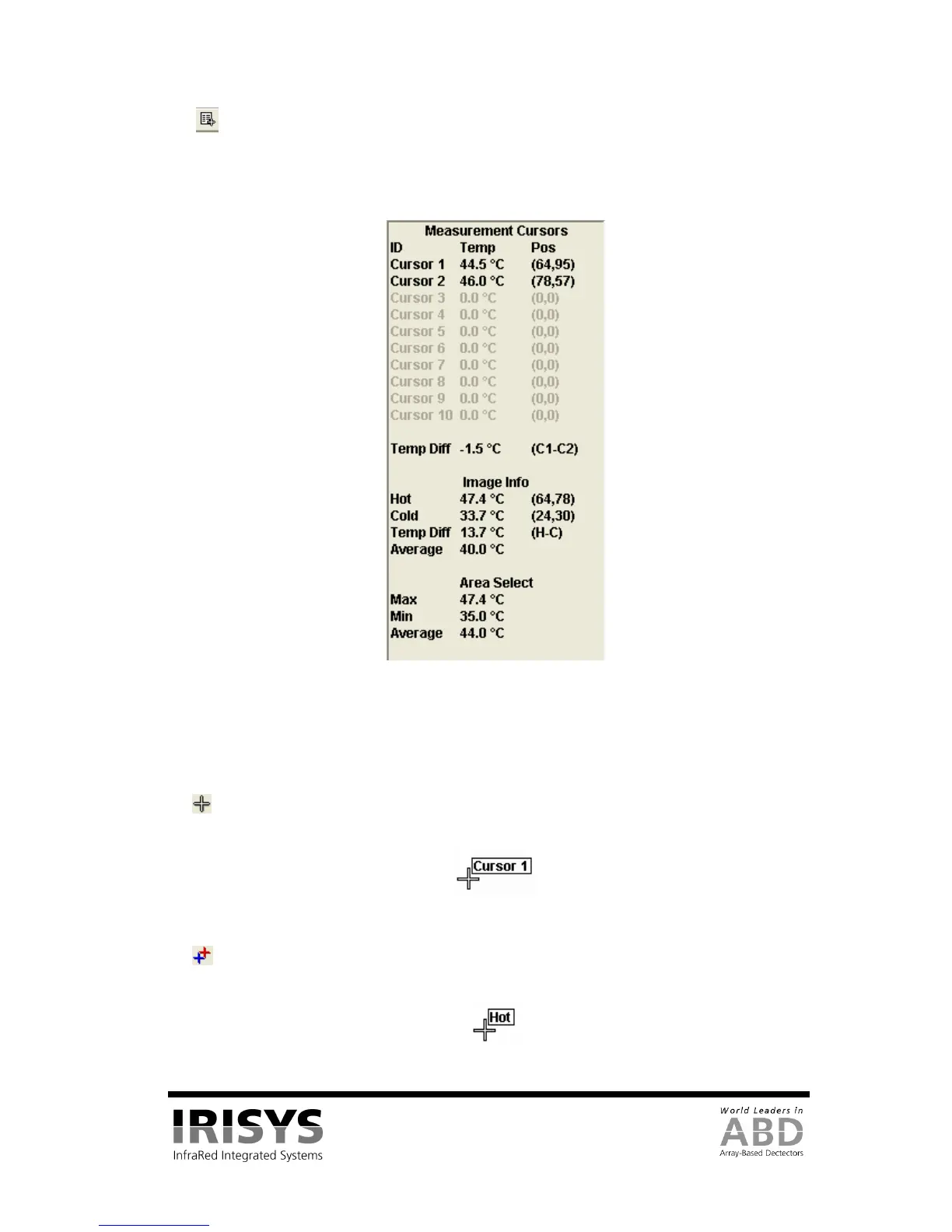
3). Measurement Cursor List - This toggles the display of the measurement cursors list shown in Figure
33, which includes the spot measurement, pixel position, and the difference between measurement cursors 1
and 2. It also displays the hottest and coldest measurements in the scene, their difference, and the average
temperature for the image. Also shown are the maximum, minimum and average temperatures for the area
analysis box (if selected in the view menu).
Figure 33: Measurement Cursor List
Measurement cursors are added to the image by double-clicking in the location that the cursor is required.
When the mouse cursor is moved over a measurement cursor the mouse cursor appears as a hand. When this
happens the measurement cursors can be moved around by dragging them, and can be removed by double
clicking them.
4) Measurement Cursors – This toggles the display of the measurement cursors on the thermal image.
This does not delete the cursors; it temporarily hides them.
Figure 34: A Measurement Cursor
5) Hot & Cold Spot Cursors – This toggles cursors over the hottest and coldest measurements in the
thermal image. The values of these (and the difference) are shown in the measurement cursors list.
Figure 35: Hotspot Cursor


 To Next Page