IPU 40108
Page 9 of 29
3.4.4 IRI 4010 Hot Button Operation
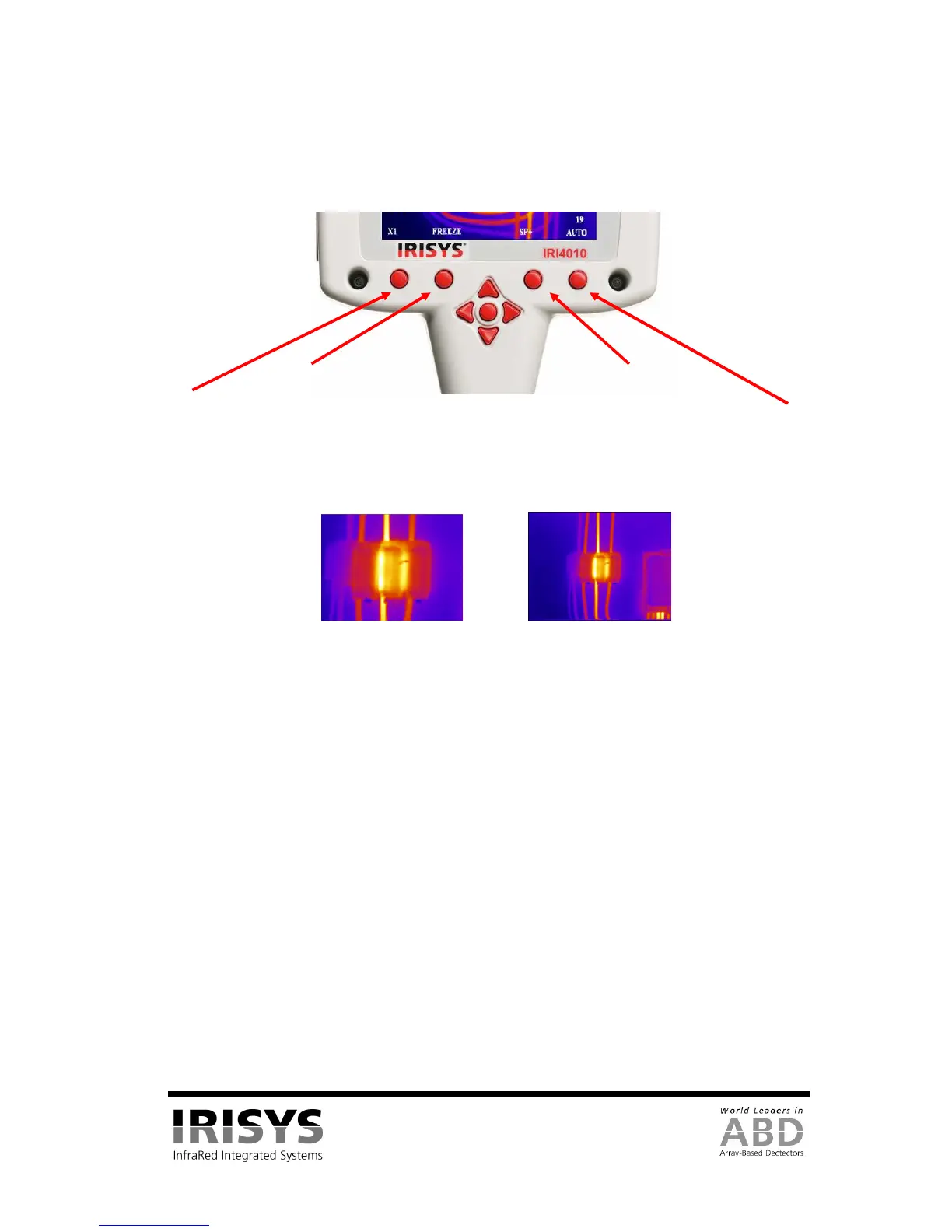
This section describes some of the basic functions of the IRI 4010. The IRI 4010’s hot buttons are labelled 1
to 4 from left to right for the purposes of this user manual. Their function is displayed as hot button labels on
the IRI 4010’s display. Their labels can change in different modes of operation.
Figure 11: Hot Buttons
3.4.4.1 Hot Button 1 – Zoom
This hot button toggles the zoom feature between off (X1) and on (X2). When zoom X2 is selected the central
region of the thermal image expands to fill the display as in Figure 12, and the hot button label displays “X2”.
Figure 12: Zoom Function
3.4.4.2 Hot Button 2 – Freeze/Save
Hot button 2 freezes the live thermal image. It is possible to edit the image in freeze mode before saving it.
Pressing hot button 2 again saves the image as an image.iri file to the SD card, whilst pressing hot button 1
instead rejects the image. The file saving takes a few seconds, and the file name is given a sequential number.
See Section 5.3.1.1.4 for how to save an image direct to a PC via the USB cable.
3.4.4.3 Hot Button 3 - Direction Buttons Control.
Hot button 3 selects either of the temperature measurement cursors (SP+ or SPX), or either L-S (temperature
level and span) when in manual mode or B-C (thermal image brightness & contrast) when in auto mode. The
4 direction buttons are then used to adjust the position of the selected cursor, the level & span, or the
brightness & contrast depending on which mode is selected. Note that SPX must be enabled in the
Measurement Settings menu, and that the B-C control is an advanced user function that must be enabled
before use in the Camera Settings menu.
3.4.4.4 Hot Button 4 – Auto / Manual
This hot button toggles between auto and manual mode. In auto mode, the imager continually adjusts the level
and span to achieve the optimum image. In manual mode it is possible to manually control the level and span
to produce the image to your requirements. See Section 3.4.6.1 for definitions of level and span, and Section
3.4.9.1 for definitions of brightness and contrast. The preset brightness and contrast of the auto mode can be
adjusted to suit your preferences (See Section 3.4.9.1).
X2 X1


 To Next Page