Chapter 4 TOTAL MODE
4.12 BATCH REPORT (F11)
1
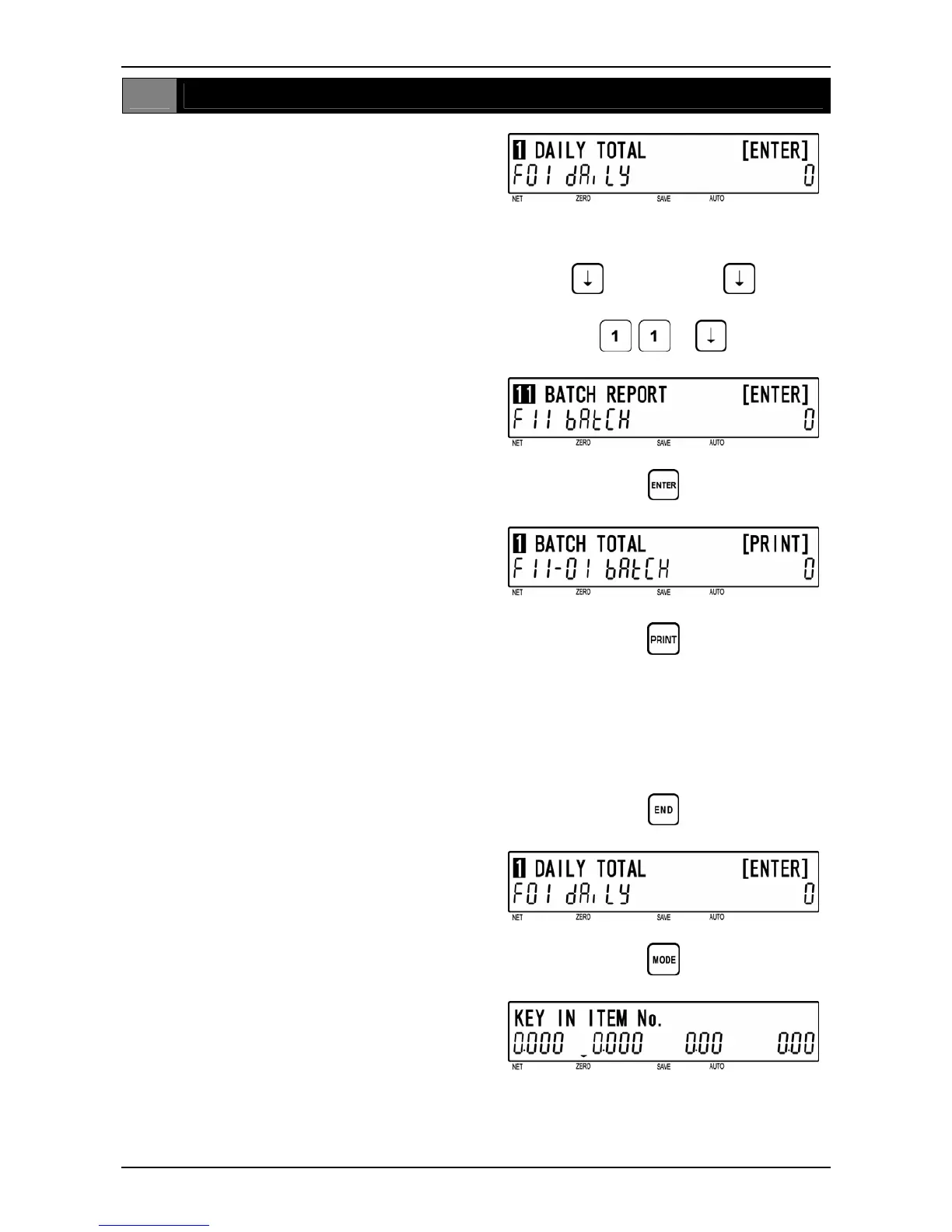
[F01 Screen]
Make sure that “Daily Total” screen (F01)
appears on the display.
Otherwise, access this screen by referring
to Section 4.1: Total Mode Entry/Exit.
2
[Batch Report]
Press the [ ↓ ] key ten times, or key in “11”
and press the [ ↓ ] key to access “Batch
Report” screen (F11).
xxxxxxxxxxxxxxxxxx
or
d
3
[Batch Total Print]
Press [ENTER] key to proceed to “Batch
Total Print” screen (F11-01).
Press the [PRINT] key to issue a batch total
label.
• Printing starts from the first batch number
with total data.
• To stop printing before completion, press
the [ZERO] key.
Note: If the Total Report on labels contains
many items, do not thread paper on to
the winding bobbin. Allow labels to
remain on backing paper.
d
d
4
[F01 Screen]
Press the [END] key to return to the F01
screen.
d
5
[Total Mode Exit]
To exit Total Mode, press the [MODE] key.
The initial display will appear.
d
4-20 BC-4000TEC User’s Manual No. JBAW97EBC-4000TEC


 To Next Page