Chapter 5 REGISTRATION MODE
5.8 DATE/TIME (P06)
1
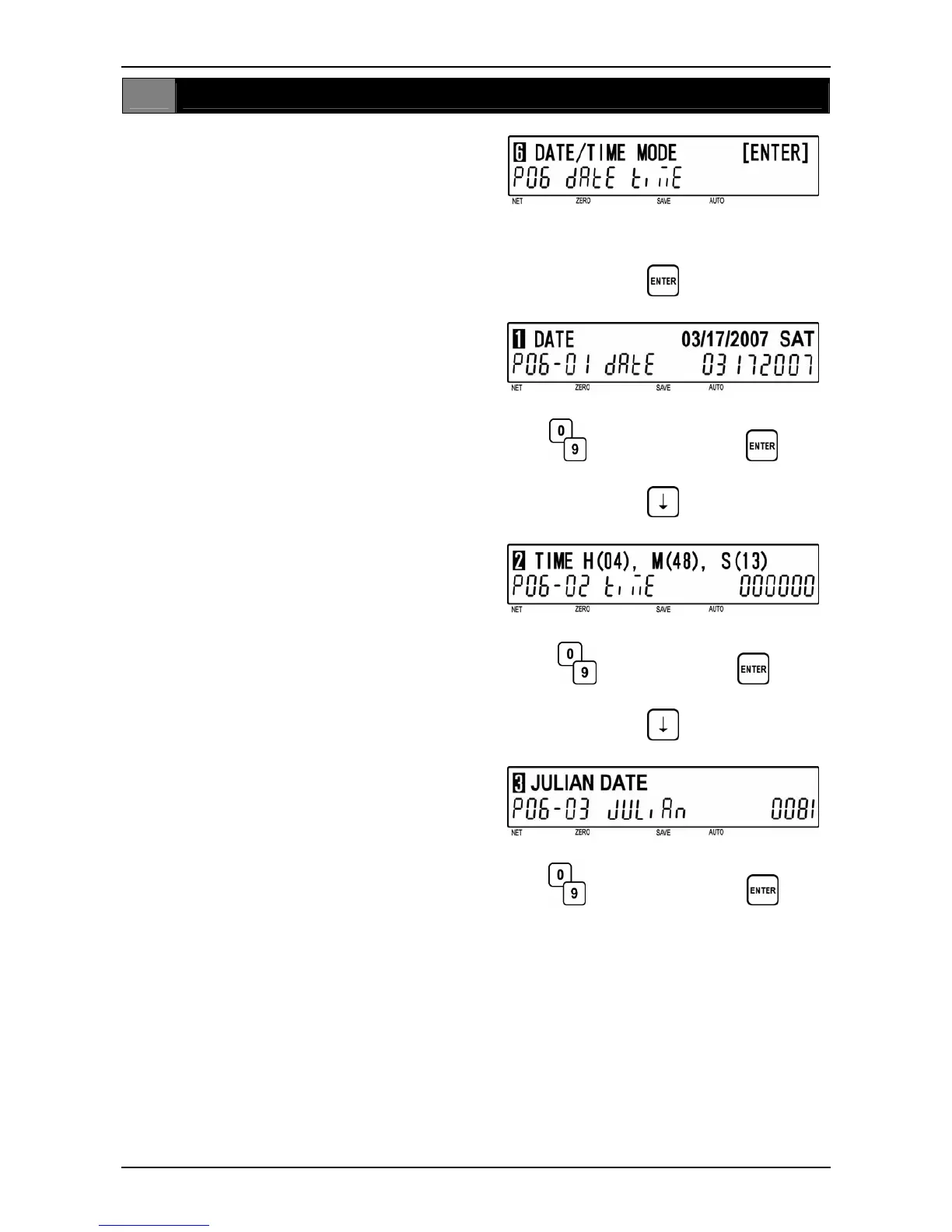
[P06 Screen]
Make sure that “Date/Time Mode” screen
(P06) appears on the display.
Otherwise, access this screen by referring to
Section 5.1: Registration Mode Entry/Exit.
2
[Date]
Press the [ENTER] key to access “Date”
screen (P06-01).
Key in a desired date (MMDDYYYY) and
press the [ENTER] key.
d
d
Date (MMDDYYYY)
3
[Time]
Press the [ ↓ ] key to proceed to “Time”
screen (P06-02).
Key in desired time (HHMMSS) and press
the [ENTER] key.
d
d
Time (HHMMSS)
4
[Julian Date]
Press the [ ↓ ] key to proceed to “Julian
Date” screen (P06-03).
Key in a desired Julian Date (XXXX) and
press the [ENTER] key.
d
d
Julian Date (XXXX)
BC-4000TEC User’s Manual No. JBAW97EBC-4000TEC 5-25


 To Next Page