Chapter 5 REGISTRATION MODE
5.6 PRESET KEY (P04)
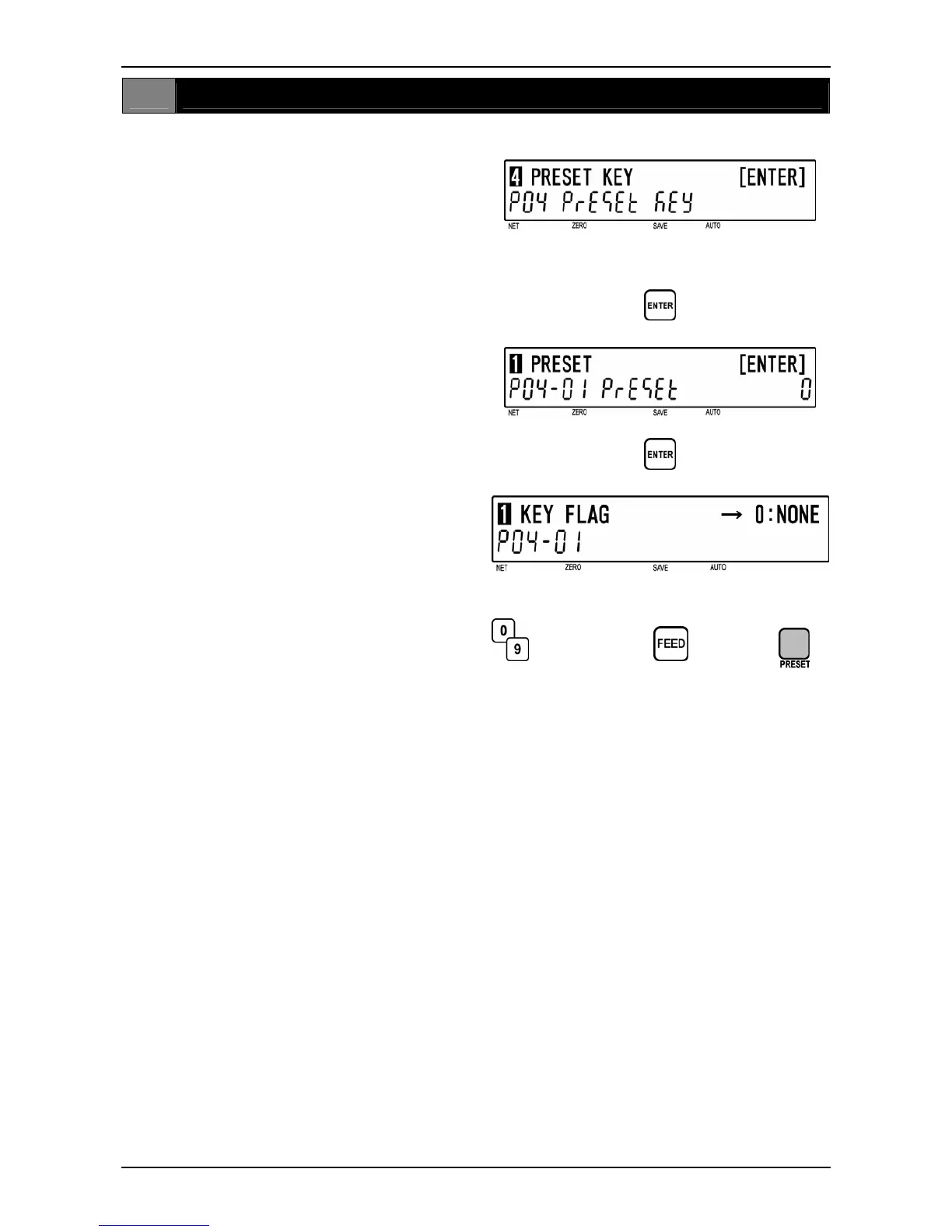
ALLOCATING PRESET KEY (P04-01)
1
[P04 Screen]
Make sure that “Preset Key” screen (P04)
appears on the display.
Otherwise, access this screen by referring to
Section 5.1: Registration Mode Entry/Exit.
2
[Preset]
Press the [ENTER] key to access
“Preset“ screen (P04-01).
d
3
[Preset Key Flag]
Press the [ENTER] key to access “Key Flag”
screen (P04-01).
Determine a desired preset key flag from the
selection data (see below). Enter the
corresponding number and press the [FEED]
key along with 0 or value and then the
assigned key .
Example: Assign a PLU preset key and link
PLU number 101 to it.
1 [FEED] 101 [key location]
Example: Assign a -% of -50%
7 [FEED] 500 [key location]
d
d
Selection data 0 or value
Selection data
0: None
1: PLU
2: Tare
3: Fixed price
4: Multiple (X)
5: Discount price
6: -$
7: -%
8: Save (PLU hold)
9: Extra message 1
10: Void
11: Peel timer
12: [99]…Double “9” entry
13: [00]…Double “0” entry
15: Subtotal print
16: Coupon message
17: Ingredients message
18: NIP message
19: Label batch print
20: Operator
21: Store name/address
22: Label format
23: Logo Image 1
24: Logo Image 2
25: Markdown price
26: Peel sensor
27: Batch number
28: Operator print
29: Log off
30: Barcode print
31: Ingredients
32: Second print
33: Cassette number
Note: The type of preset key flag may differ depending on the country.
Contact Toshiba TEC America’s dealer for more information.
5-20 BC-4000TEC User’s Manual No. JBAW97EBC-4000TEC


 To Next Page